• Hi Guest!

    We have posted a new VaM2 dev log on Patreon, starting a monthly cadence of written progress updates between Beta releases. Highlights include the new Gizmos System, Selection Carousel, and Modes System with Context-Specific Editing. Beta1.2 is 15 of 21 items complete.

    Read the full post on Patreon, or follow progress on the public Trello roadmap.
Morph Sequencer - Workhorse Beta

Plugins + Scripts Morph Sequencer - Workhorse Beta

Download [<1 MB]

LeChuck99

Member
Joined
Apr 5, 2021
Messages
77
Reactions
74
LeChuck99 submitted a new resource:

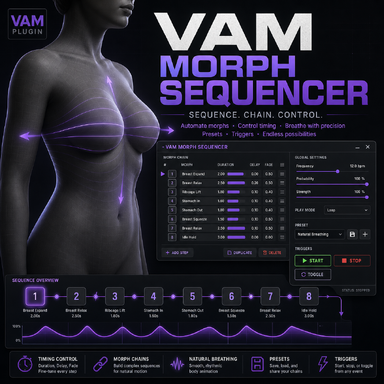
Morph Sequencer - Workhorse Beta - Morph Sequencer with some configurable Attributes. Trigger capability

Again, I am not a coder, just made this plugin with AI because the other Morph sequencers didnt provide me some functions what i needed for my scenes. Already fixed now some bugs, revamped the code and packed it into a var file. I am dropping it there, maybe its for someone useful.
Its also a "simple workhorse" Plugin, to manage some morphs. It has many options how each morph has to be played. It is also usable via Trigger e.g. Timeline.
One of the (for me) useful thing is, the additive...

Read more about this resource...
 
Hey, this looks promising! I love the fact that you can set some morphs to negative value as base and it will keep it - every expression plugin I used could only achieve negative/positive values but only from starting position of 0. Couple of suggestions for updates:

1. Would be nice if you could copy current step parameters to another step to avoid time wasting for re-adjusting timing etc, if you want 2 morphs to be synced.
2. Or maybe checkbox to make current step synced to one chosen step, with optionally independent min/max value and delay? So one could make custom breathing animation where every morph is automatically synced time-wise and you only have to play around with e.g. step 1 timings, without breaking other morphs. And in others you could just adjust power and delay slightly for example.
3. Not sure if it's in the scope of the plugin, but some randomization would be great (optionally). Like a random range slider, so if you set step min = 0 and step max 1, with random range 0.2, then possible start value would be -0.2 -- 0.2 and max value would be 0.8 -- 1.2. With min and max 0, but higher range, you could achieve semi random values, which don't always have to go between low and high etc. I thought I could just use FloatParamRandomizer for this, but looks like only currently selected step variable is accessible, so probably doing this inside of your plugin would be better.. or you could just expose every single step min/max values for the randomizer I guess.

I realize you're not a coder, so it might be not easy to do.. and as it is now, I find the plugin pretty useful! Good job.
 
LeChuck99 updated Morph Sequencer - Workhorse Beta with a new update entry:

Just more controls and knobs and some Quality of Life things

V31:
Synch/Group functions:
- Added per-step Sync Groups (Off, A–I). -> group up for synch
- Steps in the same group now share their settings automatically.
- Added local override options for grouped steps:
- Values
- Timing
- Intensity
- Chance

Quality of life:
- Added Copy Step Settings and Paste Step Settings. -> allows to copy the settings of step 1 onto step 2 etc.

Min/max now also with between min's and between max's:
- Added support for randomized Step Min and Step Max...

Read the rest of this update entry...
 
Hey, this looks promising! I love the fact that you can set some morphs to negative value as base and it will keep it - every expression plugin I used could only achieve negative/positive values but only from starting position of 0. Couple of suggestions for updates:

1. Would be nice if you could copy current step parameters to another step to avoid time wasting for re-adjusting timing etc, if you want 2 morphs to be synced.
2. Or maybe checkbox to make current step synced to one chosen step, with optionally independent min/max value and delay? So one could make custom breathing animation where every morph is automatically synced time-wise and you only have to play around with e.g. step 1 timings, without breaking other morphs. And in others you could just adjust power and delay slightly for example.
3. Not sure if it's in the scope of the plugin, but some randomization would be great (optionally). Like a random range slider, so if you set step min = 0 and step max 1, with random range 0.2, then possible start value would be -0.2 -- 0.2 and max value would be 0.8 -- 1.2. With min and max 0, but higher range, you could achieve semi random values, which don't always have to go between low and high etc. I thought I could just use FloatParamRandomizer for this, but looks like only currently selected step variable is accessible, so probably doing this inside of your plugin would be better.. or you could just expose every single step min/max values for the randomizer I guess.

I realize you're not a coder, so it might be not easy to do.. and as it is now, I find the plugin pretty useful! Good job.

Hey,
its okay, i think your topics are inside now. ;)
 
Holy damn! That was quick! I will test it out later, if it all works nicely then great stuff my man 👌🔥
 
Holy damn! That was quick! I will test it out later, if it all works nicely then great stuff my man 👌🔥
yah. you can use the standard min max for the morph, or the range min and range max with randomness between the range. You can also use e.g. the standard min (not the range sliders) AND the max ranged sliders, if you want only random ranged for the max.
If you group a step, then the settings of the first step which enters the group are the settings for the group. The second step will take those setting if you add it to the group. If you change stettings of a grouped step, then you change the settings for all members in the group. But you can with those lokal override, for each step, override the group settings. e.g. if the min/max is not exactly the same, then you can set individually set them for the step, but the rest of the sliders remains the same as in group. etc.
with the copy and paste, you can copy the setting thru all morphs, without grouping them.
smoketested it, it seems that everything works. The breathing seems really nice now, after you put a littele time into chose the morphs and config the whole thing. The idea was not bad, with ranged random for min and max.
If you encounter some bugs, you know where you can find me. lol
 
yah. you can use the standard min max for the morph, or the range min and range max with randomness between the range. You can also use e.g. the standard min (not the range sliders) AND the max ranged sliders, if you want only random ranged for the max.
If you group a step, then the settings of the first step which enters the group are the settings for the group. The second step will take those setting if you add it to the group. If you change stettings of a grouped step, then you change the settings for all members in the group. But you can with those lokal override, for each step, override the group settings. e.g. if the min/max is not exactly the same, then you can set individually set them for the step, but the rest of the sliders remains the same as in group. etc.
with the copy and paste, you can copy the setting thru all morphs, without grouping them.
smoketested it, it seems that everything works. The breathing seems really nice now, after you put a littele time into chose the morphs and config the whole thing. The idea was not bad, with ranged random for min and max.
If you encounter some bugs, you know where you can find me. lol
Thanks man, from what you say it all seems thought of pretty well! I also downloaded empty morphs to do some more testing.. hehe you know if I can manipulate morph that does nothing to fluctuate between 0-1 values.. then I can also link it with timeline animation or anything else. So thanks to your plugin all king of stuff should become easy :} cheers! Time to play around.
 
Works nicely! I noticed one thing so far:

When you randomize MIN value, looks like it glitches sometimes by snapping to randomized value when repeating cycle, i.e. if I randomized min between -1 and 0, it goes down to say, -0.8, and then on start of new cycle it snaps to, say, -0.5 and then goes up (instead of going from -0.8). I don't notice that for MAX values. Another thing that kinda had me do some weird workaround - I think it will be great if you can change invert flag per step and not per entire group. My use case was breathing animation - chest morphs go from 0 to 1, but other chest morphs need to go from 0.5 to 0.. and when I make a trigger to wait for values to reach zero -> swap preset, it breaks my morphs that are going to non zero value. OR - I think it will be much better solution: maybe make another trigger in the plugin to wait instead for STARTING value (so the one you set on the slider as min value, regardless if you have randomization enabled or not, so to just whatever you have set under Step Min). Right now I'm kinda doing weird trigger that waits for 2 seconds and then manually sets those morphs I need for value of 0.4 (their min value in the plugin), coz stop and zero just zeroes them.

Actually now that I think of it, you have button to instantly zero values and stop animating - that probably is going to be useful to just quickly wipe whatever is happening, so.... I think extra button would be great - but I am not sure how waiting is actually handled. Imagine breathing/animation, we're on preset 1. If there was a trigger that would do "wait for cycle to end, and instead of starting it again, swap to Preset 2 and continue" - you could have completely fluid swappable presets that could be triggered safely at any time.. and immediately another thought comes to mind - what if there was some kind of easing when swapping presets. Let's say that my preset 2 uses some expression that is already in the range of 0.3-1, so if I swap to it, even with that trigger I mentioned, it would just snap, because my other preset has that morph on zero. Something that Timeline has I guess. In case of triggered transition, say, plugin knows that there's 2 seconds until preset swap, so it could then calculate based on user chosen easing time (let's say 0.5 s for example). So when there's 0.5 seconds left, it would start increasing/decreasing morphs, so that when preset 2 hits, morphs are already nicely in their starting position, and zero glitches happen. Is it even doable? If there's no way of knowing for the plugin when actual transition happens, then simple "on transition trigger, after morphs go naturally to starting position, first spend X time (configurable) to morph whatever is needed to match preset 2 starting position". It would just add whatever time user has defined, so it wouldn't be snapping. Ideally, to preserve motion, it would be great if that transition time could be subtracted from the very first cycle after transition. So that 0.5 seconds would make the first loop of preset 2 last e.g. 2.5 seconds (if it's normally 3 seconds), and then next loops are in normal time? Maybe too complicated? Idk. Even if you have super short durations for other groups, then I guess it would just skip them?

Sorry for wall of text.. last thing that I think would be nice. If you could directly manipulate current pattern step duration/values/intensity with variable triggers? For example I have breathing on group A and one empty morph (ungrouped) that just goes from 0 to 1. Then I have vuml + action grouper that is controling UI slider based on that empty morph value, so I have slider that goes from 0 to 1 at the same rate. And then I can have whatever I want tied to that slider, animation, body movements etc. If you could make a slider that would change "Step 5 period" on the fly, that would be very nice. You could easily control movements that are separate from each other, but it still would follow global multiplier. You could have thrust animation tied to one control morph, then increase speed globally, so breathing and thrusting is faster, but then dial down only the control morph, so breathing remains quick, but motion is slowed down when you want. Plenty of nice stuff would be possible. One could just use Timeline instance to animate sliders and create huge variability!

Anyway, that was some big ramble (sorry again..), but I thought I'd share what would be really good for this plugin in the future. Maybe there are "better" workflows to trigger animations like that smoothly (coz Timeline + Weaver I suppose), but for expressions, that can automatically drive animations.. I'll keep playing around, already having tons of fun with empty morphs and doing some body movements. Thanks again for very nice update, it's much more fun to use now!

EDIT:

Nevermind, just need to change target from Person to none, and back again - refreshes without plugin reload!!
(((Rip, another thing. If you add morphs to favorites, you kinda have to reload entire plugin (and you lose presets unless you save them), so it's not convenient to use. Pretty sure Timeline refreshes morph list every time you access it, would be great fix.)))
 
Last edited:
Works nicely! I noticed one thing so far:

[...]
hey, thanks for the detailed description of your testing. That helps a lot.
Thats the outcome from your text. some bugfixes and some new features.

First the Bugfix and the smaller updates (That should go fast and straight forward.) then the larger ones.
The large things needs some new code, that can go also straight forward or needs some iterations. Depends on in how fast it goes forward.
e.g. the cause of snapping etc is already identified and is fixable. thnx again for your detailed description.

this is the plan now. If i missing somewhat, feel free to write me.

need a bugfix:


ItemDescriptionEstimated size
Randomized Min snappingFix snapping at cycle boundaries when Step Min Random is enabled. The new randomized min value should not cause an instant jump at the start of the next cycle.Medium
Morph list refreshMake Refresh Morph List force a full morph UID/cache refresh so newly added favorites appear without changing target or reloading the plugin.Small

new Features:


ItemDescriptionEstimated size
Local Invert OverrideAllow Invert to be overridden per step inside a sync group, likely as part of Local Intensity Override or as its own local override.Small
Stop / Fade To MinAdd actions to stop or fade used morphs back to their configured Step Min value instead of always zeroing them.Small–Medium
Queue Preset At Cycle EndAdd a trigger/action that queues a preset change and applies it only when the current cycle reaches its natural end/start position.Medium
Preset Transition FadeAdd a transition mode that fades current morph values toward the starting values of the target preset before switching, avoiding snaps between presets.Large
Runtime Group / Step ControlsAdd trigger-controllable runtime parameters such as group period/intensity multipliers or selected step values for live control from Timeline/VUML/etc.Large
 
LeChuck99 updated Morph Sequencer - Workhorse Beta with a new update entry:

Some new stuff, uglier GUI (yah its still possible), Bugfixes, smoothing sliders etc

V32:
Okay, some things are fixed, smoothed, adjusted. Also added some new features. That doesnt make the GUI any prettier, but i have also the GUI cleanup on my bucket list.
Prio: Bugfix -> Features -> GUI Painting.
The V32 is smoketested, feel free to report bugs or wishes. If i can, i am trying to implement it. But it will never make a coffe for you. ;)


Bugfixes
- Fixed randomized Step Min snapping at cycle boundaries.
(root cause was, if the random min was e.g. 0.2 and...

Read the rest of this update entry...
 
Back
Top Bottom