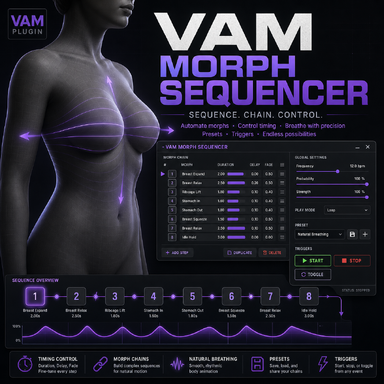

Again, I am not a coder, just made this plugin with AI because the other Morph sequencers didnt provide me some functions what i needed for my scenes. Already fixed now some bugs, revamped the code and packed it into a var file. I am dropping it there, maybe its for someone useful.
Its also a "simple workhorse" Plugin, to manage some morphs. It has many options how each morph has to be played. It is also usable via Trigger e.g. Timeline.
One of the (for me) useful thing is, the additive mode. It means, if the morph is already on e.g. 40, then the sequencer uses this setting as a zero point for an additional elevating or decreasing the morph. The Stop at Zero function stops in this case not at zero, but at the opening setting. e.g. 40 in this case. If you deactivate the Additive mode, and pressing the stop at zero again, then it sets the morphe truly to zero. Has also probality of playing function for each morph etc.
Maybe i will keep working on the plugin, but i dont have much time for it.
Its more a workhorse without a pretty GUI but with some functions.
The longer version:
Its also a "simple workhorse" Plugin, to manage some morphs. It has many options how each morph has to be played. It is also usable via Trigger e.g. Timeline.
One of the (for me) useful thing is, the additive mode. It means, if the morph is already on e.g. 40, then the sequencer uses this setting as a zero point for an additional elevating or decreasing the morph. The Stop at Zero function stops in this case not at zero, but at the opening setting. e.g. 40 in this case. If you deactivate the Additive mode, and pressing the stop at zero again, then it sets the morphe truly to zero. Has also probality of playing function for each morph etc.
Maybe i will keep working on the plugin, but i dont have much time for it.
Its more a workhorse without a pretty GUI but with some functions.
The longer version:
Description
Morph Sequencer is a Virt-A-Mate plugin that drives breathing and other subtle morph-based motion using a flexible step sequencer. It lets you define up to 40 morph steps per preset, each with its own timing, range, probability, and curve shape, and then plays them back in sync on a chosen person atom.Features
- Up to 40 configurable steps per preset, with 5 preset slots stored in the scene.
- Each step can target a specific morph with independent min/max values, period, rise/hold/fall timings, end hold, delay, intensity, probability, and optional inversion.
- Global master controls for speed, intensity, and a smooth stop‑fade time.
- Additive mode for layering breathing on top of existing morph values without overwriting the base pose.
- Per-step live buttons for quickly selecting and editing steps while the sequence is running.
- Built‑in preset system: save/load presets in scene slots or as external JSON files under Custom/PluginPresets.
- Automatic target binding, morph list refresh, and capture of current base morph values for safe return to neutral.
- One‑click actions to start/stop, stop at zero, stop and zero, and zero all used morphs.
How to use
- Add the plugin to the target person and select the Target Person Atom from the dropdown.
- Adjust Master Speed, Master Intensity, and Stop Fade Seconds to define the overall breathing behavior.
- Choose a Preset Slot, then select an Edit Step (or click one of the live step buttons) to edit that step.
- Assign a Step Morph, enable the step, and tune its min/max values, period, rise/hold/fall segments, end hold, delay, intensity, probability, and invert flag until it feels right.
- Repeat for additional steps as needed, then press Save Preset to store the configuration in the selected slot, or Save Preset As File to export it to disk.
- Use Start, Stop, Stop At Zero, Stop And Zero, and Zero Used Morphs to control playback during scenes.