• Hi Guest!

    We are extremely excited to announce the release of our first Beta1.1 and the first release of our Public AddonKit!
    To participate in the Beta, a subscription to the Entertainer or Creator Tier is required. For access to the Public AddonKit you must be a Creator tier member. Once subscribed, download instructions can be found here.

    Click here for information and guides regarding the VaM2 beta. Join our Discord server for more announcements and community discussion about VaM2.
  • Hi Guest!

    VaM2 Resource Categories have now been added to the Hub! For information on posting VaM2 resources and details about VaM2 related changes to our Community Forums, please see our official announcement here.

Genesis 2 Skins..

virtamater

Well-known member
Featured Contributor
Joined
Dec 12, 2020
Messages
384
Solutions
3
Reactions
1,770
I recently grabbed a lot of Gen 2 models straight from Daz.. none of them have Gen Textures... I know Vam has that generate texture from torso.. but t doesn't look just right.. Ive hacked a torso texture to make the gen texture from.. but they seam to all be missing the area aruond the anus... Please advise for a work around :)

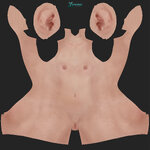
I've not looked at them within Daz yet as I'm just unfamiliar with how to navigate through it.. here's an image of one of my hacks...
Is it best to just export from within Daz? would it fix it better?


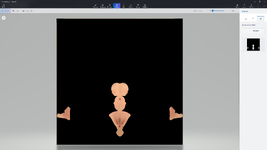
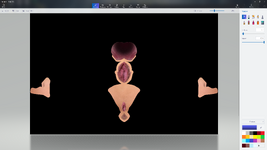
The 2 images with the made up gen textures are from another file and tried to match them up.. but there's a seam where the colors n stuff don't match.
Im using the ultimate pussy textures.. but you can see in the torso skin where the extra parts just not there lol.

Oh. How to convert the black and white bump map to a normal? or not bother lol..
 

Attachments

  • JolieFx1genitals2D.jpg
    1.5 MB · Views: 0
  • JolieFx1genitalsD.jpg
    JolieFx1genitalsD.jpg
    512 KB · Views: 0
  • LY_Jolie_Torso.jpg
    LY_Jolie_Torso.jpg
    2.8 MB · Views: 0
Last edited:
K... Ive managed to add Gens within daz.. how to export the skin files tho???
 
I recently grabbed a lot of Gen 2 models straight from Daz.. none of them have Gen Textures... I know Vam has that generate texture from torso.. but t doesn't look just right.. Ive hacked a torso texture to make the gen texture from.. but they seam to all be missing the area aruond the anus... Please advise for a work around :)

I've not looked at them within Daz yet as I'm just unfamiliar with how to navigate through it.. here's an image of one of my hacks...
Is it best to just export from within Daz? would it fix it better?


The 2 images with the made up gen textures are from another file and tried to match them up.. but there's a seam where the colors n stuff don't match.
Im using the ultimate pussy textures.. but you can see in the torso skin where the extra parts just not there lol.

Oh. How to convert the black and white bump map to a normal? or not bother lol..

Vam uses gens from 3dfleetwolfs new gens plus for v6 but i thknk its the earlier version you need. Pretty sure you can just export from daz but substance painter is probably the way to go for better results.

As for bump to normal I've used https://www.smart-page.net/smartnormal/ many times with great results.
 
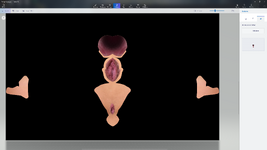
I found a work around.. after looking through my other textures. i saw how much was missing from the torso to complete the gen text and it wasn't much.. so using this as a guide, I can now add whats missing and make my own. :)
Thanks


Basically its just missing the anus part.. so i set up some templetes and used the torso texture and copoy pasted n blended the new part and added the gen details lol.. a bit time consuming, but not terrible.
 

Attachments

  • Screenshot 2026-03-31 185845.png
    Screenshot 2026-03-31 185845.png
    864.1 KB · Views: 0
  • Screenshot 2026-03-31 185627.png
    Screenshot 2026-03-31 185627.png
    1.4 MB · Views: 0
  • Screenshot 2026-03-31 185444.png
    Screenshot 2026-03-31 185444.png
    1.4 MB · Views: 0
  • PesephVag1.jpg
    PesephVag1.jpg
    423.7 KB · Views: 0
  • C1-torso.jpg
    C1-torso.jpg
    5 MB · Views: 0
  • genitalsBlank.png
    genitalsBlank.png
    400.1 KB · Views: 0


? Is there a Daz to Vam???? i recently acquired a bunch of clothes from Daz too and been wondering how to get them into Vam.. :) Where to find info on that?


? Is there a Daz to Vam???? i recently acquired a bunch of clothes from Daz too and been wondering how to get them into Vam.. :) Where to find info on that?

Clothes is easy, you just need the clone morphs for the different generations.

Gen3/8 - https://hub.virtamate.com/threads/daz3d-autofit-clones.51210/
Gen 9 - https://hub.virtamate.com/resources/genesis-9-autofit-clone-for-genesis-2-female.48220/

And the OG

I think the only changes you need to make is to export the fitted cloth as obj then reimport before saving the scene for vam.
 
The Custom clothing option.. is that also the way to import Daz peeps . through the custom section within the skins?
I'm gonna pay around with this for a bit.. thanks again!
 
Moving g2 morphs from daz to vam is easy you just grab the morphs in .dsf format from your daz library and drop them in your vam morphs folder.

There's a bit more involved for g3/8/9 as these need conversion to g2 first, there's a few plugins and nuances involved to do the job properly.

Deal with the clothes and we can cross that bridge later ;)
 
Thanks again! imported a top. fairly easy although.. it's mesh seems like it was designed for a larger bust so it looks like it's a bit to high on Lexie within the default scene.. I also realized that I don't have the Gens addon in Daz so perhaps thats why there's no Gen Textures included on the looks I just bought? .. i recently read the gens morphs come with a bundle or something?
Is that another Golden Palace I'd have to get from the site that provides it for VaM2?

The clothes is definitely enough to figure out now lol Thanks again!
 
Top and cloth... I'll deal with the sims later.. I'm not sure where they are within Daz lol.. Plenty to mess around with :)
 

Attachments

  • Screenshot 2026-04-02 193243.png
    Screenshot 2026-04-02 193243.png
    1.7 MB · Views: 0
  • Screenshot 2026-04-02 193251.png
    Screenshot 2026-04-02 193251.png
    4.2 MB · Views: 0

Similar threads

Back
Top Bottom