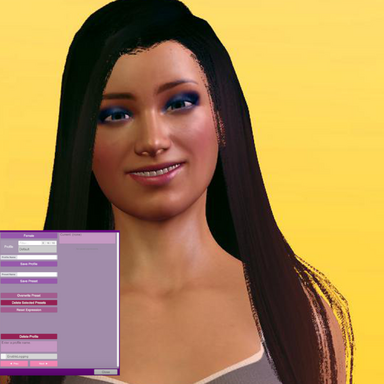
Expression Presets

Plugins + Scripts Expression Presets

Download [<1 MB]
starman updated starman's Expression Presets with a new update entry:

Expression Presets v2 - Auto detection

Update 30/11/2026

  • Added auto detection of expression morphs installed.
  • Session plugin no longer required at all.
  • Session plugin can still be used by advanced users to add supplementary morphs of whatever kind you like.
  • UI stuff
The facial expression morphs currently available on Hub are found automatically by the plugin including tongues with bone mod formulas ect. Duplicate morphs are handled and saved. Session plugin can still be used to add whatever body morphs...

Read the rest of this update entry...
 
Your plugin is absolutely amazing—I sincerely hope you can add a preview image feature. You know, when there are so many custom emojis, it’s impossible to distinguish them intuitively with just text.
 
Oh good, I'm glad it's working! There are several ways to hot save and not having through go the thumbnail snapping process is the slimmed down way for quick use. I will consider thumbnails if I return to this plugin!
 
Best expression plugin for me. In addition to optional thumbnails, it would be nice to have float on/off value for expressions (from 0 to 1), so that you can animate whole preset with just one node in a timeline with a trigger. Also copy/paste would be nice.
 
Good the plugin is getting use! Thumbnails I won't work with until Vam 2 because of the restrictive MVR plugin UI. I'd have to remake the plugin with a custom UI to do that.

As for a stored value for a preset to be "on"... It's a list of morphs and a static value. The morphs can be mutated in between applications. When you load a preset all morphs are first reset, and then preset is applied. Maybe a merge load function is what you mean.. but turning a preset off while remembering that other lists of morphs are "on" sounds like a state machine. The presets work just like the MVR native morph presets: the only real difference is it targets only expression morphs.

The plugin triggers can be used together with one of the state machines that are on the hub. For TL I don't use this, and instead use TL itself and a Expression Randomizer for these morphs.

Making a merge load trigger is possible if there is a use for it.
 
Last edited:
I 'm not familiar with vam api, i might be wrong here. I was referring to ability of appling presets gradually. For example, some preset has saved smile morph with value of 1 and eye morph with value of 0.5, and if you apply it on 50% you set smile to 1 * 50% = 0.5 and eye to 0.5*50% = 0.25. I checked up the script, loading should be straightforward to implement
Code:
private void LoadExpression(string name, float proportion = 1) // overload for partial preset load, proportion goes from 0 to 1
{
    //Bunch of stuff here
    
    //apparently here goes applying of saved morph values
    for (int i = 0; i < morphArr.Count; i++)
    {
        string id = morphArr[i]["id"].Value;
        float value = morphArr[i]["value"].AsFloat;

        float proportionalValue = value * proportion; // modify saved value by proportion from input
        if (resolvedMorphs.ContainsKey(id))
        {
            resolvedMorphs[id].morphValue = proportionalValue; // applying modified value
            string label = resolvedMorphs[id].resolvedDisplayName;
            if (string.IsNullOrEmpty(label)) label = id;
            sb.AppendLine(label + " " + value.ToString("F2"));
        }
    }
    
    
    //Bunch of stuff here also
}

No idea about how UI implementation works here though
 
Oh, that's what you mean of course. I read the request too quickly. Yes, that's very possible.

I didn't have a use case for this on presets but it's easy to do. I'll look at it when I find the time later this week. At the very least it can just be exposed to be driven by VAM's trigger system. So any slider or float driver plugin will work with it. For Timeline that is the use case.
 
Last edited:
Back
Top Bottom