

I would really like to learn how to export my characters from Daz to VAM. I already have some knowledge. My goal is to export G9 characters, but I know it's quite complicated, so if I can export G8 characters, I'll be happy. I know I have to transfer the Morphs from G8 to a G2 that is compatible with VAM, but I can't get Morph Loader Pro or Transfer Utility to work. I would be very grateful to anyone who can help me. Thank you.
You are using an out of date browser. It may not display this or other websites correctly.
You should upgrade or use an alternative browser.
You should upgrade or use an alternative browser.
VaM2 Daz to VAM Please!
- Thread starter YoshioMaster
- Start date
Threads relating to VaM2

You have to follow the published process exactly, step by step. Forget G9 for now. There are major differences. Be glad G8 to G2 works as well as it does. It's not perfect, but it can be done. You transfer the morph, then use a skin already available in Vam. That's the easiest way. If necessary, install an older version of Daz. I have 4.15, which works well for this.

 hub.virtamate.com
Import genesis 8 character(only morph) to vam(with pictures) - Guides -
Same Guide without pictures *Any deviations from the instructions are at your own risk or if you know better than me. If so, let me know. This manual is saved in PDF, you can download it together with the ZIP file 1) Download T-Pose-Gen2.zip...
hub.virtamate.com
Você precisa seguir o processo publicado exatamente, passo a passo. Esqueça o G9 por enquanto. Há grandes diferenças. Considere que a conversão de G8 para G2 funciona tão bem quanto funciona. Não é perfeito, mas é possível. Você transfere o morph e depois usa uma pele já disponível no Vam. Essa é a maneira mais fácil. Se necessário, instale uma versão mais antiga do Daz. Eu uso a versão 4.15, que funciona bem para isso.
Import genesis 8 character(only morph) to vam(with pictures) - Guides -
Same Guide without pictures *Any deviations from the instructions are at your own risk or if you know better than me. If so, let me know. This manual is saved in PDF, you can download it together with the ZIP file 1) Download T-Pose-Gen2.zip...
Thank you so much for sharing. I'll try to do that.

If you're serious, I'm a DAZ specialist and spent the last few years as part of my bigger projects making plenty of setups for this and have many ready to go. I'm very busy though so if you want one of my basic DAZ to VAM (any gen) adapter scene as well as my any VAM directly to any DAZ fig let me know by either sending a message or finding my discord. I likely won't log in here again for months I'm that busy but anyone interested in this kind of thing I just want some feedback.I would really like to learn how to export my characters from Daz to VAM. I already have some knowledge. My goal is to export G9 characters, but I know it's quite complicated, so if I can export G8 characters, I'll be happy. I know I have to transfer the Morphs from G8 to a G2 that is compatible with VAM, but I can't get Morph Loader Pro or Transfer Utility to work. I would be very grateful to anyone who can help me. Thank you.
You have to follow the published process exactly, step by step. Forget G9 for now. There are major differences. Be glad G8 to G2 works as well as it does. It's not perfect, but it can be done. You transfer the morph, then use a skin already available in Vam. That's the easiest way. If necessary, install an older version of Daz. I have 4.15, which works well for this.
Import genesis 8 character(only morph) to vam(with pictures) - Guides -
Same Guide without pictures *Any deviations from the instructions are at your own risk or if you know better than me. If so, let me know. This manual is saved in PDF, you can download it together with the ZIP file 1) Download T-Pose-Gen2.zip...
Thank you very much for the suggestion, I learned a lot here. I just couldn't save the file to use in VAM. I did everything correctly up to item 22, but then I don't know how to save it because the tool says it's obsolete, no longer used in version 4.24 of Daz. But there are several possibilities there, I just don't know which one to use.You have to follow the published process exactly, step by step. Forget G9 for now. There are major differences. Be glad G8 to G2 works as well as it does. It's not perfect, but it can be done. You transfer the morph, then use a skin already available in Vam. That's the easiest way. If necessary, install an older version of Daz. I have 4.15, which works well for this.
Import genesis 8 character(only morph) to vam(with pictures) - Guides -
Same Guide without pictures *Any deviations from the instructions are at your own risk or if you know better than me. If so, let me know. This manual is saved in PDF, you can download it together with the ZIP file 1) Download T-Pose-Gen2.zip...
I believe the option is "deprecated" but not eliminated. That means they're not going to support it anymore, but it still works. Like I said, you can also roll back to a previous version.
The save option is there, but it's grayed out. But there must be another function to replace it, right? As for reverting to a previous version of Daz, I can't do that, my friend, because all the characters I intend to bring to VAM were created with products and morphs that are only compatible with the version I use. If I change the version, I'll have to redo several things to fix the characters.I believe the option is "deprecated" but not eliminated. That means they're not going to support it anymore, but it still works. Like I said, you can also roll back to a previous version.
The save option is there, but it's grayed out. But there must be another function to replace it, right? As for reverting to a previous version of Daz, I can't do that, my friend, because all the characters I intend to bring to VAM were created with products and morphs that are only compatible with the version I use. If I change the version, I'll have to redo several things to fix the characters.
Attachments
Thank you very much for the suggestion, I learned a lot here. I just couldn't save the file to use in VAM. I did everything correctly up to item 22, but then I don't know how to save it because the tool says it's obsolete, no longer used in version 4.24 of Daz. But there are several possibilities there, I just don't know which one to use.
I believe the option is "deprecated" but not eliminated. That means they're not going to support it anymore, but it still works. Like I said, you can also roll back to a previous version.
No,
It was just renamed to modifier assets for legitimate technical reasons. Simple explanation is technically morphs can hold much more than morphs and always could/did. Just use modifier assets.
No,
It was just renamed to modifier assets for legitimate technical reasons. Simple explanation is technically morphs can hold much more than morphs and always could/did. Just use modifier assets.
View attachment 550573
I would not use the method in this tutorial personally. Much simpler to export a lot of OBJ objects with the name of the morphs you want and load them all in to morph loader at once but don't rig them. if you feel you need to rig them, use Mike3D's character splitter to which will also normalize the figure scale first and then rig it, otherwise following this step of adjusting the rigging to fit the shape is hoping you get lucky but the farther from base shape your figure is the less likely that will give you a good result without then having to learn to fix it.
Mike 3D's splitter/scale normalizer/rigger: https://github.com/Mike3D/Character-Splitter-for-DAZ-Studio
It works with any DAZ figure.
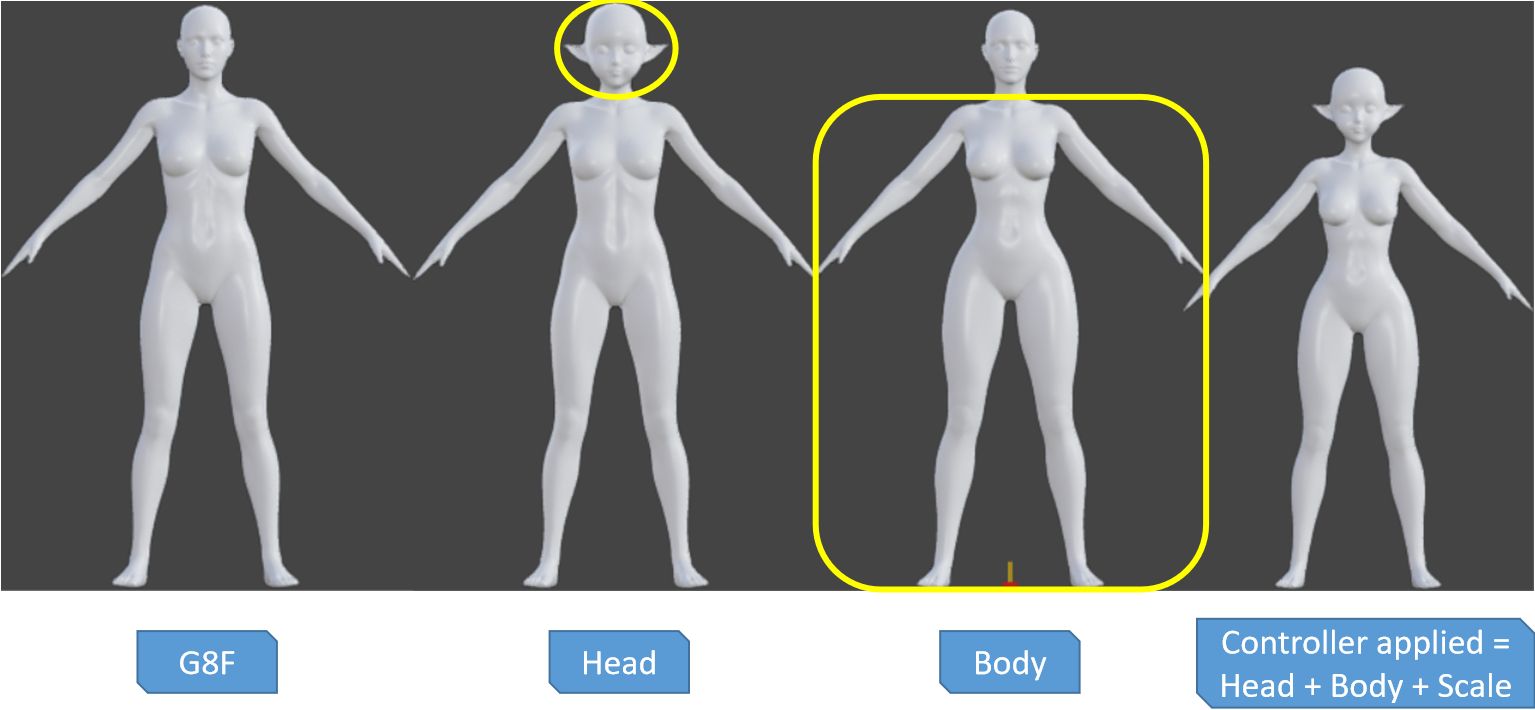
If your character is an odd shape, normalizing makes any really tall, short character the same size as the base character making it 9x more likely that you don't need to rig/freeze at all, and if you do, it will be again many more times likely to succeed rigging correctly with a normalized character. Then, if your character is short or tall, you adjust the scale in VAM back to their original size.
It's a pain to un-rig a character, so simpler to make two, one rigged and one unrigged every time (Delta and Rigged versions). And it gives whoever is using your morph options.
Last edited:
then use a skin already available in Vam. That's the easiest way. If necessary, install an older version of Daz. I have 4.15, which works well for this.
It's much easier than people think transferring textures from any fig to any fig in DAZ. Especially using a saved surface set. These four images are the only steps. It does a great job, especially since it isn't really baking but restretching it mathematically.
In Windows it's in the equivelant spot.
And that's it. Takes max 15 minutes even on a 15 year old computer. The only reason you might get bad maps is if your UV's aren't right.
If you are missing normal maps coming from an old figure or one of the G2 variants that doesn't have them on purpose the easiest way is to dive in to the daz-blender bridge and it does a good baking job there and you can pull the maps out.
@aMoose could you publish this flow here as a tutorial? New Vam users really like having a step by step guide to follow.
I might - or I may just save everyone lots of time and upload a pre-setup daz scene made with bare install . Rigging in reality is more than I would recommend for beginners at all.
I save them uncompressed so you could also copy paste the data of it instead of downloading it I suppose.
I have a DAZ scene that takes VAM OBJ files and adapts them on to base G2's for seemless cross-checking but I'm curious how our OP does as most the people I've seen over the years use or make their own clones with these tutorials inevitably quit because there's so many special cases that everyone will run in to whether it is clothes or rigging misbehaving the most common rig misbehave from auto adjust is eyes and fingers.
Using a preset scene like my own is a different approach and I made an auto-adaptive rig as well that can give you any pose to any shape instead which is what people don't realize what they really want 9/10 times insteaf of custom bone lengths, sizes, positions.
But DAZ is database heavy-so if I do offer these kind of tutorials I need to make sure they are understandable enough or someone may wind up in a worse position with a setup they didn't make they don't know they broke and can't do the job any other way

Also all this is part of a much bigger project I've been doing for almost three years so I have to be careful not to publish something bad and I'm the type of person that can't help myself when someone needs help which is why I tend to stay away from here as I'd have re-written the entire DAZ manual and have hundreds of video tutorials which I had actually started doing a year back

Last edited:
I already do a lot of things in Daz, it's not the first time I've used VAM, and I found it quite interesting. But I don't have such an advanced goal. All of this is very cool, but it seems very difficult. I just wanted to bring my characters into VAM, make some scenes with them. Take advantage of the program's physics to test animations, because in Daz, I can't visualize an animation in real time, and I always waste time rendering. And animating in Daz is very difficult because it doesn't have a decent IK system. But I like the quality. I eagerly await a tutorial from you, but one that addresses this in an easy-to-understand way. Thank you very much for the explanations.I might - or I may just save everyone lots of time and upload a pre-setup daz scene made with bare install . Rigging in reality is more than I would recommend for beginners at all.
I save them uncompressed so you could also copy paste the data of it instead of downloading it I suppose.
I have a DAZ scene that takes VAM OBJ files and adapts them on to base G2's for seemless cross-checking but I'm curious how our OP does as most the people I've seen over the years use or make their own clones with these tutorials inevitably quit because there's so many special cases that everyone will run in to whether it is clothes or rigging misbehaving the most common rig misbehave from auto adjust is eyes and fingers.
Using a preset scene like my own is a different approach and I made an auto-adaptive rig as well that can give you any pose to any shape instead which is what people don't realize what they really want 9/10 times insteaf of custom bone lengths, sizes, positions.
But DAZ is database heavy-so if I do offer these kind of tutorials I need to make sure they are understandable enough or someone may wind up in a worse position with a setup they didn't make they don't know they broke and can't do the job any other way
Also all this is part of a much bigger project I've been doing for almost three years so I have to be careful not to publish something bad and I'm the type of person that can't help myself when someone needs help which is why I tend to stay away from here as I'd have re-written the entire DAZ manual and have hundreds of video tutorials which I had actually started doing a year back
My workflow is to create a face morph in Daz using a plugin called HeadShop Pro. This makes a face OBJ from a photo I then tweak in Daz for G8 or G3. Although I can spin dials with the best of them in Daz, the G8 to G2 flow works best with a default body. Once transferred to Vam, I make the rest of the adjustments there. I really don't want to get into Blender or Unity if I can avoid it.
Daz has no soft body physics, their clothing sim implementation is a huge waste of time, and rendering animations is downright painful. Vam is much better in those aspects, but Vam1 is stuck on G2. Vam2 isn't production yet, and it's likely nothing from Vam1 will port to 2 easily.
I know about Map Transfer. There are some things it doesn't work for. I have used it to bring some V4 skins into Vam for G2 just for my own use. There are so many good skins in Vam, that's not really needed, IMO. The problem with exotic creatures in Daz is that they use geografts. Can your flow handle that? I ported a G2 creature that used only morphs, but others didn't work.

Daz has no soft body physics, their clothing sim implementation is a huge waste of time, and rendering animations is downright painful. Vam is much better in those aspects, but Vam1 is stuck on G2. Vam2 isn't production yet, and it's likely nothing from Vam1 will port to 2 easily.
I know about Map Transfer. There are some things it doesn't work for. I have used it to bring some V4 skins into Vam for G2 just for my own use. There are so many good skins in Vam, that's not really needed, IMO. The problem with exotic creatures in Daz is that they use geografts. Can your flow handle that? I ported a G2 creature that used only morphs, but others didn't work.
I do the same thing. I also use the plugin. In G9 with the plugin it looks very good, especially the textures, but in G8 the quality is much lower and I always have to adjust the textures. This plugin creates a morph of the head, with shapes similar to the reference photo, but I always have to make some adjustments. The body remains generic. I work a lot on the bodies to make them as similar as possible to the reference. Were you able to fix the eye problem using this tutorial process?My workflow is to create a face morph in Daz using a plugin called HeadShop Pro. This makes a face OBJ from a photo I then tweak in Daz for G8 or G3. Although I can spin dials with the best of them in Daz, the G8 to G2 flow works best with a default body. Once transferred to Vam, I make the rest of the adjustments there. I really don't want to get into Blender or Unity if I can avoid it.
Daz has no soft body physics, their clothing sim implementation is a huge waste of time, and rendering animations is downright painful. Vam is much better in those aspects, but Vam1 is stuck on G2. Vam2 isn't production yet, and it's likely nothing from Vam1 will port to 2 easily.
I know about Map Transfer. There are some things it doesn't work for. I have used it to bring some V4 skins into Vam for G2 just for my own use. There are so many good skins in Vam, that's not really needed, IMO. The problem with exotic creatures in Daz is that they use geografts. Can your flow handle that? I ported a G2 creature that used only morphs, but others didn't work.
View attachment 550591
Last edited:
OK! I decided to make the video but it has taken much more than two hours because I decided to have a virtual windows 11 machine that is set up for the video now with a clean DAZ install but also so I can freeze that computer for teaching and let people try things on my computer and then restore it back to its original state.
DAZ is database heavy making it both the most powerful 3d program in existence for what it does but also the riskiest and most frustrating. I long ago took the position that teaching demonstrating sharing assets or making any tutorial in DAZ with only the base un-modified freshly installed free DAZ provided assets with at most some public scripts must be the standard. So I've taken that a step farther making it virtual and can offer anyone remote use of my demo system. I will begin showing some simple things tomorrow after first showing what install I'm demo-ing on.
I do have a clone setup I can show but I assume your clone most have come out OK. I made a custom one for every DAZ gen to G2 that are extremely hard to break and distort the eyes the bare minimum. I made them from slowly and painfully matching them to G2 T-Pose and by not re-rigging.
The best clone/mimic/othergen follower across the past 4 years I've only seen two other authors so far that have done clones properly to virtually no breaking and only one that bothered to do G2. No one goes through the effort as it means the source genesis figure must match the G2 m/f female in almost every way first and almost entirely through pose controls (rotations, scales, and lastly transforms which is the opposite of all the tutorials and takes a lot of experience doing so. In their defense though, most tutorial writers and clone providers virutally all said their clones were for making clothes and not for characters conversions or adaptations. It will make more sense when I demo. It may not make sense until you find a character your tutorial clone simply cannot handle. It may also only show up later in the fine morph mistakes you might not see until you already converted hundreds of morphs from one library to another.
DAZ is database heavy making it both the most powerful 3d program in existence for what it does but also the riskiest and most frustrating. I long ago took the position that teaching demonstrating sharing assets or making any tutorial in DAZ with only the base un-modified freshly installed free DAZ provided assets with at most some public scripts must be the standard. So I've taken that a step farther making it virtual and can offer anyone remote use of my demo system. I will begin showing some simple things tomorrow after first showing what install I'm demo-ing on.
I do have a clone setup I can show but I assume your clone most have come out OK. I made a custom one for every DAZ gen to G2 that are extremely hard to break and distort the eyes the bare minimum. I made them from slowly and painfully matching them to G2 T-Pose and by not re-rigging.
The best clone/mimic/othergen follower across the past 4 years I've only seen two other authors so far that have done clones properly to virtually no breaking and only one that bothered to do G2. No one goes through the effort as it means the source genesis figure must match the G2 m/f female in almost every way first and almost entirely through pose controls (rotations, scales, and lastly transforms which is the opposite of all the tutorials and takes a lot of experience doing so. In their defense though, most tutorial writers and clone providers virutally all said their clones were for making clothes and not for characters conversions or adaptations. It will make more sense when I demo. It may not make sense until you find a character your tutorial clone simply cannot handle. It may also only show up later in the fine morph mistakes you might not see until you already converted hundreds of morphs from one library to another.
Last edited:
I appreciate your effort and I hope I can understand. Thank you.OK! I decided to make the video but it has taken much more than two hours because I decided to have a virtual windows 11 machine that is set up for the video now with a clean DAZ install but also so I can freeze that computer for teaching and let people try things on my computer and then restore it back to its original state.
DAZ is database heavy making it both the most powerful 3d program in existence for what it does but also the riskiest and most frustrating. I long ago took the position that teaching demonstrating sharing assets or making any tutorial in DAZ with only the base un-modified freshly installed free DAZ provided assets with at most some public scripts must be the standard. So I've taken that a step farther making it virtual and can offer anyone remote use of my demo system. I will begin showing some simple things tomorrow after first showing what install I'm demo-ing on.
I do have a clone setup I can show but I assume your clone most have come out OK. I made a custom one for every DAZ gen to G2 that are extremely hard to break and distort the eyes the bare minimum. I made them from slowly and painfully matching them to G2 T-Pose and by not re-rigging.
The best clone/mimic/othergen follower across the past 4 years I've only seen two other authors so far that have done clones properly to virtually no breaking and only one that bothered to do G2. No one goes through the effort as it means the source genesis figure must match the G2 m/f female in almost every way first and almost entirely through pose controls (rotations, scales, and lastly transforms which is the opposite of all the tutorials and takes a lot of experience doing so. In their defense though, most tutorial writers and clone providers virutally all said their clones were for making clothes and not for characters conversions or adaptations. It will make more sense when I demo. It may not make sense until you find a character your tutorial clone simply cannot handle. It may also only show up later in the fine morph mistakes you might not see until you already converted hundreds of morphs from one library to another.
Which version? I have all of them if you want me to look at anything. Also have the DAZ ones and FaceGen. EDIT: is there a reason you don't go straight to Gen2 or do you not have that HSP version?My workflow is to create a face morph in Daz using a plugin called HeadShop Pro
You're technically correct there's no soft body by 3d tech definition of the term. But you can absolutely do soft things in DAZ. They haven't implemented it and in my opinion have no reason to as their system is very good. However I willl defend you a bit in that very few people know how and the documentation is some of the worst and when someone like me figures out how to do something they very often do not share it as I haven't up until now.Daz has no soft body physics, their clothing sim implementation is a huge waste of time, and rendering animations is downright painful. Vam is much better in those aspects, but Vam1 is stuck on G2. Vam2 isn't production yet, and it's likely nothing from Vam1 will port to 2 easily.
I know about Map Transfer. There are some things it doesn't work for. I have used it to bring some V4 skins into Vam for G2 just for my own use. There are so many good skins in Vam, that's not really needed, IMO.
Well, you're good at what you do and your workflow is with that in mind for everyone else doing texture conversions specifically (not baking outside of DAZ) is a must.
The problem with exotic creatures in Daz is that they use geografts. Can your flow handle that? I ported a G2 creature that used only morphs, but others didn't work.
How are your Geograft UV's set up? Easiest would be to send me an example or link to a identical example I can test and ideally point to where things either look like they can't be done, fail, or get a bad result will be most helpful. The gens I have set up as a geograft but I don't include these and I'm not sure I can include the VAM one as it is licensed from 3feetwolf. The male gens I have set as a follower haven't seen it need a graft even when coming from a VAM via OBJ it has shapematched just fine.
Last edited:
The HSP version I have supports only G3 and G8. I find that using G3 is a little easier to port to G2 using the G8 to G2 flow. I've been using Daz since V3 and David. It has a lot of nice things about it, but animation is not one of them, IMO. Vam wins that contest hands down.
I don't create geografts. The DAZ PA's do. Some things just won't port. On that Anemone screenshot I posted above, she's missing the gills on her neck. That's a geograft. There are several items of custom geometry on Anemone that don't port. I didn't try the custom hair, tho.
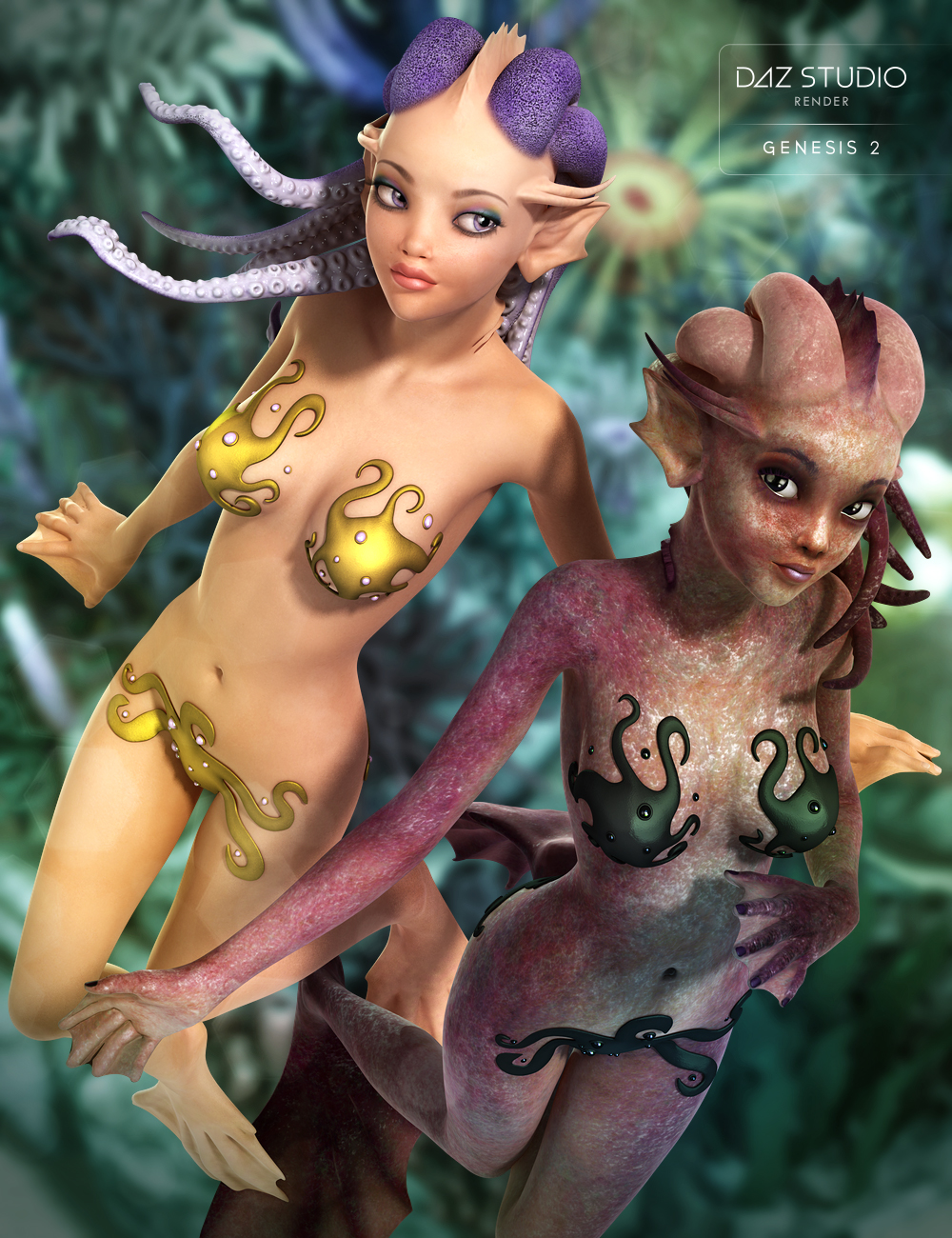
I don't create geografts. The DAZ PA's do. Some things just won't port. On that Anemone screenshot I posted above, she's missing the gills on her neck. That's a geograft. There are several items of custom geometry on Anemone that don't port. I didn't try the custom hair, tho.

The HSP version I have supports only G3 and G8. I find that using G3 is a little easier to port to G2 using the G8 to G2 flow. I've been using Daz since V3 and David. It has a lot of nice things about it, but animation is not one of them, IMO. Vam wins that contest hands down.
I don't create geografts. The DAZ PA's do. Some things just won't port. On that Anemone screenshot I posted above, she's missing the gills on her neck. That's a geograft. There are several items of custom geometry on Anemone that don't port. I didn't try the custom hair, tho.
I'd be happy to take a look at it. Nothing is unportable, if it isn't working then the UV's aren't suited for it, but easy for me to fix them and any areas fixed will work fine in the future if the geografts are the same. Maybe there is a misunderstanding about how the geographs work and the steps to prep them before conversion and how but it is not a problem to accomplish.
I've been using DAZ a similar amount of time. Since Poser 3 and 4. For anyone not Slimer reading that and it doesn't make sense...if you know you know.
I have Ninive Pro, have the lady of the lake, but no anemone. I'd rather not buy it quite yet. Any others? Alternative, if you want to send me an OBJ of the post-grafted fig in both Base and HR0 should be enough and not violate their TOS.
It looks like Ninive doesn't have geografts. I'll have to look for something else to experiment with. I was trying to port Minotaur 6, but the horns didn't work. I don't think those are a geograft tho. With geografts, I don't think the UV is the problem, it's the fact that they are adding a new augmented mesh to something.
I managed to achieve a satisfactory result for myself by converting the G8 to G2 and using morphs. The only problem I can't solve is the eyes, which aren't correct. If anyone knows how to fix this and could give me a hint, I would be very grateful. And I have a question, which I don't know if it exists or not: is there a model made for VAM that is like the base model of Genesis 2? Because I always believe it could be better if I could use a neutral structure and not one with an already established appearance like those in VAM.
Similar threads

- Replies
- 2
- Views
- 1K

- Replies
- 1
- Views
- 374
