CPU Performance Patch v2.0

Plugins + Scripts CPU Performance Patch v2.0

Download [2.96 MB]
is there a correct way to use the scrolling ? Quest 3 with virtual desktop in oculus mode. scrolling only works sometimes. its more likely to work if I have both thumbs on the thumbsticks
 
Is there any way you could recommend what you'd think would be the best configuration for both config files? my setup is R7 9850X3D and RTX 5080 with 32GB RAM.
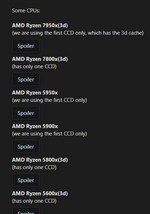
I don't have recommended settings for each cpu individually. Everyone needs to configure SkinMeshPartDLL.ini themselves to match their cpu
Also will the patch be working as long as I just drag and drop them into the correct folders?
Yes, you just need to replace the files in the correct folders
Will installing BepInEx also help with the FPS increase?
Installing BepInEx itself won't give you any fps boost. It's needed here to run NativeGCPatcher, which helps reduce those occasional small stutters that happen from time to time
I can't believe my FPS would drop to lower 40s in some scenes.
Fps dropping into the 40s in some heavy scenes, that's actually not unusual at all. A lot depends on the scene itself, like how many characters there are, hair physics settings, the number of lights, and many, many other things. Even powerful hardware can struggle with some heavily loaded scenes in vam
 
is there a correct way to use the scrolling ? Quest 3 with virtual desktop in oculus mode. scrolling only works sometimes. its more likely to work if I have both thumbs on the thumbsticks
I tested and used it for quite a while on quest 3 + virtual desktop using VDXR. I didn't notice any issues so far 🤔 I'll take a closer look at it
 
do someone have a installations guide for BepInEx?? would want to add the NativeGCPatcher. and don't seem to figure out how to begin. thanks!
 
No. This patch works with all cpus. Everyone just needs to configure SkinMeshPartDLL.ini properly for their own processor
So do we need to work off from the original CPU performance patch mod cpu examples of what to add in the skinmeshpart.dll if the cpu fits in only 'one'
 

Attachments

  • Screenshot 2026-11-08 100439.png
    Screenshot 2026-11-08 100439.png
    28.1 KB · Views: 0
do someone have a installations guide for BepInEx?? would want to add the NativeGCPatcher. and don't seem to figure out how to begin. thanks!
I'll add a short guide on how to install BepInEx to the post
So do we need to work off from the original CPU performance patch mod cpu examples of what to add in the skinmeshpart.dll if the cpu fits in only 'one'
Sure, you can use that information as a reference for configuring your own ini file
 
Back
Top Bottom