Beta | VaM LeanCore

Plugins + Scripts Beta | VaM LeanCore

Download [<1 MB]

wanderer

Well-known member
Featured Contributor
Joined
Jun 14, 2022
Messages
130
Reactions
1,024
wanderer submitted a new resource:

Beta | VaM LeanCore - VaM Optimization For Morphs and Load Time !!

Personal Note​


I recently learned that @MonsterShinkai is no longer with us. Although I did not have the chance to interact with him much, I deeply admired his work. He was one of those creators whose every new release I looked forward to, and his passing feels like a personal loss. I only wish I had reached out while I still had the chance.

This release is dedicated to you, my friend, @MonsterShinkai. Rest in peace.

From now on, I...

Read more about this resource...
 
It probably works, check it only with ~300 vars. Thanks for yet another approach.
 
LeanCore version: 0.7.0
VaM package/VAR count: [Your VAR Count, e.g., 1500]
CacheBuilder Threads: 6 (also tested with 4)
Desktop or VR launcher: Desktop Mode (VaM (Desktop Mode).bat)
Was VaM Clear Cache used immediately before the problem?: Yes (Cleared Cache/ and BepInEx/cache/VaMLeanCore)
What scene or action triggered it?:
Loading an Atom Preset (Person preset/Appearance preset) triggers the following exception, resulting in broken character mesh/morph restoration:

!> Exception during Restore of geometry: System.NullReferenceException: Object reference not set to an instance of an object
at DAZCharacterSelector.SelectCharacterByName (System.String characterName, Boolean fromRestore) [0x00000] in <filename unknown>:0
at DAZCharacterSelector.RestoreFromJSON (SimpleJSON.JSONClass jc, Boolean restorePhysical, Boolean restoreAppearance, SimpleJSON.JSONArray presetAtoms, Boolean setMissingToDefault) [0x00000] in <filename unknown>:0
at MeshVR.PresetManager.Restore (SimpleJSON.JSONClass jc) [0x00000] in <filename unknown>:0

Does Enabled=false avoid the problem?: Yes. When Enabled=false, the preset loads normally without any NullReferenceException or mesh deformation.
Relevant BepInEx/LogOutput.log attached: Yes (See attached log file)
 
LeanCore version: 0.7.0
VaM package/VAR count: [Your VAR Count, e.g., 1500]
CacheBuilder Threads: 6 (also tested with 4)
Desktop or VR launcher: Desktop Mode (VaM (Desktop Mode).bat)
Was VaM Clear Cache used immediately before the problem?: Yes (Cleared Cache/ and BepInEx/cache/VaMLeanCore)
What scene or action triggered it?:
Loading an Atom Preset (Person preset/Appearance preset) triggers the following exception, resulting in broken character mesh/morph restoration:

!> Exception during Restore of geometry: System.NullReferenceException: Object reference not set to an instance of an object
at DAZCharacterSelector.SelectCharacterByName (System.String characterName, Boolean fromRestore) [0x00000] in <filename unknown>:0
at DAZCharacterSelector.RestoreFromJSON (SimpleJSON.JSONClass jc, Boolean restorePhysical, Boolean restoreAppearance, SimpleJSON.JSONArray presetAtoms, Boolean setMissingToDefault) [0x00000] in <filename unknown>:0
at MeshVR.PresetManager.Restore (SimpleJSON.JSONClass jc) [0x00000] in <filename unknown>:0

Does Enabled=false avoid the problem?: Yes. When Enabled=false, the preset loads normally without any NullReferenceException or mesh deformation.
Relevant BepInEx/LogOutput.log attached: Yes (See attached log file)Thanks for testing
Thanks for testing i will look into it. Is the exception all you got in the log file or its an ingame exception message?
 
About 9k vars. 75sec warm boot with and without leancore.
Made no difference for me. Maybe because I'm already running BrowserAssist with var offloading ?
Still, I appreaciate the effort to make VAM start faster :D
 
Thanks for testing i will look into it. Is the exception all you got in the log file or its an ingame exception message?
It was an in-game error message.
Even when I load an atom preset, it goes through the loading process but nothing changes, and when I load a clothing preset, the outfit glitches out into a spaghetti mess at atom coordinates (0,0,0) and flails around wildly.
 
About 9k vars. 75sec warm boot with and without leancore.
Made no difference for me. Maybe because I'm already running BrowserAssist with var offloading ?
Still, I appreaciate the effort to make VAM start faster :D
Ok if you do var offloading then there is noting to build the cache. So ya it would make no difference.
 
Ok if you do var offloading then there is noting to build the cache. So ya it would make no difference.
but like in theory leancore should make offloading obsolete and give it the same heap error resistance, right ? So no more feeding AddonPackages with 1k vars per boot if BrowserAssists var management should fail. That would be awesome.
 
but like in theory leancore should make offloading obsolete and give it the same heap error resistance, right ? So no more feeding AddonPackages with 1k vars per boot if BrowserAssists var management should fail. That would be awesome.
Yes, thats the whole idea. Offloading becomes obsolete. Cache build is offloaded to leancore to run on multiple cores and morphs are only loaded when actively needed. You can try disabling var offloading from browserassist and check the results and share them. That would be a gret test.
 
I've tried with more vars (around few thousands - mostly clothings and few hundred scenes) and loading scene was looong. Didn't saved the logs though. Still var browser is the best but loading additional content is pain in the ass (extra clicks for install content and then use in game) so i'm still waiting for an alternative.
 
I've tried with more vars (around few thousands - mostly clothings and few hundred scenes) and loading scene was looong. Didn't saved the logs though. Still var browser is the best but loading additional content is pain in the ass (extra clicks for install content and then use in game) so i'm still waiting for an alternative.
You can bump of the core 8 or more to make the caching through lean core faster. Send me the bepinex log to see whats going on if you can so i can optimise it further.
 
wanderer updated Beta | VaM LeanCore with a new update entry:

Beta | VaM LeanCore | 0.8.0-RC1

VaM LeanCore 0.8.0-RC1 - What Changed Since 0.7.0​


Version 0.7.0 concentrated on large-library startup and morph demand loading. Version 0.8.0 extends LeanCore into runtime skinning and scene construction, with particular attention paid to repeated work inside plugin-heavy scenes.

The main additions are:

  • Native x64 acceleration for VaM's hottest Person skinning loop.
  • A persistent binary morph-descriptor index that reduces repeated package-morph import work...

Read the rest of this update entry...
 
For update 0.8.0-RC1
Package name - VaMLeanCore-0.8.0-RC1.zip
If you are still seeing the 0.7.0 zip then please hold off from downloading.
The review process might not have completed yet by the admins in the background.
VaMLeanCore-0.8.0-RC1.zip
 
Ryzen 7 9800X3D - MSI RTX 5080 Shadow 16GB VRAM - 64GB RAM

No plugin, empty default scene no person atom - load time : 2 min 38 sec
No plugin, load 1st person atom in empty scene - load time : 1 min 52 sec

With plugin, empty default scene no person atom - load time : 31 sec
With plugin, load 1st person atom in empty scene - load time : 19 sec

This is huge.
Current VAM folder size : 791GB - I know, I have a problem 🤪
(I have another 100GB of old content archived just to skim down load times already.)
361GB of addon packages
1.43GB of morphs ~30,000 files
146GB of clothing - ~110,000 files
3.96GB of hair - ~31,000 files

I would love to clean up my VAM folder, but it's beyond too late.
Every creator likes to put their loose files scattered everywhere, textures in particular.
I've been a VAM user since around 2019 and have some super old stuff from Reddit and other sources that do not exist anymore.
Deleting everything and starting over would almost be a crime.
Thank you for this black magic. Load times were dreadful, I'd usually start VAM and go out for a smoke because it took so long.

Noticing an issue, perhaps a limitation.

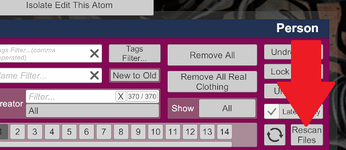
If I load a new look, and I'm missing a hair dependency, normally I would drop the loose files into the base folder, then use the "rescan files" button which will refresh the loose files.
This allows me to reload the look or scene and the problem will be fixed.
This function is not working now. Guessing this has to do with how the cache system works, it's not updating after the game is booted.
 
Last edited:
Will be testing this for a while with a fresh empty cache folder.
So far is seems stable with Proton under Linux. Technically the same Windows-setup, except that for BepInEx I need an extra Steam launch parameter.
 
Ryzen 7 9800X3D - MSI RTX 5080 Shadow 16GB VRAM - 64GB RAM

No plugin, empty default scene no person atom - load time : 2 min 38 sec
No plugin, load 1st person atom in empty scene - load time : 1 min 52 sec

With plugin, empty default scene no person atom - load time : 31 sec
With plugin, load 1st person atom in empty scene - load time : 19 sec

This is huge.
Current VAM folder size : 791GB - I know, I have a problem 🤪
(I have another 100GB of old content archived just to skim down load times already.)
361GB of addon packages
1.43GB of morphs ~30,000 files
146GB of clothing - ~110,000 files
3.96GB of hair - ~31,000 files

I would love to clean up my VAM folder, but it's beyond too late.
Every creator likes to put their loose files scattered everywhere, textures in particular.
I've been a VAM user since around 2019 and have some super old stuff from Reddit and other sources that do not exist anymore.
Deleting everything and starting over would almost be a crime.
Thank you for this black magic. Load times were dreadful, I'd usually start VAM and go out for a smoke because it took so long.

Noticing an issue, perhaps a limitation.

If I load a new look, and I'm missing a hair dependency, normally I would drop the loose files into the base folder, then use the "rescan files" button which will refresh the loose files.
This allows me to reload the look or scene and the problem will be fixed.
This function is not working now. Guessing this has to do with how the cache system works, it's not updating after the game is booted.
I am sorry didnt see your message. Do you mean mid game the var rescan is not working or even if you have added the var game is not recognising the var with leancore enabled?
 
Ryzen 7 9800X3D - MSI RTX 5080 Shadow 16GB VRAM - 64GB RAM

No plugin, empty default scene no person atom - load time : 2 min 38 sec
No plugin, load 1st person atom in empty scene - load time : 1 min 52 sec

With plugin, empty default scene no person atom - load time : 31 sec
With plugin, load 1st person atom in empty scene - load time : 19 sec

This is huge.
Current VAM folder size : 791GB - I know, I have a problem 🤪
(I have another 100GB of old content archived just to skim down load times already.)
361GB of addon packages
1.43GB of morphs ~30,000 files
146GB of clothing - ~110,000 files
3.96GB of hair - ~31,000 files

I would love to clean up my VAM folder, but it's beyond too late.
Every creator likes to put their loose files scattered everywhere, textures in particular.
I've been a VAM user since around 2019 and have some super old stuff from Reddit and other sources that do not exist anymore.
Deleting everything and starting over would almost be a crime.
Thank you for this black magic. Load times were dreadful, I'd usually start VAM and go out for a smoke because it took so long.

Noticing an issue, perhaps a limitation.

If I load a new look, and I'm missing a hair dependency, normally I would drop the loose files into the base folder, then use the "rescan files" button which will refresh the loose files.
This allows me to reload the look or scene and the problem will be fixed.
This function is not working now. Guessing this has to do with how the cache system works, it's not updating after the game is booted.
Your numbers are exactly what i wanted hear!! And it what leancore is designed to do. The more vars you have the more drastic time reduction you will notice with leancore. Happy for you mate. And for the rescan please elaborate a bit on the issue and may be how to reproduce it so that i can look into it.
 
Your numbers are exactly what i wanted hear!! And it what leancore is designed to do. The more vars you have the more drastic time reduction you will notice with leancore. Happy for you mate. And for the rescan please elaborate a bit on the issue and may be how to reproduce it so that i can look into it.
Load a new character, doesn't matter - appearance preset, load scene, load look, etc.
Missing hair dependency, or clothing dependency.
Download the missing content, then drop the loose files into the custom folder.
In the clothing and hair tab, you can rescan local files, and the missing content will appear.
You can now reload the character and the missing dependency will be resolved.
This does not work with leancore.

rescan.png

I have not tested by adding the var, then using the package manager to rescan.
The package manager is insanely slow by comparison, and I tend to keep the majority of hair and clothing files outside of AddonPackages.

Regardless, I'm very happy with the load times. If I have to reload VAM to fix a dependency issue, it won't take an eternity.
 
Load a new character, doesn't matter - appearance preset, load scene, load look, etc.
Missing hair dependency, or clothing dependency.
Download the missing content, then drop the loose files into the custom folder.
In the clothing and hair tab, you can rescan local files, and the missing content will appear.
You can now reload the character and the missing dependency will be resolved.
This does not work with leancore.

View attachment 622738

I have not tested by adding the var, then using the package manager to rescan.
The package manager is insanely slow by comparison, and I tend to keep the majority of hair and clothing files outside of AddonPackages.

Regardless, I'm very happy with the load times. If I have to reload VAM to fix a dependency issue, it won't take an eternity.
Ah ok. So you have offloaded the var package to a custom folder. Leancore main philosophy is to take cache build and scan from vam and do it outside of vam bec vam native cache build is just not cutting it anymore. That might conflict with having a custom var folder. What plugin are you using to hot load hair and clothing from a custom folder?
And like you said, since we have optimized load time, might as well just drop in everything into addonpackages folder and restart vam :).
 
Ah ok. So you have offloaded the var package to a custom folder. Leancore main philosophy is to take cache build and scan from vam and do it outside of vam bec vam native cache build is just not cutting it anymore. That might conflict with having a custom var folder. What plugin are you using to hot load hair and clothing from a custom folder?
And like you said, since we have optimized load time, might as well just drop in everything into addonpackages folder and restart vam :).
I think you misunderstand. The base game "custom" folder, nothing special about it, no plugin required.

VAM\Custom\Clothing
VAM\Custom\Hair

Most vars can be unpacked and work just fine, so long as the creator doesn't go crazy with custom subfolder paths.

The issue is, with Leancore, newly added loose files do not update when clicking the button to rescan files.
 
I think you misunderstand. The base game "custom" folder, nothing special about it, no plugin required.

VAM\Custom\Clothing
VAM\Custom\Hair

Most vars can be unpacked and work just fine, so long as the creator doesn't go crazy with custom subfolder paths.

The issue is, with Leancore, newly added loose files do not update when clicking the button to rescan files.
Ok i get it now. Thanks for clarifying. I will check it out and release a update if i can reproduce and mitigate the issue.
 
Back
Top Bottom