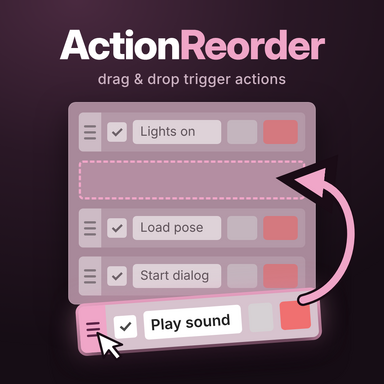
Action Reorder

Plugins + Scripts Action Reorder

Download [<1 MB]

PetaZwega

Invaluable member
Featured Contributor
Joined
Apr 25, 2021
Messages
228
Reactions
4,639
Could a hide trigger option be added to the plugin? I find myself always adjusting the same triggers and plugins when creating a scene. Hiding the ones I rarely or never touch could be helpful.
 
Could a hide trigger option be added to the plugin? I find myself always adjusting the same triggers and plugins when creating a scene. Hiding the ones I rarely or never touch could be helpful.
With plugins I definitely see what you mean, they're so annoyingly large and take up a lot of space if you have loaded a few. Collapsing them to a smaller size could definitely improve visual clarity.

Though I have trouble imagining how hiding the trigger actions would work. Could you elaborate on how you envision hiding them would look like?
 
With plugins I definitely see what you mean, they're so annoyingly large and take up a lot of space if you have loaded a few. Collapsing them to a smaller size could definitely improve visual clarity.

Though I have trouble imagining how hiding the trigger actions would work. Could you elaborate on how you envision hiding them would look like?
Place a toggle box adjacent to the grab locations on the left of the action tab. By selecting the toggle box that selected action tab is hidden behind a drop-down button. Use the drop-down button to view and remove all hidden tabs. You could also incorporate the sliding function by sliding the tab downward to a point it is automatically hidden behind a drop-down button.
 
Place a toggle box adjacent to the grab locations on the left of the action tab. By selecting the toggle box that selected action tab is hidden behind a drop-down button. Use the drop-down button to view and remove all hidden tabs. You could also incorporate the sliding function by sliding the tab downward to a point it is automatically hidden behind a drop-down button.
Gotta be honest, was a bit sceptical about this at first 😅 But now that its implemented; super helpful. Great stuff, thanks for the suggestions ❤️

Still working on plugin reorder and it looks promising, but it's more complicated than reordering trigger actions as it turns out.
 
PetaZwega updated Action Reorder with a new update entry:

Multi Drag, Hide Actions and Bug fixes

New
  • Hide actions: drag them onto the new “Hidden actions” field at the bottom of each list. Click the field to view hidden actions in place. “Unhide all” restores them. Thank you @Toddy for this suggestions!
  • Hidden actions are saved per scene, in VaM/Saves/PluginData/PetaZwega/ActionReorder when saving the scene. Nothing is written into the scene.
  • Move several actions at once: tap grips to select, then drag.

Fixes
  • ...

Read the rest of this update entry...
 
Thanks for the plugin, quite usefull! Have a feature request: add option to copy and paste single action, unlike in vanilla where you have to copy everything everytime. No pressure if you don't want.
 
Thanks for the plugin, quite usefull! Have a feature request: add option to copy and paste single action, unlike in vanilla where you have to copy everything everytime. No pressure if you don't want.
Always open for new ideas! But isn't this already possible? You can either duplicate actions or copy them after opening their settings.

Or did I misunderstand you?
 
Back
Top Bottom