


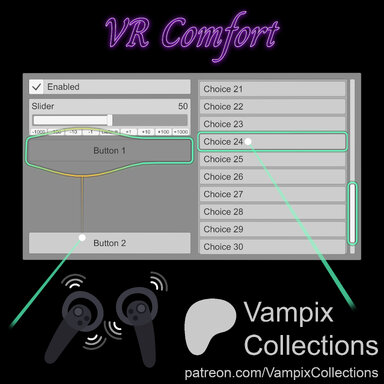


VR Comfort
Steady aim, buttons that meet you halfway and more.
UI navigation that finally feels like it was made for VR ♡
UI navigation that finally feels like it was made for VR ♡
Fed up with VaM's shaky VR navigation, clicking the wrong button and fighting to land the one you actually want?
VR Comfort steadies your aim, pulls buttons toward the pointer, scrolls lists with the thumbsticks, gives you the haptic feedback you never thought you needed, and more ♡
Features 
 Stable Pointer — Small shakes are smoothed away; a deliberate sweep still lands at once.
 Precision Grip — Hold the grip and the pointer moves at a fraction of your hand's speed, for the tiny toggles and sliders. (Oculus headsets for now, No SteamVR yet)
 Button Assist — Nearby buttons pull the pointer in and keep the hover steady through the click.
 Hover Glow — The button you point at glows, stretches toward your real aim as the pull holds on, flashes on the click and rides the scrollbar while you scroll.
  Thumbstick Scroll — Point at a list and push the thumbstick. Tabs step one per right/left flick, choosers turn a page per push, especially useful while browsing hair/clothing/morphs pages. (Oculus headsets for now, No SteamVR yet)
 Edge Scrolling — Hold the pointer near a list's top or bottom and it scrolls automatically.
 Haptic Feedback — A tick when you land on a button, a pulse on the click, a tick per step or page, and Magnet Feel: a rumble as you pull off a held button, a snap when it lets go. (Oculus headsets for now, No SteamVR yet)
 Menu Placement — VaM's menu opens farther from your face, along the line of your sight, at a distance you choose. No more menu spawning right up to your face.
 Desktop Too? — In desktop mode, although not too functionally useful, the mouse gets Hover Glow if you wanna keep the cool look, and the wheel turns the choosers' pages.
 Fully Tunable — Every feature has its own card, every setting a hint, any colours you like. Your settings are kept with a default session preset.
See It In Action ⛶
Aim near a button… it pulls the pointer in, the glow stretches as you drift, and it lets go only when you clearly aim at the next one.
Point at a list and push the stick… it scrolls and the glow rides the scrollbar.
Press the menu button… it opens where you can read it, not right up in your face.
Getting Started 
1. Add VR Comfort once
Open VaM's main menu, go to Session Plugins, choose Add Plugin and load VRComfort.cslist from this package. It is a Session Plugin, so it covers every menu in every scene.
2. Make it load every time
Save your Session Plugins as user defaults and VR Comfort loads at every VaM startup with your settings.
3. Start from the defaults
Aim at any menu and use it as you always do. Button Assist is on, the glow is on, the stick scrolls lists. Treat the defaults as a starting point: the Navigation tab holds every setting, and Show Hints explains each one in a line.
4. Let me know what other inconveniences you are experiencing in VR, just maybe I will have them fixed here
Everything here began as one annoyance. If VaM in VR still fights you somewhere, say where, and if a Session Plugin can fix it, it goes on the list for the next version.
Good to Know 
Headsets Support
Thumbstick Scroll, Haptics and Precision Grip need VaM running on Oculus (Quest or Rift, including a Quest over Virtual Desktop). SteamVR is not yet fully supported, but plan to add it. VaM gives a plugin no access to OpenVR/SteamVR logic, so thumbsticks, grip and haptics wait for now. Stable Pointer, Button Assist, Hover Glow, Edge Scrolling and Menu Placement work there. The Status card says which features are on for your headset.
Tips
- Pointer feels sluggish? Lower Smoothing. Still shaky on tiny toggles? Hold the grip for Precision Grip instead of raising it.
- Buttons grabbing too eagerly? Lower Button Assist's Strength, or switch off Halos Fit The Button so every button pulls from the same distance.
- Glow hard to see on a white panel? Dark Edge is on by default for exactly that. Raise Intensity or pick a stronger colour if you want more.
- Want the stick to move you while pointing at a list? Switch Thumbstick Scroll off and VaM's own behaviour returns at once.
- Experiment freely. Nothing is permanent. Reset to Defaults brings the tested feel back, and VR Comfort turned off is VaM untouched.

Thank you for trying VR Comfort. ⸜(。˃ ᵕ ˂ )⸝♡
⋆。‧˚ʚ I appreciate any feedback you may wish to leave, your thoughts help me improve. ɞ˚‧。⋆
⋆˚✿˖° If you really enjoyed this release, consider leaving a like or react to it or adding it to your favorites, and feel free to follow my profile for more to come. °✿˖˚⋆



 Thank YOU ♡