

Resource requires running a bat file. Make sure you trust the creator and apply your own security measures.
Private Hub Dependencies
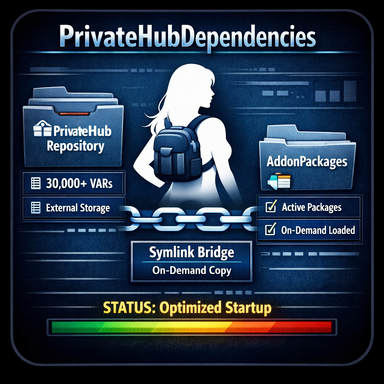
Keep large private VAR libraries outside your active VaM setup and copy only the dependencies you actually need.A performance-focused extension of AutoGetDependencies by everlaster.
Features
- Scan dependencies from package meta.json files
- Scan dependencies from unpackaged saved scene .json files
- Copy missing dependencies from private local VAR libraries
- Support multiple private source folders
- Support source folders and subfolders
- Fast repeated local copies through the package index
- Local version resolution options
- Works alongside normal VaM Hub dependency handling
- Keeps the active AddonPackages folder smaller and cleaner
Overview
PrivateHubDependencies is a VaM session plugin that extends AutoGetDependencies with private and local package sources.
It can scan dependencies from package meta.json files and normal unpackaged saved scene .json files. Missing packages can be copied from one or more private VAR libraries into AddonPackages, allowing large collections to stay outside the active VaM installation.
This is useful for private archives, backup libraries,
How It Works
VaM plugins are sandboxed and cannot directly access arbitrary external folders.
PrivateHubDependencies uses a helper junction / SymLink structure inside PluginData. This allows it to:
- access one or more private source folders
- search source folders and subfolders for matching VAR files
- copy required VAR files into AddonPackages
- rescan packages so VaM can recognize newly copied files
Source files are copied, never moved.
Fast Local Package Index
When Co
Later local copy operations reuse this index, making dependency lookup much faster even with very large libraries. Progress and the final package and VAR count are shown in the plugin UI.
Use Rebuild local index after adding, removing, or changing VAR files in a source folder. The index is kept for the current VaM session and is rebuilt automatically when needed.
Local Version Resolution
- Exact versions only
- Exact first, otherwise newest
- Always newest available
These modes apply to packages found in the configured local sources.
Safety note:
The optional setup batch file creates junctions / SymLinks inside your VaM folder structure. This allows the plugin to read from configured private source folders and copy VAR files into AddonPackages.Setup
- Install the plugin as a VaM session plugin.
- Run CreatePrivateHubDependenciesSymLinks.bat, or create the required junction / SymLink structure manually.
- Add one or more private source folders when prompted.
- Load flurol.PrivateHubDependencies in VaM.
- Use Select scene/meta.json to scan a saved scene or package, or use Scan loaded scene.
- Select the desired Local version resolution mode.
- Click Copy local missing dependencies. The local package index is built automatically on first use.
- Click Rescan packages so VaM detects the copied VAR files.
Notes
- Source files are copied, not moved.
- The plugin does not create junctions automatically; the batch file is an optional setup helper.
- Use Rebuild local index after changing a local source folder.
- The helper setup can be removed with RemovePrivateHubDependenciesSymLinks.bat.
- Remove the SymLinks helper structure before packaging the plugin into a VAR.
- Only use source folders and plugins you trust.
Credits & License
Adapted from AutoGetDependencies by everlasterOriginal license: CC BY 4.0
Original resource:
https://hub.virtamate.com/resources/autogetdependencies.51304/
Additional credits:
- SymLinks / junction workflow inspired by BrowserAssist by JayJayWon
- Includes MacGruber_Utils by MacGruber
- Modified and extended by flurol
What the batch file does
CreatePrivateHubDependenciesSymLinks.bat is a convenience setup tool. It does not modify private source files.It creates this helper structure:
- Saves/PluginData/flurol/PrivateHubDependencies/SymLinks
- SymLinks/AddonPackages: junction to VaM's real AddonPackages folder
- SymLinks/Quelle: folder containing one or more source junctions such as Source1, Source2, and Source3
This lets the plugin access private source folders and copy matching VAR files into AddonPackages.
Manual setup alternative
If you do not want to run the batch file, you can create the same structure manually.Required structure
Create this folder:Saves/PluginData/flurol/PrivateHubDependencies/SymLinks
Inside it, create:
- a junction named AddonPackages pointing to your real AddonPackages folder
- a folder named Quelle
- one or more source junctions inside Quelle, such as Source1, Source2, and Source3
Example structure
Saves/PluginData/flurol/PrivateHubDependencies/SymLinks/AddonPackages-> points to VaM/AddonPackages
Saves/PluginData/flurol/PrivateHubDependencies/SymLinks/Quelle/Source1
-> points to your first private source folder
Saves/PluginData/flurol/PrivateHubDependencies/SymLinks/Quelle/Source2
-> points to your second private source folder
Example commands
Example Windows junction commands:mklink /J "F:\VaM\Saves\PluginData\flurol\PrivateHubDependencies\SymLinks\AddonPackages" "F:\VaM\AddonPackages"
mklink /J "F:\VaM\Saves\PluginData\flurol\PrivateHubDependencies\SymLinks\Quelle\Source1" "F:\MyPrivateVars"
mklink /J "F:\VaM\Saves\PluginData\flurol\PrivateHubDependencies\SymLinks\Quelle\Source2" "F:\OtherPrivateVars"
The batch file simply automates this setup.
Resource requires running a bat file. Make sure you trust the creator and apply your own security measures.