Resource requires running a bat file. Make sure you trust the creator and apply your own security measures.
Private Hub Dependencies
Keep large private VAR libraries outside your active VaM setup and copy only the dependencies you actually need.A performance-focused extension of AutoGetDependencies by everlaster.
Overview
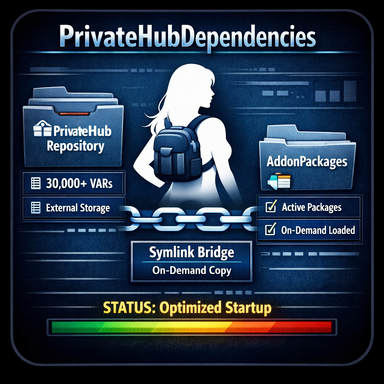
PrivateHubDependencies is an extension of AutoGetDependencies that adds support for private and local package sources. The original plugin detects missing dependencies and helps resolve them through the Hub, while this version can also copy matching packages from private local archives when needed. This makes it possible to keep large private VAR collections outside your active VaM setup and only bring required packages into AddonPackages when they are actually needed.How It Works
The plugin uses a helper bridge structure based on junctions / SymLinks.Because VaM plugins are sandboxed, the plugin cannot directly access arbitrary external folders.
Instead, it works through a prepared helper structure inside PluginData to:
- access one or more private/local source folders
- copy matching .var files into AddonPackages
- let VaM detect the copied packages after a package rescan
Features
- copying of missing private dependencies
- support for multiple private/local source folders
- cleaner active AddonPackages setup
- works alongside normal Hub dependency handling
Safety note:
The optional batch file creates junction / SymLinks inside your VaM folder structure so the plugin can access private sources and copy packages into AddonPackages. Only use this setup if you understand what the links do and only use plugins from sources you trust.
Setup
- Install the plugin as a VaM session plugin
- Run CreatePrivateHubDependenciesSymLinks.bat, or set up the required junction / SymLinks structure manually (see below).
- Add one or more private source folders when prompted
- Load flurol.PrivateHubDependencies in VaM
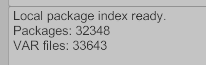
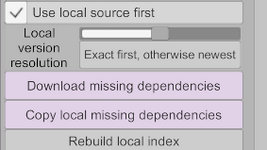
- Scan dependencies in the plugin UI
- Click Copy local missing dependencies from local path
- Click Rescan packages so VaM detects the copied .var files
Notes
- Source files are copied, not moved
- The plugin does not create the junctions automatically
- The helper setup can be removed again with RemovePrivateHubDependenciesSymLinks.bat
- Remove the SymLinks helper structure before packaging the plugin into a .var
Credits & License
Adapted from AutoGetDependencies by everlasterOriginal license: CC BY 4.0
Original resource:
https://hub.virtamate.com/resources/autogetdependencies.51304/
Additional credits:
- SymLinks / junction workflow inspired by BrowserAssist by JayJayWon
- Includes MacGruber_Utils by MacGruber
- Modified and extended by flurol
What the batch file does
CreatePrivateHubDependenciesSymLinks.bat is only a convenience setup tool.It does not modify your private source files.
It creates the helper junction / SymLinks structure required by the plugin:
- Saves/PluginData/flurol/PrivateHubDependencies/SymLinks
- SymLinks/AddonPackages -> junction to VaM's real AddonPackages
- SymLinks/Quelle -> folder that contains one or more source junctions such as Source1, Source2, etc.
Manual setup alternative
If you do not want to run the batch file, you can create the same structure manually.Required structure
Create this folder:Saves/PluginData/flurol/PrivateHubDependencies/SymLinks
Inside it, create:
- a junction named AddonPackages pointing to your real AddonPackages folder
- a folder named Quelle
- inside Quelle, create one or more source junctions such as Source1, Source2, etc., each pointing to one of your private VAR source folders
Example structure
Saves/PluginData/flurol/PrivateHubDependencies/SymLinks/AddonPackages-> points to VaM/AddonPackages
Saves/PluginData/flurol/PrivateHubDependencies/SymLinks/Quelle/Source1
-> points to your first private source folder
Saves/PluginData/flurol/PrivateHubDependencies/SymLinks/Quelle/Source2
-> points to your second private source folder
Example commands
Example Windows junction commands:mklink /J "F:\VaM\Saves\PluginData\flurol\PrivateHubDependencies\SymLinks\AddonPackages" "F:\VaM\AddonPackages"
mklink /J "F:\VaM\Saves\PluginData\flurol\PrivateHubDependencies\SymLinks\Quelle\Source1" "F:\MyPrivateVars"
mklink /J "F:\VaM\Saves\PluginData\flurol\PrivateHubDependencies\SymLinks\Quelle\Source2" "F:\OtherPrivateVars"
The batch file simply automates this setup.
Resource requires running a bat file. Make sure you trust the creator and apply your own security measures.