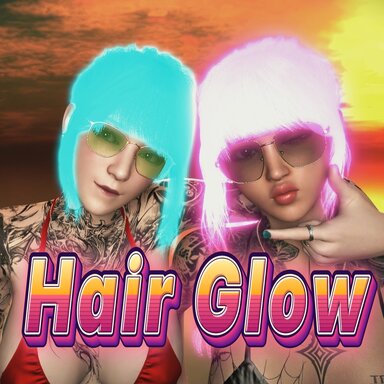

Just like the name says, it's a simple, easy-to-use plugin.
While building some tools for my own use, I played around with this one, found it pretty cool, and decided to properly polish it up for the community to have fun with it.
While building some tools for my own use, I played around with this one, found it pretty cool, and decided to properly polish it up for the community to have fun with it.
Quick GuideInstall
Put Ztulian.HairGlow.1.var into the AddonPackages folder of VaM. Nothing else is needed.Make the hair glow
- Open a scene and select a person (Person atom) who got vam hair.
- Open the Plugins tab and press Add Plugin.
- Press Select File..., choose the package Ztulian.HairGlow, then HairGlow.cs.
- The hair glows at once, in cyan, with a soft halo around it.
- Press Open Custom UI... to adjust it.
Basic adjustments
| You want | Change |
|---|---|
| Another glow colour | Glow colour |
| Brighter or softer hair | Brightness |
| A stronger or weaker halo | Halo strength |
| A wider or tighter halo | Halo size |
| No halo, glowing hair only | Untick Halo around the hair |
| Everything off | Untick Glow on |
Good to know
- Only strand (sim) hair glows. Scalps and mesh hair do not.
- The glow colour is mixed with the hair's own colour. White or light hair gives the cleanest colour; black hair glows weakly.
- In VR the hair glows but has no halo( BUT STILL GLOW BY BRIGHTNESS ). The halo shows on desktop and in VaM screenshots
- All settings are saved with the scene.
- For more (breathing, rainbow, react to sound, a colour per hair part) press Advanced settings
Every feature in detail
Main page
| Control | Range | Default | What it does |
|---|---|---|---|
| Glow on | on / off | on | Switches everything. Off puts the hair back exactly as the scene had it. |
| Brightness | 0 to 30 | 5 | How bright the strands themselves are. High values burn towards white. |
| Glow colour | colour picker | cyan | The glow colour, used for the hair and the halo. |
| Halo around the hair | on / off | on | The soft light around the hair. |
| Halo strength | 0 to 10 | 2 | How strong the halo is. 0 switches the halo off. |
| Halo size | 2 to 7.9 | 5 | How far the halo spreads. |
| Advanced settings > | button | Opens the advanced page. |
- Brightness and Halo strength are independent: one sets the strands, the other the halo. For hair that keeps a clear colour with a large halo, keep Brightness low and raise Halo strength.
- The halo comes only from hair the camera can see. Hair hidden behind the head or the body does not shine through.
- The halo is the plugin's own and does not need PostMagic. If the scene has PostMagic bloom switched on, a high Brightness makes PostMagic add its own halo on top; the status box says so in one line.
- The plugin looks for hair once a second. Changing, removing or adding hair needs no action.
Advanced page
Press Advanced settings > to open it and < Back to the simple page to return. Every effect here acts on both the hair and the halo, and they can be combined.| Control | Range | Default | What it does |
|---|---|---|---|
| Breathing | on / off | off | The hair gets brighter, then darker, again and again. |
| Seconds per breath | 0.3 to 15 | 3 | Length of one breath. |
| How dark it gets | 0 to 1 | 0.7 | How much it dims at the low point. 1 is fully dark. |
| Rainbow | on / off | off | The colour runs through all hues, starting from Glow colour. |
| Seconds per round | 0.5 to 60 | 8 | Time for one full round of colours. |
| React to sound | on / off | off | The hair brightens with the loudness of sound. |
| Listen to | list | Everything you hear | Which sound source to follow. |
| Sensitivity | 0.1 to 20 | 3 | How loud it must be for full brightness. |
| Hue | 0 to 1 | from the colour | The hue as one number, so Timeline and triggers can change the colour. |
React to sound
- In silence the hair keeps 15% of Brightness; louder sound makes it brighter, up to 2.5 times.
- Everything you hear is all sound VaM is playing, mixed together.
- Press Listen to to choose one atom: an AudioSource atom, a person's head audio, a speaker inside an asset. The hair then follows only that source.
- One source alone gives a smaller signal than everything together. If the hair barely reacts, raise Sensitivity.
Each hair part by itself (right column)
Every strand hair part on the person gets three controls. The list follows the hair when it changes.
| Control | Range | What it does |
|---|---|---|
| Tick box with the part's name | on / off | Unticked, that part does not glow. |
| Colour shift | -0.5 to 0.5 | Moves that part's colour away from the main colour. 0.5 is the opposite colour. |
| Brightness x | 0 to 3 | Multiplies that part's brightness. 1 is the same as the rest. |
Triggers, Timeline and other plugins
The sliders and tick boxes are ordinary VaM parameters, so triggers, Timeline and other plugins can use them as targets. In a trigger window: Receiver Atom is the person, Receiver is the line containingHairGlow, Receiver Target is one of the names below.| Name in the Target list | Kind |
|---|---|
| Glow on, Halo around the hair, Breathing, Rainbow, React to sound | tick box |
| Brightness, Halo strength, Halo size, Hue | number |
| Breathing seconds per breath, Breathing how dark it gets, Rainbow seconds per round, React to sound sensitivity | number |
| Glow colour | colour |
| React to sound source | list choice |
- Colour by transition: use Glow colour (full colour) or Hue (hue only, a simpler trigger window). With Glow colour, VaM's own trigger window draws its Test Transition slider over the small buttons under the two colour pickers; the transition itself works normally.
- Timeline: add the plugin's number parameters as float params and keyframe them like any other.
- Audio plugins that send standard VaM triggers, such as BeatIt, can target Brightness or Halo strength. This pairing has not been tested. When another plugin drives Brightness, switch React to sound off, or the two multiply.
- The per-part controls are not in the Target list; they are set by hand in the panel. Leave the parameter Hair parts alone: the plugin stores the per-part choices there.
Saving, screenshots, performance
- Saving: every setting is saved with the scene, including the per-part choices and the sound source. A loaded scene glows as it did when saved.
- Screenshots: VaM's screenshot button captures the glowing hair and the halo.
- Several people: add the plugin to each person; each has its own colour and settings.
- Off and removal: unticking Glow on, disabling the plugin or removing it puts the hair back exactly as the scene had it.
| Case | Frames per second |
|---|---|
| Plugin off | 41.7 |
| Glowing hair, no halo | 40.9 |
| Glowing hair with halo, one person | 38.7 |
Known limits
- Only strand hair glows. Scalps and mesh hair do not react to this kind of light.
- The glow colour is multiplied by the hair's own colour. Cyan on pink hair, for example, reads as blue until Brightness is high. For a true colour use white or light hair.
- VR: the hair glows, but the plugin's halo is not drawn. The status box shows an orange line.
- The halo is drawn on the main desktop camera and VaM's screenshot cameras. Other cameras (a WindowCamera atom, cameras of other plugins) show the glowing hair without the halo.
- While it glows, the hair no longer takes the scene's sky light; lamps in the scene still light it as usual.
- The plugin works on Person atoms only.
Troubleshooting
| You see | Cause and fix |
|---|---|
| Status box says NO STRAND HAIR | The person wears no strand hair. Put a sim hair on. |
| The hair glows in the wrong colour | The hair's own colour is mixing in. Use a lighter hair colour or raise Brightness. |
| The hair is burnt white, colour lost | Brightness is too high. Lower it and use Halo strength for the shine. |
| The halo covers the face | Lower Halo strength or Halo size. |
| No halo | Check that Halo around the hair is ticked and Halo strength is above 0. In VR there is no halo. |
| The whole scene blooms | That is PostMagic bloom in the scene, not the plugin's halo. Lower Brightness or adjust PostMagic's bloom. |
| React to sound is on but the hair stays dark | The source chosen in Listen to is silent, or Sensitivity is too low. |
| One hair part does not glow | That part is unticked on the advanced page. |