True Through - Native Passthrough Meta Bridge

Plugins + Scripts True Through - Native Passthrough Meta Bridge

Download [48.1 MB]
Hi!

This is a pretty big update, so let’s take a look at some sweet new features:

Hands gallery
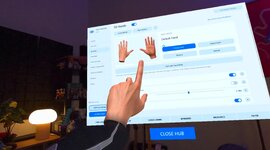
Screenshot_1.jpg

You can now browse available hands, pick your favorites, and import them.

New default hand textures


Cleaner and more refined! The old textures are still available too.

Smart occlusion


A flexible feature that helps prevent hands from disappearing too soon when they come into contact with a character. You can push your hands deeper into the character’s body while still keeping them visible.
Need your feedback to see how good it feels.

Smooth person mask


My favorite feature in this update!

Smoother, customizable transitions around the character’s mask make the whole experience feel much more natural and satisfying.

Built-in room builder and room calibration plugins

These were missing from the previous update and are now included!

Improved hand physics

Hand physics got an upgrade too.

Enjoy the update, share your feedback, and let me know if anything isn’t working as expected <3

Sleepy-eyed mascot meltdown.png
Added Fingers adjustment

Now both hand mask and 3d hands have independent finger size settings.
Also added a button to sync created mask with 3d hands and vice versa.


Tip:

- Make the hand mask slightly tighter than your actual hands and soften it with feather to better prevent holes from appearing in the character during movement.
- For the 3D hands, however, try to replicate your own hands as accurately as possible.

Security Scan Update
The updated TrueThrough 0.23.4 package passed a local Microsoft Defender Antivirus scan with no threats detected. The rebuilt installer also received a “No Threat Detected” verdict from Filescan.io.

Two included files — openvr_api.dll and TrueThroughTestRoom.exe — still receive warnings from Filescan. Their exact hashes, analysis reports and relevant OpenXR source-code explanation have been submitted to Filescan support for manual review.
The review is pending. These warnings have not yet been officially confirmed as false positives.

03-Filescan-DLL-Review-Requested.jpg02-Filescan-Installer-No-Threat.jpg

Installation​

  1. Download the TrueThrough ZIP archive.
  2. Extract the entire archive into a normal folder. Do not run Setup directly from inside the ZIP.
  3. Keep TrueThrough-Setup-0.23.4.exe and TrueThrough-Package.zip together. Do not extract the inner TrueThrough-Package.zip.
  4. Save your scene and close VaM and TrueThrough Test Room.
  5. Run TrueThrough-Setup-0.23.4.exe.
  6. Select your game’s VaM.exe, then click Install / Update.
  7. Connect your headset through Meta Horizon Link PC VR, with Meta set as the active OpenXR runtime and hand tracking enabled.
  8. Open the TrueThrough Hub to configure your settings, launch Test Room, or start VaM.

CPU Performance Patch v2.0 changes Assembly-CSharp.dll, so True Through installer was refusing to install. Fixed.​

Fixed instalation to work with latest VaM version 1.22.0.13.
Back
Top Bottom