


Contains executable files or external scripts. Ensure you trust the creator and apply your own security measures.
TrueThrough - Real Passthrough & Hand Tracking for VaM
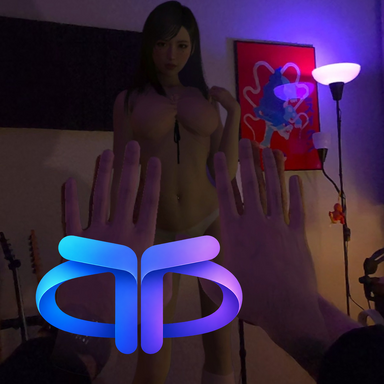
Bring your real space into VaM with true transparency, tracked hands and a dedicated control hub.
See your room, use your hands and adjust how they appear all without chromakey.
Included features
Use "TrueThroughClothingAlpha" character plugin to create a clothing alpha:
Use "TrueThroughProxyShadow" plugin on cubes to create a shadow catcher:
Requirements
The installer includes the required plugins, default hand textures, desktop shortcuts and a Restore VaM option to return managed files to their pre-installation state.
Installation:
1. Run the exe file,
2. Select your VaM.exe
3. Install
Turn off "Show Skybox"


Room Calibration plugin
Included in archive
I created this plugin to align a virtual room with a real-world space as quickly as possible.
Make sure you add this plugin to your empty atom named RoomRoot!
All the lights, walls, character should be parented to the RoomRoot also.
Before starting, set the character height to 0 (no offset for the height).
1. First, create a reference: select three points in the room that are sufficiently far apart from one another. Place your controller at each point, one by one, and capture the position.
2. Once the reference is created, save both the reference and the scene.
3. For future calibration, activate the calibration mode. Place the controller at the corresponding points—following the same order used during the initial reference creation—and capture each position. After the third point, provided everything was done correctly, the room will be reconstructed exactly as it was when the reference was created.
Ensure that simultaneous data input from multiple sources (hands and controllers) is not enabled, as the plugin may switch between them.
Room builder plugin
Included in archive
The fastest method to create walls and floors for recreating a room for True Through.
Created walls and floors automatically recieves True Through proxy shadow plugin.
Make sure adding this plugin to the empty atom named RoomRoot!
Video guide:
I have many more cool things in the works for this project, but for now, I look forward to your feedback on the current features - enjoy!
Bring your real space into VaM with true transparency, tracked hands and a dedicated control hub.
See your room, use your hands and adjust how they appear all without chromakey.
Included features
- True passthrough transparency
Blend VaM with your real surroundings using alpha transparency. No green screen or colour keying required. - Hand Mask
Reveal your real hands through a tracked mask with adjustable size, global thickness and edge softness. - Textured 3D Hands
Switch to virtual hands with the included default material, adjustable size and a smooth wrist fade. Scene lighting support helps them match your VaM scene. - Full Tracking hand collisions
Interact with supported scene colliders using the Full Tracking physics mode. - Hand gestures and mixed input
Configure pinch and grab gestures, enable either hand and use hands alongside controllers. - Proxy Shadow
Add shadow receivers to manually positioned scene geometry, helping virtual shadows blend with your real space. Shadow-receiving geometry must be created and positioned manually in VaM. - Clothing Alpha support
Control clothing transparency through the included plugin. - Standalone Test Room
Adjust your hand visuals before launching VaM. Access the hub inside Test Room or use the desktop interface.
Use "TrueThroughClothingAlpha" character plugin to create a clothing alpha:
Use "TrueThroughProxyShadow" plugin on cubes to create a shadow catcher:
Requirements
- Windows x64
- A compatible Meta Quest headset connected through Meta Link PC VR
- Meta OpenXR runtime and hand tracking enabled
The installer includes the required plugins, default hand textures, desktop shortcuts and a Restore VaM option to return managed files to their pre-installation state.
Installation:
1. Run the exe file,
2. Select your VaM.exe
3. Install
Turn off "Show Skybox"
Room Calibration plugin
Included in archive
I created this plugin to align a virtual room with a real-world space as quickly as possible.
Make sure you add this plugin to your empty atom named RoomRoot!
All the lights, walls, character should be parented to the RoomRoot also.
Before starting, set the character height to 0 (no offset for the height).
1. First, create a reference: select three points in the room that are sufficiently far apart from one another. Place your controller at each point, one by one, and capture the position.
2. Once the reference is created, save both the reference and the scene.
3. For future calibration, activate the calibration mode. Place the controller at the corresponding points—following the same order used during the initial reference creation—and capture each position. After the third point, provided everything was done correctly, the room will be reconstructed exactly as it was when the reference was created.
Ensure that simultaneous data input from multiple sources (hands and controllers) is not enabled, as the plugin may switch between them.
Room builder plugin
Included in archive
The fastest method to create walls and floors for recreating a room for True Through.
Created walls and floors automatically recieves True Through proxy shadow plugin.
Make sure adding this plugin to the empty atom named RoomRoot!
Video guide:
I have many more cool things in the works for this project, but for now, I look forward to your feedback on the current features - enjoy!
Contains executable files or external scripts. Ensure you trust the creator and apply your own security measures.

