




Overview
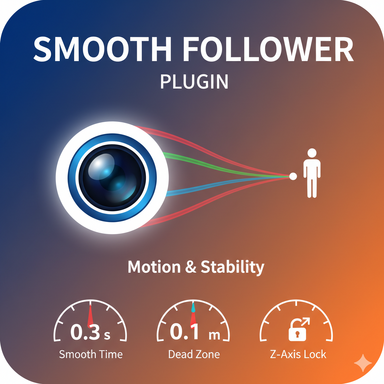
This plugin provides the ability for the object it's attached to, to smoothly follow a specific target (e.g., a character's head, a moving prop). It is designed to achieve natural and stable camera work, similar to that of a professional camera operator.
Main Features
Flexible Target Selection: You can select any Atom in the scene and a specific Node (Rigidbody) within it as the follow target. The Atom selection list dynamically updates every time it's opened, ensuring it's always up-to-date.
Detailed Follow Control: In addition to a master On/Off toggle for the plugin, you can individually enable or disable following for the X, Y, and Z axes. It also features a unique function where disabling Z-axis follow locks the object's position at its current Z-coordinate.
Advanced Smoothing Controls:
Smooth Time: Sets the approximate time in seconds it will take for the camera to catch up to the target. This allows you to intuitively adjust the "weight" and "fluidity" of the camera's movement. Note: A smaller value results in faster, more responsive movement.
Dead Zone: Establishes a threshold or "play area" where the camera will not move if the target is within this range. This prevents camera shake caused by minor target vibrations, allowing it to remain perfectly still.
Easy Offset Management: Finely adjust the relative distance from the target using XYZ sliders. The "Set Current Offset" button allows you to instantly set the current relative position as the new offset with a single click.
Basic Usage
1.Add this plugin to the object you want to move (the follower).
2.From the UI, select the Target Atom and Target Node you wish to follow.
3.Toggle "FOLLOW ENABLED" to On.
4.Adjust the Smooth Time and Dead Zone to your preference to define the camera's behavior.
5.If needed, use the "Set Current Offset" button to set the follower to maintain its current distance from the target.

This plugin provides the ability for the object it's attached to, to smoothly follow a specific target (e.g., a character's head, a moving prop). It is designed to achieve natural and stable camera work, similar to that of a professional camera operator.
Main Features
Flexible Target Selection: You can select any Atom in the scene and a specific Node (Rigidbody) within it as the follow target. The Atom selection list dynamically updates every time it's opened, ensuring it's always up-to-date.
Detailed Follow Control: In addition to a master On/Off toggle for the plugin, you can individually enable or disable following for the X, Y, and Z axes. It also features a unique function where disabling Z-axis follow locks the object's position at its current Z-coordinate.
Advanced Smoothing Controls:
Smooth Time: Sets the approximate time in seconds it will take for the camera to catch up to the target. This allows you to intuitively adjust the "weight" and "fluidity" of the camera's movement. Note: A smaller value results in faster, more responsive movement.
Dead Zone: Establishes a threshold or "play area" where the camera will not move if the target is within this range. This prevents camera shake caused by minor target vibrations, allowing it to remain perfectly still.
Easy Offset Management: Finely adjust the relative distance from the target using XYZ sliders. The "Set Current Offset" button allows you to instantly set the current relative position as the new offset with a single click.
Basic Usage
1.Add this plugin to the object you want to move (the follower).
2.From the UI, select the Target Atom and Target Node you wish to follow.
3.Toggle "FOLLOW ENABLED" to On.
4.Adjust the Smooth Time and Dead Zone to your preference to define the camera's behavior.
5.If needed, use the "Set Current Offset" button to set the follower to maintain its current distance from the target.


