


Contains browser scripts that run outside VaM. Ensure you trust the creator and apply your own security measures.
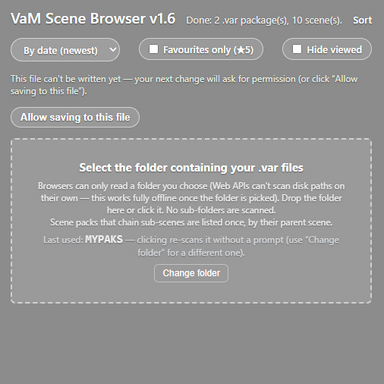
Self contained (vibe coded) html file that scans a directory for any VAR files and lists a preview and description. It also has a rating and viewed toggle to help keep track of things.
1. Click on "Allow saving to file" and select the HTM file. The settings are also saved to the browser cache but would be lost if the cache is cleared.
2. Then just select the folder containing the VAR files.
It's worth noting that it does not scan sub directories. I find it simpler to have separate sub folders for looks or creators and select those as needed.
NOTE:
The ratings and viewed settings are saved in the HTM file including the VAR names. If you share the file with others you may unknowingly share these details. These references can be removed under the [ratings] and [viewed] sections at the end of the file.
License: FC
1. Click on "Allow saving to file" and select the HTM file. The settings are also saved to the browser cache but would be lost if the cache is cleared.
2. Then just select the folder containing the VAR files.
It's worth noting that it does not scan sub directories. I find it simpler to have separate sub folders for looks or creators and select those as needed.
NOTE:
The ratings and viewed settings are saved in the HTM file including the VAR names. If you share the file with others you may unknowingly share these details. These references can be removed under the [ratings] and [viewed] sections at the end of the file.
License: FC
Contains browser scripts that run outside VaM. Ensure you trust the creator and apply your own security measures.