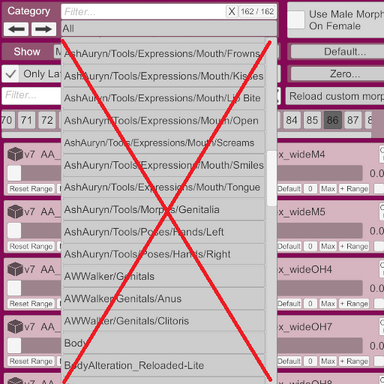


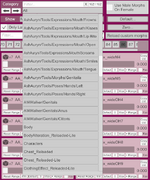
This is a tool for browsing, filtering, and adjusting morphs on a Person atom. It accompanies the default Morphs Tab with a compact array and adds multi-criteria filtering.
Can override existing morph classification system to bring some Order.


UI Overview
UI Interaction tips:
- **Hover** any control to see a tooltip at the bottom of the UI including some extended morph info.
- **Right-click** a popup chooser or a text input to reset it to `All` / empty string.
- **Shift+Scroll** on a slider → coarse adjustment; **Alt+Scroll** → fine (×0.1) adjustment.
- **Right-click** on a slider → reset its value to 0.
- **Shift-click** on a slider → mark it as selected for drag-and-drop.
*Last Touched Morph*
A morph becomes the *last touched* when you change its value or Left-clicked it. If the last touched morph survives a filter change, the view jumps to the page containing it.
## Morph Banks
The banks list is a set of morph lists shown in the lower part of the UI. The first bank, **all**, always holds the whole morph set (the current filter result); the banks after it are your own lists. Only one bank is shown at a time — clicking a bank row switches the sliders to it. A bank with unsaved changes in composition (not values) is highlighted.
Morphs are added to a bank by **dragging a slider onto its row** (dragging a multi-selection (shift-click) adds the whole group). Banks live in memory until you save them explicitly.
When saving a bank the current morph values are written and the other .vap content is preserved.
> The **all** bank reflects the current filters and cannot be edited — it has no own file and is rebuilt on every filter/cache change.
MorphCache — How Filters Work
At startup (and after `Cache` or `Alter`) the plugin builds three dictionaries that map categories to the full morph list. When the filter is active with **Include Children**, any key that starts with the chosen path + `"/"` is included. With **Inverse**, all keys *except* the matched ones are included.
The cache built based on internal DAZMorph data:
GuessCreator logic examples
A creator root (the part before the first `/`, e.g. `"AshAuryn"`) is always present in the Creator list. It is a shortcut for all subcategories of that author: picking a root enables **C (Include Children)** automatically (not visible in UI), so `"AshAuryn"` selects every morph of that author. The root itself stores no morphs of its own — the selection is always built from its subcategories.
Flag Filter Syntax
The flag string is a sequence of single-character flags. Each flag either **requires** the property to be true (no prefix) or **forbids** it (`!` prefix).
This brings functionality similar to "Show" filter in the standard Morph Tab.
Flags table:
Examples
`a` Only morphs that are currently active
`!g` Only morphs that are NOT in a package (built-in)
`f` Only morphs marked as favorite
`a!gf` Morphs that are active **AND** not in a package **AND** favorite
`!pf` Morphs that are NOT pose controls **AND** are favorite
`!d` Only morphs that are NOT driven
Characters not in `apftrgd` are ignored, so you can use punctuation for readability (e.g. `"a,!g,f"` is equivalent to `"a!gf"`).
Regex Filter
The regex is matched against `DAZMorph.resolvedDisplayName` with `RegexOptions.IgnoreCase`.
Tools
Update All To Latest — replaces every outdated morph version in the open banks with its newest version (the morph value is carried over).
Cache Only Latest (toggle) — hides older versions of morphs from all banks and filters: only the newest version of each morph is kept.
The Zero... and Default... popups are the same commands as in VaM's standard morph tab (zero / reset to default), applied to the plugin's morph list instead. "Shown" acts only on the currently displayed morphs, the other commands on the whole set.
The `Alter` Button
Loads `Saves/PluginData/MorphHelper/replace.json` (a JSON array of objects).
Each object may contain (similar to any Morph Preset *.vap):
Lookup prefers `uid`; falls back to `name`. The matched morph gets `overrideRegion` and `group` reassigned, then the cache is rebuilt. After `Alter`, all choosers are updated and the filter is re-applied.
Example file:
Save morphs list
Writes every morph known to the plugin into `Saves/PluginData/MorphHelper/MorphsAll.json`.
Important caveats:
- The morph list is **highly user-dependent**. It reflects exactly which packages and community content are installed on your machine. Two users will almost certainly see different lists.
- Some morphs are marked with `"preloadMorphs" : "false"` in their package metadata. VaM loads such morphs **on demand**: they are activated only when actually requested (e.g. by a scene, preset or plugin), and stay inactive otherwise. This is VaM's normal behavior — the plugin merely follows it, so these morphs will **not appear** in the list until they have been activated at least once in the current session. Opening a `.vap` that contains such a morph via the plugin's bank `Open`/`Reload` requests it from VaM right away, so it shows up immediately. If you don't see a morph you expect, it simply has not been requested yet — loading a scene or preset that uses it will bring it in. Some plugins (ShakeIt for example) have their own morphs that are not exported but can still be saved into a `.vap` by the plugin itself.
Typical workflow to alter your categories:
1. Press **Save morphs list** — produces `MorphsAll.json`.
2. Use an external tool (editor, script, diff tool) to examine the JSON and create a `replace.json` with the morphs whose region/group you want to reassign.
3. Press **Alter** — the changes are applied and the cache is rebuilt.
The `MorphsAll.json` file is purely informational; Alter reads only `replace.json`. This two-file design lets you inspect the full morph database offline and craft batch edits without trial-and-error in VaM.
Why I do this?
The standard interface offers several filtering options. These include categories, morph type, and filtering by name. Currently, the "categories" are cluttered with junk and aren't helpful for filtering.
Why is this? I think it's because there's no filtering by morph creator (which, by the way, is available in the clothing selection), so authors try to compensate for this (and each in their own way): they include their name in the morph title or category. If you look inside the morph system, you'll see the following information, compiled from .vmi files provided by morph authors: region, group, isPoseControl. The author's name itself isn't listed. However, it can be extracted from the package name and/or the morph path as they should follow some rules. Potentially with three such filters, you can quickly find the desired morph if the data is properly filled in. So, if all authors suddenly update their morph packages, in which the region and group are selected from some relatively fixed set according to a uniform principle, and the file paths are selected for controlled extraction of the author's name, then the problem is solved! Clearly, this won't happen. Then all that remains is to replace the regions and groups for all/some morphs in the current session without changing the .vmi files (changing .vmi file is not a good option). This script provides such tools: you can export all the information about your morphs, create a replacement list, and import these replacements. I asked some AI tool to create a Python script for creating the replacements, but the moderators forbid sharing it. I (and you too!) can only share the resulting replacement file.
The script categorizes morphs into the following regions.
Regions:
Groups are an important classification that is currently largely unused. Currently, morphs essentially have only two groups, defined by isPoseControl flag, and this flag is used to select morphs for saving in different preset file types. I propose using it to assign morph handling method. The internal mechanics of other scripts can and should be guided by these values, so it's important to adhere to a unified principle, which I hope you can help me formulate. For example, scripts such BootyMagic, ShakeIt have dozens of active morphs that don't need to be saved to a pose preset. These morphs can be assigned a group that will be ignored when saving a pose.
Groups:
Can override existing morph classification system to bring some Order.
UI Overview
| Control | Description |
| Group / Creator / Region popup | Drop-down with `All` default. Each has two toggles: **C** (include Children subcategories) and **I** (Invert the selection) |
| Filter Flags | Enter a flag string to require or forbid morph properties |
| Regex Match | Filter morphs whose display name matches a .NET regex |
| `<` `>` buttons | Scroll the morph slider bank backward/forward by one page |
| Page slider | Horizontal slider — jump directly to any page of the current filter result |
| min / range- / default / range+ / max / snap 0.1 | Per-morph value actions on the *last touched* slider |
| Morph sliders | 4×3 grid of custom sliders; each displays the morph name and current value |
| Save morphs list | Dumps every known morph into `Saves/PluginData/MorphHelper/MorphsAll.json` |
| Log last morph | Prints *last touched* morph information |
| Alter | Batch-reassign region/group from `Saves/PluginData/MorphHelper/replace.json` |
| Cache | Rebuild the internal MorphCache (useful after externally adding/removing morphs) |
| Reload Custom Morphs | As builtin feature |
| Enable Other Gender Morphs | As builtin Use Female/Male Morphs on Male/Female depending on the current character gender selection (morphs are appended) |
UI Interaction tips:
- **Hover** any control to see a tooltip at the bottom of the UI including some extended morph info.
- **Right-click** a popup chooser or a text input to reset it to `All` / empty string.
- **Shift+Scroll** on a slider → coarse adjustment; **Alt+Scroll** → fine (×0.1) adjustment.
- **Right-click** on a slider → reset its value to 0.
- **Shift-click** on a slider → mark it as selected for drag-and-drop.
*Last Touched Morph*
A morph becomes the *last touched* when you change its value or Left-clicked it. If the last touched morph survives a filter change, the view jumps to the page containing it.
## Morph Banks
The banks list is a set of morph lists shown in the lower part of the UI. The first bank, **all**, always holds the whole morph set (the current filter result); the banks after it are your own lists. Only one bank is shown at a time — clicking a bank row switches the sliders to it. A bank with unsaved changes in composition (not values) is highlighted.
Morphs are added to a bank by **dragging a slider onto its row** (dragging a multi-selection (shift-click) adds the whole group). Banks live in memory until you save them explicitly.
| Button | Action |
| Open | Opens a `.vap` preset and adds its morphs as a new bank (or updates the bank already opened from the same file). |
| Save | Saves the selected bank to its own `.vap` file. |
| Save As | Saves the selected bank to a new `.vap` file (asks for a name). |
| Reload | Re-reads the selected bank from its file on disk. |
| *Create | Creates a new empty bank. If morphs are dropped onto it, creates a bank filled with the dropped selection. |
| *Delete | Deletes the selected bank. If morphs are dropped onto it, removes them from the current bank instead. |
| Apply Values | Applies the morph values stored in the current bank's `.vap` file to the character. Morphs not in the bank (deleted/missing) are skipped; morphs added manually are left untouched. |
| Reset Values | Resets every morph of the current bank to its default value. |
When saving a bank the current morph values are written and the other .vap content is preserved.
> The **all** bank reflects the current filters and cannot be edited — it has no own file and is rebuilt on every filter/cache change.
MorphCache — How Filters Work
At startup (and after `Cache` or `Alter`) the plugin builds three dictionaries that map categories to the full morph list. When the filter is active with **Include Children**, any key that starts with the chosen path + `"/"` is included. With **Inverse**, all keys *except* the matched ones are included.
The cache built based on internal DAZMorph data:
region filter = DAZMorph.resolvedRegionName (same as Category in the standard Morph Tab),group filter = DAZMorph.group (absent in the standard Morph Tab),creator filter = GuessCreator() my routine for creator identification as this information is not provided internally.GuessCreator logic examples
Code:
DAZMorph.isRuntime == false       → "BuiltIn"
DAZMorph.isInPackage == false: extraction from DAZMorph.uid:
  ex1:
    "Custom/Atom/Person/Morphs/female/kemenate/f_lashes_separate.vmi" → "kemenate"
  ex2:
    "Custom/Atom/Person/Morphs/female/AUTO/Hip Width2.vmi" → "N/A"
DAZMorph.isInPackage == true
  from DAZMorph.packageUid:
    "AshAuryn.Pose_Tools.5.var" → "AshAuryn/Pose_Tools"
  ** now disabled **
  from DAZMorph.uid :
    "AshAuryn.Pose_Tools.5.var:/Custom/Atom/Person/Morphs/female/AshAuryn/Pose Tools/Smiles/AA_basicsquint4.vmi" → "AshAuryn/Pose Tools/Smiles"
  The result is which is longer: "AshAuryn/Pose Tools/Smiles"
  ** now disabled as it makes more mess, example:
  AWWalker.AWW_GenMorphResources.9:/Custom/Atom/Person/Morphs/female_genitalia/data/3feetwolf/New Genitalia For Victoria 6/Genitalia-default/Morphs/AWWALKER/AWW_Legacy/ab_gen_close.vmi" →
  "data/3feetwolf/New Genitalia For Victoria 6/Genitalia-default/Morphs/AWWALKER/AWW_Legacy" and there are much of them**
A creator root (the part before the first `/`, e.g. `"AshAuryn"`) is always present in the Creator list. It is a shortcut for all subcategories of that author: picking a root enables **C (Include Children)** automatically (not visible in UI), so `"AshAuryn"` selects every morph of that author. The root itself stores no morphs of its own — the selection is always built from its subcategories.
Flag Filter Syntax
The flag string is a sequence of single-character flags. Each flag either **requires** the property to be true (no prefix) or **forbids** it (`!` prefix).
This brings functionality similar to "Show" filter in the standard Morph Tab.
Flags table:
| Char | DAZMorph Property |
| a | active |
| p | isPoseControl |
| f | favorite |
| t | isTransient |
| r | isRuntime |
| g | isInPackage |
| d | isDriven |
| l | isLatestVersion |
| u | unloaded: `morph.isDemandLoaded && !morph.isDemandActivated` |
| o | Other gender morph, no DAZMorph representation |
`a` Only morphs that are currently active
`!g` Only morphs that are NOT in a package (built-in)
`f` Only morphs marked as favorite
`a!gf` Morphs that are active **AND** not in a package **AND** favorite
`!pf` Morphs that are NOT pose controls **AND** are favorite
`!d` Only morphs that are NOT driven
Characters not in `apftrgd` are ignored, so you can use punctuation for readability (e.g. `"a,!g,f"` is equivalent to `"a!gf"`).
Regex Filter
The regex is matched against `DAZMorph.resolvedDisplayName` with `RegexOptions.IgnoreCase`.
Tools
Update All To Latest — replaces every outdated morph version in the open banks with its newest version (the morph value is carried over).
Cache Only Latest (toggle) — hides older versions of morphs from all banks and filters: only the newest version of each morph is kept.
The Zero... and Default... popups are the same commands as in VaM's standard morph tab (zero / reset to default), applied to the plugin's morph list instead. "Shown" acts only on the currently displayed morphs, the other commands on the whole set.
The `Alter` Button
Loads `Saves/PluginData/MorphHelper/replace.json` (a JSON array of objects).
Each object may contain (similar to any Morph Preset *.vap):
{ "uid": "path_to_morph.vmi", "name": "Display Name", "region": "assigned region", "group": "assigned group" }Lookup prefers `uid`; falls back to `name`. The matched morph gets `overrideRegion` and `group` reassigned, then the cache is rebuilt. After `Alter`, all choosers are updated and the filter is re-applied.
Example file:
JSON:
{
  "replace": [
    { "name": "MyMorph", "region": "head/face", "group": "shape" },
    {
        "name": "Nostrils flat",
        "uid": "Spacedog.Import_Reloaded_Lite.2:/Custom/Atom/Person/Morphs/female/Nose_Reloaded-Lite/Nostrils flat.vmi",
        "region": "head/face/nose",
        "group": "shape"
    },
    {
        "name": "Thigh Front",
        "uid": "Custom/Atom/Person/Morphs/female/AUTO/Thigh Front.vmi",
        "region": "body/legs/thighs",
        "group": "shape"
    },
    {
        "name": "belly2",
        "uid": "Skynet.OrificeDynamics.30:/Custom/Atom/Person/Morphs/female/OrificeDynamics/belly2.vmi",
        "region": "body/torso/belly",
        "group": "pose/tension/dynamic"
    },
  ]
}
Save morphs list
Writes every morph known to the plugin into `Saves/PluginData/MorphHelper/MorphsAll.json`.
Code:
  ["name"] = DAZMorph.resolvedDisplayName,
  ["uid"] = DAZMorph.uid,
  ["package"] = DAZMorph.packageUid,
  ["region"] = DAZMorph.resolvedRegionName,
  ["group"] = DAZMorph.group,
  ["pose"] = DAZMorph.isPoseControl,
["creator"] = GuessCreator(morph)- The morph list is **highly user-dependent**. It reflects exactly which packages and community content are installed on your machine. Two users will almost certainly see different lists.
- Some morphs are marked with `"preloadMorphs" : "false"` in their package metadata. VaM loads such morphs **on demand**: they are activated only when actually requested (e.g. by a scene, preset or plugin), and stay inactive otherwise. This is VaM's normal behavior — the plugin merely follows it, so these morphs will **not appear** in the list until they have been activated at least once in the current session. Opening a `.vap` that contains such a morph via the plugin's bank `Open`/`Reload` requests it from VaM right away, so it shows up immediately. If you don't see a morph you expect, it simply has not been requested yet — loading a scene or preset that uses it will bring it in. Some plugins (ShakeIt for example) have their own morphs that are not exported but can still be saved into a `.vap` by the plugin itself.
Typical workflow to alter your categories:
1. Press **Save morphs list** — produces `MorphsAll.json`.
2. Use an external tool (editor, script, diff tool) to examine the JSON and create a `replace.json` with the morphs whose region/group you want to reassign.
3. Press **Alter** — the changes are applied and the cache is rebuilt.
The `MorphsAll.json` file is purely informational; Alter reads only `replace.json`. This two-file design lets you inspect the full morph database offline and craft batch edits without trial-and-error in VaM.
Why I do this?
The standard interface offers several filtering options. These include categories, morph type, and filtering by name. Currently, the "categories" are cluttered with junk and aren't helpful for filtering.
Why is this? I think it's because there's no filtering by morph creator (which, by the way, is available in the clothing selection), so authors try to compensate for this (and each in their own way): they include their name in the morph title or category. If you look inside the morph system, you'll see the following information, compiled from .vmi files provided by morph authors: region, group, isPoseControl. The author's name itself isn't listed. However, it can be extracted from the package name and/or the morph path as they should follow some rules. Potentially with three such filters, you can quickly find the desired morph if the data is properly filled in. So, if all authors suddenly update their morph packages, in which the region and group are selected from some relatively fixed set according to a uniform principle, and the file paths are selected for controlled extraction of the author's name, then the problem is solved! Clearly, this won't happen. Then all that remains is to replace the regions and groups for all/some morphs in the current session without changing the .vmi files (changing .vmi file is not a good option). This script provides such tools: you can export all the information about your morphs, create a replacement list, and import these replacements. I asked some AI tool to create a Python script for creating the replacements, but the moderators forbid sharing it. I (and you too!) can only share the resulting replacement file.
The script categorizes morphs into the following regions.
Regions:
Code:
"body",
"body/anus",
"body/genitalia",
"body/torso",
"body/torso/chest",
"body/torso/chest/breasts",
"body/torso/back",
"body/torso/belly",
"body/torso/abs",
"body/torso/waist",
"body/torso/hips",
"body/torso/pelvis",
"body/torso/butt",
"body/torso/belle",
"body/neck",
"body/arms",
"body/arms/shoulders",
"body/arms/upper",
"body/arms/forearms",
"body/arms/elbows",
"body/arms/wrists",
"body/arms/hands",
"body/legs",
"body/legs/thighs",
"body/legs/knees",
"body/legs/shins",
"body/legs/calves",
"body/legs/ankles",
"body/legs/feet",
"head",
"head/scalp",
"head/hair",
"head/ears",
"head/ears/lobe",
"head/face",
"head/face/brow",
"head/face/cheeks",
"head/face/chin",
"head/face/eyes",
"head/face/eyes/eyelids",
"head/face/eyes/eyelashes",
"head/face/jaw",
"head/face/mouth",
"head/face/mouth/lips",
"head/face/mouth/teeth",
"head/face/mouth/tongue",
"head/face/mouth/gums",
"head/face/nose",
"head/face/nostrils",
"head/face/temples",
"head/face/forehead",
"character" (for full head and body morph)Groups:
Code:
"shape",
"shape/alteration", [scars/old/young/mutant]
"shape/correction", [lashes/glasses, not pose-related]
"pose",
"pose/deform", [caused by a force]
"pose/deform/clothes",
"pose/deform/impact",
"pose/fingers", [ special for fingers bend ]
"pose/tension", [muscle tension in hold pose, BetterBends, ShakeIt]
"pose/tension/expressions", [special facial expressions ]
"pose/tension/dynamic" [muscle tension in running, BootyMagic, ShakeIt, OrificeDynamics]