



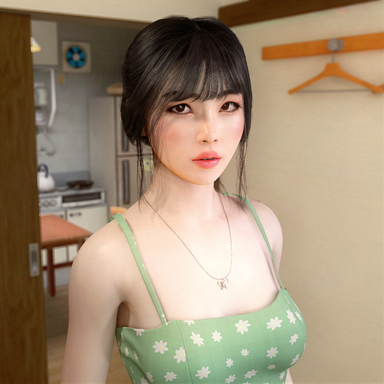


on this guide will show how you can simple take higher resolution screenshots with two methods 1 for reshade users and one for non-reshade users .
1 for reshade users
the way i do to simply increase resolution to take screenshots with reshade is to use SRWE

the way i take my screenshots is with 1:1 because it is what fits better for discord or any other place for multiple screenshots in a post and the value for megapixels on 12 but this depends on the resolution you seek comparated to your monitor .
here is the fitment process i do
starting with the default

then i select the resolution and aspect and click set on srwe after this i set on vam the camera where i want

then click on vam window and take screenshot

result from 1080p to 3448x3425

part 2 upscale inside vam
this method is for those who don't use reshade we gona use Super Shot here , all my scenes have postmagic as a base with lut even if i take screenshot with reshade for a more versatile use here i will show you the setup i use .

if you use postmagic Depth of Field don't use resolution multiplier or too high resolutions far from your monitor because it tends to force more pixels on the image resulting in a loss on this effect (bloom loses quite abit too if do the same) but if you are not using any of these effects you can safely use resolution multiplier without any con's .
here's the result of this settings

plugin's used on the scene

 hub.virtamate.com
 hub.virtamate.com
 hub.virtamate.com
 hub.virtamate.com
 hub.virtamate.com
1 for reshade users
the way i do to simply increase resolution to take screenshots with reshade is to use SRWE
the way i take my screenshots is with 1:1 because it is what fits better for discord or any other place for multiple screenshots in a post and the value for megapixels on 12 but this depends on the resolution you seek comparated to your monitor .
here is the fitment process i do
starting with the default
then i select the resolution and aspect and click set on srwe after this i set on vam the camera where i want
then click on vam window and take screenshot
result from 1080p to 3448x3425
part 2 upscale inside vam
this method is for those who don't use reshade we gona use Super Shot here , all my scenes have postmagic as a base with lut even if i take screenshot with reshade for a more versatile use here i will show you the setup i use .
if you use postmagic Depth of Field don't use resolution multiplier or too high resolutions far from your monitor because it tends to force more pixels on the image resulting in a loss on this effect (bloom loses quite abit too if do the same) but if you are not using any of these effects you can safely use resolution multiplier without any con's .
here's the result of this settings
plugin's used on the scene
Light Options - Plugins + Scripts -
Allows configuring some Unity Light options that the default UI doesn't have. The default Light UI in VAM doesn't show all of the available parameters, and some aren't fully set up. For example, the 'point bias' will affect shadowBias for point...
hub.virtamate.com
PostMagic - Plugins + Scripts -
Admin Note: This plugin is specifically made for desktop use and as stated in the description only partially works in VR. If you wish to not have this plugin loaded at all you can permanently disable it from within the "Package Manager"...
hub.virtamate.com
Eyelid Behavior Editor - Plugins + Scripts -
A small plugin that lets you customize some of VAM's built-in eyelid behaviors. Based on a request from @CuddleMocap. Usage Add to a Person Atom Sliders on the left modify blink settings and how the eyelid behaves when the model looks up or...
hub.virtamate.com
Eyelids_look - Morphs -
Morphs for plugin STOPPER EYELID-BEHAVIOR The preset is in VAR:
hub.virtamate.com
FUTA/MALE BODY SMOOTHER TESSELLETION -
OPEN FOR COMMISION WORK CONTACT DISCORD SERVER SUPPORT AT PATREON Season Plugin ver - https://hub.virtamate.com/resources/automaticbodysmoother-season-plugin.5235/ Public Release vam don't use Tessellation on male body but I found a way to...
hub.virtamate.com

![[Looks] Tess](https://1424104733.rsc.cdn77.org/data/resource_icons/64/64506.jpg?1770894601)

![[Looks] Mayara](https://1424104733.rsc.cdn77.org/data/resource_icons/64/64009.jpg?1769065657)
![[Looks] Mei](https://1424104733.rsc.cdn77.org/data/resource_icons/63/63192.jpg?1766120947)

![[Looks] Mika](https://1424104733.rsc.cdn77.org/data/resource_icons/61/61004.jpg?1758537809)
![[Looks] Lise](https://1424104733.rsc.cdn77.org/data/resource_icons/60/60718.jpg?1757664174)
![[Looks] Sasha](https://1424104733.rsc.cdn77.org/data/resource_icons/60/60438.jpg?1756779499)
![[Hair] Long Curly 4](https://1424104733.rsc.cdn77.org/data/resource_icons/60/60370.jpg?1756588096)
