

You are using an out of date browser. It may not display this or other websites correctly.
You should upgrade or use an alternative browser.
You should upgrade or use an alternative browser.
Paid Plugins + Scripts RandomCycleAnimator PLUS (Paid Contents)
- Author Crimeless
- Creation date
-
- Tags
- paid content plugin random
- PC
“The Magnetic Field Update”

RCAPLUS V4 is now released.
This update adds the new Magnetic Field feature.
It is designed to reduce the issue where controllers gradually drift away from their original positions due to random Force motion.
In previous versions, if random Force continued to be applied in certain directions, controllers could slowly move away from their initial positions over time.
V4 adds a soft return force that gently guides targets back around their captured Home Position, while preserving the natural random motion that RCAPLUS is designed for.
New Features
1) Magnetic Field
A new Magnetic Field feature has been added.
This feature records the current position of each selected target as its Home Position, then gently pulls the target back when it moves too far away.
This is not a hard lock, and it does not directly correct the target’s position.
Targets still move freely with the existing random Force behavior, but when they drift beyond the configured range, an additional return Force is applied.
Main Controls
Use Magnetic Field
Turns the entire Magnetic Field feature ON / OFF.
When this is OFF, RCAPLUS uses only the existing Force / Torque / Morph behavior, and no Magnetic Field return force is applied.
Capture Home Position
Records the current target positions as their Home Position.
Magnetic Field uses this position as the reference point, so press this button after placing the targets in the desired base position.
Affect Force Targets
Controls whether Magnetic Field affects normal Force targets.
When enabled, the normal controllers selected in RCA will receive return Force when they move too far away from their Home Position.
Affect Toe Targets
Controls whether Magnetic Field affects Toe targets.
When enabled, toe / small toe controllers can also receive return Force, making it easier to reduce drift around small foot controls.
Dead Radius
The free movement area around the Home Position.
Targets inside this radius will not receive return Force, allowing the random motion to remain natural and not feel overly constrained.
Field Radius
The outer range where Magnetic Field becomes fully effective.
After a target moves beyond the Dead Radius, the return force becomes stronger as it approaches the Field Radius, helping prevent continuous drifting.
Strength
Controls how strongly the target is pulled back toward the Home Position.
Higher values create a stronger return force, but if set too high, the motion may feel heavier or less natural.
Damping
Controls how much outward movement is reduced.
Instead of only pulling the target back, Damping also helps reduce the momentum of targets moving farther away from the Home Position, making overshooting and excessive oscillation easier to control.
Max Force
Limits the maximum return force applied by Magnetic Field.
Even if the target is far away or Strength is high, this value caps the force to help prevent unstable physics behavior.
The V4 Magnetic Field uses a Home Position based system.
When you press Capture Home Position, RCAPLUS records the current positions of the active Force / Toe targets.
After that, when a target moves away from its Home Position, an additional Force is applied to guide it back.
This helps reduce unwanted long-term drifting while preserving the random and organic motion.
Magnetic Visualization
A visualization feature has been added for Magnetic Field.
When Show Magnetic Visualization is enabled, you can see the captured magnetic area directly in the scene.
The visualization includes:
This makes it easier to understand how Magnetic Field is affecting each target.
- Home Position markers
- Dead Radius range
- Field Radius range
- Arrows showing the direction / strength of the magnetic return Force
2) Toe Target Support
I added toe targets (left / right) to Select Target.
These are special targets that normally do not function as standard Force Receivers, so they required a somewhat different implementation.
Because of this, their behavior is also slightly different from normal targets. Please keep the following points in mind:
- Do not set Torque values too high, especially on the X Axis
Toe targets can twist easily when Torque is applied. Much smaller values are recommended compared to other targets.- It is recommended to set Foot control to OFF or Comply
Toe targets alone are mostly controlled by the Foot control, so they may barely move if the Foot control is too restrictive.- For Magnet, enable “Affect Toe Targets”
Toe target support is implemented through a different route, so this option must be enabled for Magnetic Field to affect them.🛠 Improvements
- Cleaned up unused functions and classes
Notes / Behavior
RCAPLUS V4 is designed to make long scenes easier to control, especially when using Force-based random motion on multiple controllers.
- Magnetic Field only works when Use Magnetic Field is ON
- Magnetic Field affects positional movement only; it does not add Magnetic Torque
- Magnetic Field is only an additional control layer for the existing cycle animation / Force animation. If you want to avoid overly large movement, it is recommended to first adjust the Force or Cycle values directly, then use Magnetic Field afterward
- If targets are changed, removed, or reloaded, it is recommended to capture the Home Position again
RCAPLUS will continue to improve.
If you have any feature requests, feel free to leave a comment!
— Thank you for using RCAPLUS and for your support!
“The Trigger Update”
RCAPLUS V3 is now released.
This update focuses on a new Slot system for instantly switching between multiple configurations, along with external trigger support — “The Trigger Update”.
See it in action in the video below.
(Sorry as always for the low video resolution. I like using Imgur because it’s lightweight to view and easy to upload, but if you have any recommended video upload sites, I’d love to know.)
1) Slot System (Multiple Preset States)

You can now save your current settings into slots and switch instantly without going through preset loading.
2) Add / Remove Slots
- After adjusting parameters, click “Save Slot” to store the state, or “Delete Slot” to clear it
- If you load a preset while a slot is selected, the preset data will be fully applied into that slot
- Slot labels change color: Green = saved manually, Blue = created via preset load
The default number of slots is 3. You can increase or decrease the slot count from the UI, up to 20 slots.
3) Slot Blend (Added to the “Misc” page)
- Removing a slot that contains data will show a confirmation dialog to prevent accidental deletion
- Enable “Skip remove slot confirmation” to bypass the confirmation
Slot Blend smooths the transition when switching slots by interpolating Force / Torque / Morph changes over a Blend Time, reducing abrupt jumps.
4) External Trigger Support for Slots
Slot switching now supports external triggers.
By selecting “Slot Popup” as the Receiver Target, you can specify which slot selector should be controlled.
- Examples: UIButton, Timeline plugins, etc.
Improvements
- Improved preset loading safety / compatibility
Fixed an issue where preset saving could behave incorrectly under certain conditions- Other minor bug fixes
RCAPLUS will continue to evolve. If you have any feature requests, feel free to leave a comment!
- Slot Blend is active only when “Use Slot Blend” is ON and “Blend Time > 0”
- The maximum Blend Time is fixed at 10 seconds
RCAPLUS V2 Release Notes
RCAPLUS V2 is now released.
This major update focuses on a full UI system overhaul, official Morph feature integration, and improved preset loading stability.

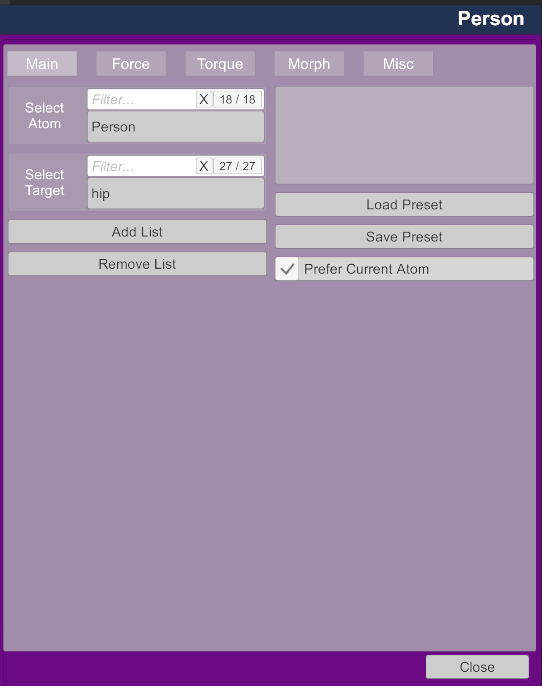
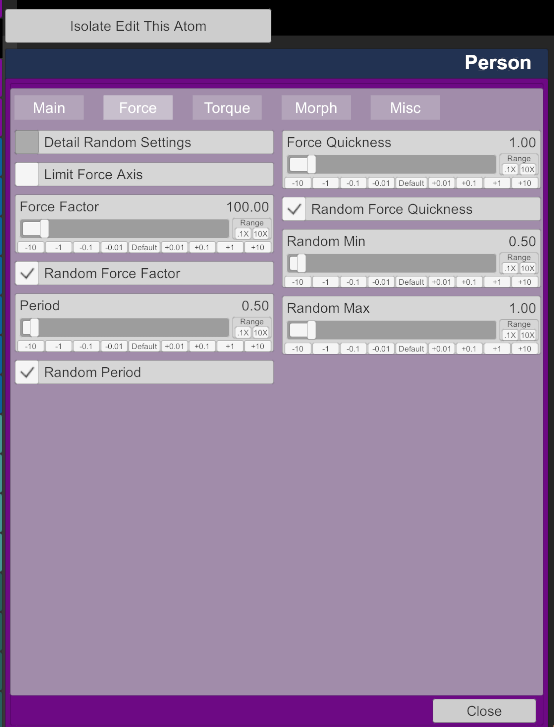
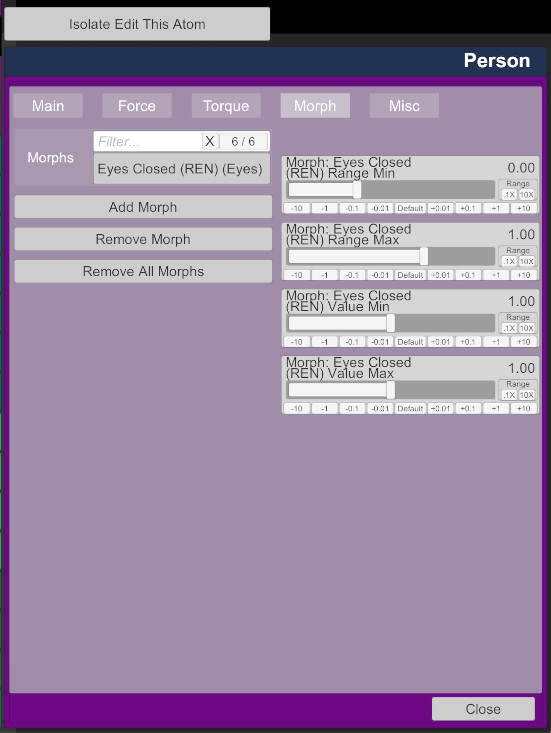
新着情報
1) Major UI Redesign (Multi-page Layout)
The UI has been redesigned into a multi-page structure (Main / Force / Torque / Morph / Misc).
This greatly improves usability, and because fewer UI elements are displayed per page, it also reduces UI overhead and indirectly improves performance.
- No impact on existing features
- Compatible with older presets
- If anything feels unstable, I recommend re-saving your presets on the latest version
Check out the video below for a quick demo.
2) Morph Feature: Official Implementation
The Morph feature is no longer shown as “Beta”. It now has its own dedicated page and is enabled by default.
I also expanded the situations where Morph values are fully reset:
3) Preset Loading Fix (Multi-Atom Scenes)
- On removal
- On plugin reload
- When loading a preset (NEW)
Fixed an issue where preset loading could fail under certain conditions, such as scenes with multiple atoms.
Added a new toggle: “Prefer Current Atom”
- ON: Prioritizes the containingAtom (the atom the plugin is currently on)
- OFF: Prioritizes the previously selected atom before loading
Technical Notes
RCAPLUS will continue to evolve. If you have feature requests, feel free to leave a comment!
- Split RCA_UIManager.cs into the UISystem folder (partial classes)
- Created a new .cslist and updated references
- Refactored the UI while keeping performance impact minimal
— Thank you for using RCAPLUS and for your support!