• Hi Guest!

    We are extremely excited to announce the release of our first Beta1.1 and the first release of our Public AddonKit!
    To participate in the Beta, a subscription to the Entertainer or Creator Tier is required. For access to the Public AddonKit you must be a Creator tier member. Once subscribed, download instructions can be found here.

    Click here for information and guides regarding the VaM2 beta. Join our Discord server for more announcements and community discussion about VaM2.
  • Hi Guest!

    VaM2 Resource Categories have now been added to the Hub! For information on posting VaM2 resources and details about VaM2 related changes to our Community Forums, please see our official announcement here.
Features
  • Virtual categories
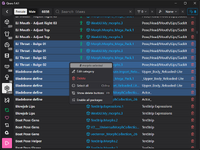
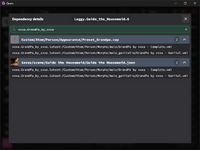
    Screenshot_Virtual_Categories.png
    Create a virtual category that points to any other location on your system where you keep packages to make Qvaro aware of them.
    Virtual categories are only seen by Qvaro and packages in them will not be loaded in VaM.
    This is useful for people who use tools like Var Browser to speed up VaM loading, that puts packages in different directories.
  • Simplified disabling & enabling workflow
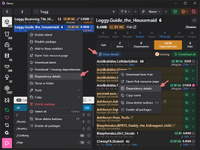
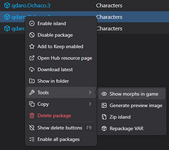
    Screenshot 2025-11-20 165714.jpg

    Isolate island buttons are gone. Now you have a dedicated top bar button to disable all packages (excluding keep enabled lists), after which you can start clicking on Enable island buttons which now show up only on disabled packages. Less clutter, and you won't accidentally click on Isolate island button ever again.
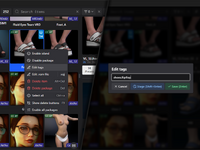
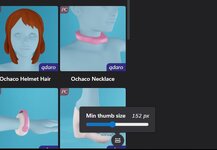
  • Added UI to change thumbnail sizes
    It's a small button in the lower right corner of any section with thumbnails.
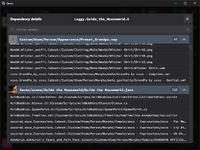
    Screenshot 2025-11-20 165615.jpg
  • Added is:keepenabled search filter
  • You can now extract individual files from a package by right clicking them in package's Files tab
  • Editing text files in your preferred editor now also works for files inside packages
    To open a file in a custom editor, configure the Editor command in settings, and right click the file in package's Files tab.
  • Various small UI tweaks and fixes
Fixes
  • Enabling islands from item's context menu wasn't enabling dependencies.
  • Satisfied package dependencies weren't being recognized when casing of package's filename didn't match casing of dependency as defined in dependent package's `meta.json`.
Features
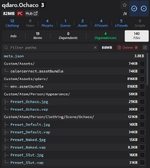
  • Improved package files browser to enhance readability.
    improved_file_browser.png
  • Automatic broken chinese VARs detection and fixing tool.
    Chinese VARs are sometimes packaged with wrong encoding that breaks VAM's package loader. Fixing tool will convert them to UTF8 and repackage them.
    If you already have broken chinese VARs in your catalog, you need to Rebuild it for them to get detected.
    Right click the "Update catalog" button and select "Rebuild catalog".
  • VAR editing priority option in settings.
    You can use it to tell Qvaro to prioritize smaller file size when editing VARs at the expense of slower edits. More about this in Help section.
  • Packages now have "Repackage" buttons in their context menus.
    If you've changed the above mentioned "VAR editing priority" option to size, you can use the `is:modified` filter to display only VARs previously modified by Qvaro, select them all, and repackage them to make them smaller.
    The savings are small, but some people complained their packages got slightly bigger when edited by Qvaro, so here's a remedy.
  • Small UI tweaks and fixes.
Fixes
  • Creating subcategories when renaming a category didn't work.
Automatic Items Deduplicator

qvaro_deduplicator.png


It deduplicates items automatically, but you first must put all of your clothing & hairs into a category separate from scenes, looks, and other VARs, otherwise Qvaro just doesn't have a way to tell which package should be the carrying one. There's an info section right above it describing everything about how it works.

Improved search UI

qvaro_search_ui.png


Adding and removing filters is now easier, and sorting has been moved from filters to its own UI.

Improved items search

When searching items, the query is now also compared against the item path, so if you have an appearance folder named `Male`, you can search for those appearances by adding `/male` to your search query.

And a handful of other small UI tweaks and fixes.

Features​

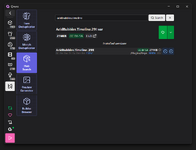
- Hub Search tool: allows downloading any Hub hosted package by their name.

Screenshot_18.png

- Clicking on missing dependency now opens its Hub page in your browser (if there is one).
- You can also open Hub page of any installed VAR. The button is either in its context menu, or on its page.
- Ability to download VARs into specific category.
- When downloading dependencies the UI now shows their size, and allows you to cancel individual or all queued downloads.

Fixes​

- Preview generator with empty title was suggesting empty filename when saving the file.
- Various small UI tweaks and fixes.
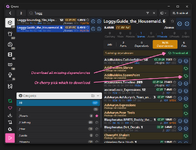
You can now download dependencies from Vam Hub. Unlike in game, you can cherry pick which dependencies will be downloaded, with an option to download all of the dependencies of a single VAR.

Screenshot_17.png

You can also update packages by right clicking them and selecting Download latest option. This will replace the current package with its latest version available on Hub.

Download latest can be also used to restore original version of packages modified by Qvaro if you think you broke something.
Note: you can use is:modified filter to search for packages you told Qvaro to modify in some way.

Features​

- Clothing Plugin Manager integration.
• Indicators to see which items are using Clothing Plugins.
• `is:cpm` filter to look for these items.
• Right click options to add/remove Clothing Plugin Manager to local items.
• Builder Browser tool that can fix up Clothing Manager issues before finalizing a package.
Screenshot_16.png
- Multiselect in item sections.
- Button to open Package Issues Resolver now shows up in sidebar when there are any package issues.

Fixes​

- Packages getting disabled when their parent category was in Keep Enabled list.
- Enabling/disabling category was ignoring packages in subcategories.
- Various UI tweaks and fixes.
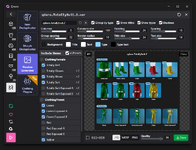
Added Package Preview Generator:

Screenshot_15.png

- Fixed item sections not listing local items (regression in previous version).
- Fixed preset counter sometimes assigning presets to wrong items.
- Fixed Package disabling logic ignoring old package versions.
Island zipper. Allows zipping package and all or some if its dependencies. You can find it in each package's context menu.

Screenshot_12.png

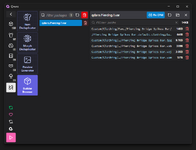
Package issues resolver. Allows you to easily deal with duplicate or corrupted packages. It pops up as a notification/log entry action only when there are some issues.

Screenshot_13.pngScreenshot_14.png

Added is:eek:ld and is:disabled filter aliases for is:latest and is:enabled.
Various UI tweaks and fixes.
- Added morph deduplicator:

Screenshot_10.png

- Eliminated a tiny CPU load when idle, making Qvaro completely inert when running in the background.
- Various UI tweaks and fixes.
Added ability to select and delete individual files in packages.

Screenshot_07.jpg

Added ability to edit packaged or local text files.

Screenshot_09.jpg

Added update checking & releases/changelog section.
Item grids now display preset counters.
Improved error handling.
Back
Top Bottom