Add this plugin to a Person atom, and you can use it to quickly update preset screenshots in a given folder.
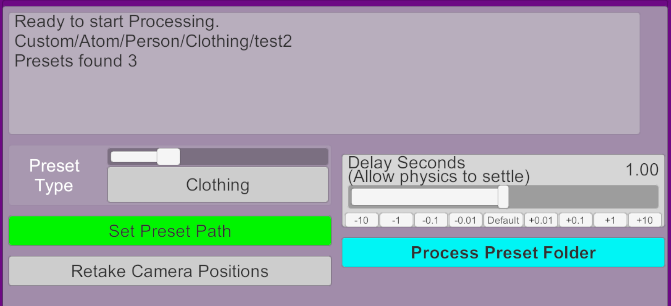
- Choose the Preset Type and then choose the folder (Set Preset Path).
- Optional: Adjust the Delay Seconds if needed, it will pause after loading the preset for this many seconds. This allows some time for hair/clothing physics to settle.
- Press Process Preset Folder and it will loop through all the presets in the selected folder, loading them and then updating the screenshot accordingly.
- This is a shameless combination of code from ky1001's PresetLoader and @Chokaphi 's PresetMaker
- Thanks so much to those creators for their awesome plugins!!!
- I highly recommend using @atani 's PhotoStudio scene with this plugin!
- You can chose: Appearance, Clothing, Hair, Skin, Pose presets.
- Local files only as it's saving screenshots, don't try to select a var (though that is handled).
- It will ask to save Camera position for each preset type if you did not do so yet. You can use Retake Camera Positions to re-save the camera position.
- The Camera position also saves FOV, so you can feel free to adjust FOV as needed.
- The Camera position will be tied to the location of the person's head, so if the preset loaded is short/tall or the pose is on the ground, the camera will automatically move as needed.
- Press the spacebar key to exit/stop processing.
- This overwrites the screenshot of the preset only, does not overwrite the .vap preset file. That being said, it's always a good idea to back-up your stuff.