

You are using an out of date browser. It may not display this or other websites correctly.
You should upgrade or use an alternative browser.
You should upgrade or use an alternative browser.
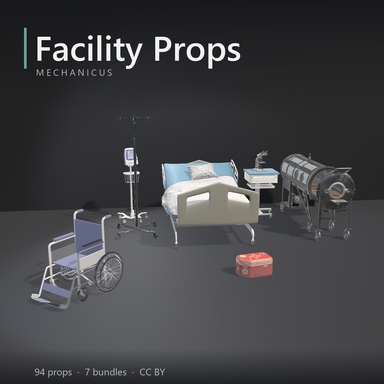
Assets + Accessories Medical Facility Props
- Author Mechanicus
- Creation date
- Hub-Hosted VAR
- CC BY
Medical Facility Props Expanded
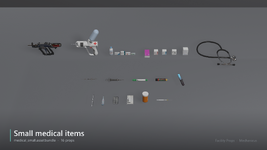
99 props for building clinics, wards, labs and offices in VaM: furniture, medical equipment, small medical items, lab props and building fittings. Free models from Sketchfab (CC BY 4.0) and Poly Haven (CC0), converted for VaM: real-world size, a pivot where you would place them, the front facing +Z, colliders fitted to their shape and Unity Standard materials. They are split into 7 themed bundles, so a scene loads only what it uses.
What’s new in version 2
The 94 props of version 1 keep their bundle, prefab name, size and pivot, so scenes made with version 1 keep working; point them at version 2 to get all of the above.
- Seven props repainted. In version 1, hospital_bed_modern, gurney, wheelchair_modern, beam_bench_4_blue, beam_bench_5, hospital_door and microscope_modern came in flat colour, as their models were authored, and read as untextured. Each is now painted part by part (the modern bed: its boards, vinyl mattress, pillow, rails, panel, frame and wheels) and every part has a fine surface: paint, plastic and vinyl with a soft grain and mottling, metal brushed.
- The C-arm X-ray painted by part: c_arm_xray’s white body, dark and grey covers, the blue and red trim, the vinyl, the screens and the steel are now separate materials, each with the same fine surface.
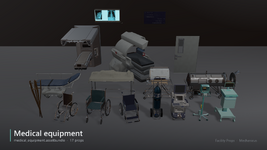
- Five new props: an ultrasound cart (ultrasound_cart) and an oxygen cylinder on its trolley (oxygen_trolley) in medical_equipment; a wheeled doctor’s stool with a backrest (doctor_stool), a tall steel stool (stool_tall) and a brushed steel wall cabinet with a window (wall_cabinet_steel) in medical_supply.
- Fitted colliders. Version 1 gave every prop one box over its whole bounds, so a person floated above a bed’s mattress, could not sit in a wheelchair or on a bench, and bumped into invisible walls around IV poles, screens and stands. Now each piece of furniture and equipment has a set of boxes that follows its shape: mattress, seat, backrest, armrests, wheels, poles, shelves. Compact props (cabinets, crates, drums, small items) keep a single box.
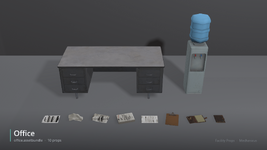
- Clipboard: the maker’s mark is removed. The clip of the clipboard (office bundle) no longer shows the “Supplyhaven” mark embossed on it twice in version 1.
- Linear colour. Version 1’s bundles were built in Gamma colour space while VaM renders in Linear, so every material drew under a pale grey sheen: darks read grey and colours washed out. Version 2 is built in Linear, as VaM is: black stands black, the medical blues and reds and the wheelchairs keep their colour, whites are clean, and metal and smoothness maps read at their real strength.
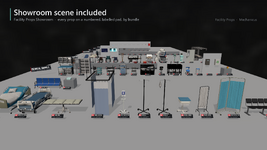
- A showroom scene in the package: every prop on a numbered, labelled pad by bundle.
How to use
- Add an atom: Misc > CustomUnityAsset.
- On its Asset tab, click Select File, open Mechanicus.FacilityProps.2, then Custom/Assets/Mechanicus/FacilityProps/, and pick a bundle (for example medical_ward.assetbundle).
- Choose the prop in Select Asset: assets/bundles/facilityprops/<bundle>/<prop>.prefab.
The showroom scene
The package holds a scene, Facility Props Showroom (in the scene browser under Mechanicus): every prop on a numbered pad, by bundle, floor pieces on the floor, small ones on a bench, wall pieces on a board, each with a label giving its prefab name, size and triangle count. Open it to see what is in the pack, then copy what you want into your own scene.
Licence
CC BY 4.0 (https://creativecommons.org/licenses/by/4.0/). You may use, modify and redistribute it, also commercially, with credit to the authors below. Every model is modified: converted for VaM (rescaled to real size, re-pivoted, decimated where heavy, textures resized, new Unity materials).
Credits
Models licensed CC BY 4.0, modified: converted for VaM:
CC0 (public domain; credited as a courtesy):
- “[v2] Laboratory biohazard box” by usedm (https://sketchfab.com/usedm), https://sketchfab.com/3d-models/v2-laboratory-biohazard-box-ed61290e4af24ad28fe2a298967f7b70, CC BY 4.0: biohazard_crate
- “Autoinjector” by Milch Frische (https://sketchfab.com/MilchFrische), https://sketchfab.com/3d-models/autoinjector-e426b178833847919a1ba24381d0066b, CC BY 4.0: auto_injector
- “Bed Curtain and Vital Signs Monitor” by Ethan Cragun (https://sketchfab.com/EDIIIC), https://sketchfab.com/3d-models/bed-curtain-and-vital-signs-monitor-295ed50eeaa249e8bbeed7b305d3da71, CC BY 4.0: cubicle_curtain, vitals_monitor_stand
- “Chair Hospital” by Khafesys (https://sketchfab.com/Khafesys), https://sketchfab.com/3d-models/chair-hospital-baaa4ec5d6d34ad49004e4d151b43aa2, CC BY 4.0: beam_bench_5
- “Curtain -Emergency -Injection -Hospital - 14MB” by Mehdi Shahsavan (https://sketchfab.com/ahmagh2e), https://sketchfab.com/3d-models/cur...ospital-14mb-521e1c0def86420886c56842d9ae0f90, CC BY 4.0: privacy_screen
- “Disposable Medical Masks” by Leoskateman (https://sketchfab.com/leoskateman), https://sketchfab.com/3d-models/disposable-medical-masks-657b3a5d3e184a01b1708a3a24c27b44, CC BY 4.0: medical_masks_box, medical_mask, medical_mask_flat
- “Doctor Stool.obj” by krio302 (https://sketchfab.com/krio302), https://sketchfab.com/3d-models/doctor-stoolobj-9092b79648a34875906eb57a525fe3be, CC BY 4.0: doctor_stool
- “Fever thermometer” by BlackCube (https://sketchfab.com/blackcube4), https://sketchfab.com/3d-models/fever-thermometer-acb2c16f9224404d996ab44c26d58176, CC BY 4.0: thermometer_digital
- “First AID” by Andrew_Fox (https://sketchfab.com/Andrew_Fox), https://sketchfab.com/3d-models/first-aid-ff57f112feb342aa9b87bf052e16f230, CC BY 4.0: first_aid_case
- “Full Metal Barrel Biohazard” by Daniel Yaroshenko (https://sketchfab.com/yarodan), https://sketchfab.com/3d-models/full-metal-barrel-biohazard-2346391a6ec648019d41d26eabe73bda, CC BY 4.0: drum_biohazard_rusty
- “Game Ready PBR Microscope” by Leo_Newman (https://sketchfab.com/Leo_Newman), https://sketchfab.com/3d-models/game-ready-pbr-microscope-a4d9a0fbe5d844769c1865d7b9a6ad9d, CC BY 4.0: microscope_brass
- “generic Paracetamol pill pack.” by CBI_studios (ChoboiAssets) (https://sketchfab.com/alsoliman905), https://sketchfab.com/3d-models/generic-paracetamol-pill-pack-d8ac3ce4b11f4350a3f2535f3121e040, CC BY 4.0: paracetamol_box, blister_pack
- “Gourney - Hospital Bed” by meeww (https://sketchfab.com/meeww), https://sketchfab.com/3d-models/gourney-hospital-bed-aecf349e49864d8492cf320e5b8d063c, CC BY 4.0: gurney
- “Hospital Bed” by Ansh_Singla (https://sketchfab.com/www.poisonsting), https://sketchfab.com/3d-models/hospital-bed-0e974ea6eb9a4c069c56f152ae5162a4, CC BY 4.0: hospital_bed
- “Hospital Bed” by CobbleGames (https://sketchfab.com/cobblegames), https://sketchfab.com/3d-models/hospital-bed-02ab679ff3f24018a8bcaf30b3b2cd47, CC BY 4.0: exam_couch
- “Hospital bench” by nkulekoqiniso (https://sketchfab.com/nkulekoqiniso), https://sketchfab.com/3d-models/hospital-bench-07a86471d6894df295a0436db3227978, CC BY 4.0: beam_bench_4_blue
- “Hospital direction sign” by Sousinho (https://sketchfab.com/sousinho), https://sketchfab.com/3d-models/hospital-direction-sign-5dfee1a2f1434a14ab196d8315828315, CC BY 4.0: direction_sign
- “Hospital dolly for equipment - Carrello” by centronina3d (https://sketchfab.com/centronina3d), https://sketchfab.com/3d-models/hos...ent-carrello-10f2c95b505442029679ea8f5910cf40, CC BY 4.0: equipment_dolly
- “Hospital Door” by anasrar (https://sketchfab.com/anasrar), https://sketchfab.com/3d-models/hospital-door-46e99d254ff34f45ad8ae7cb40321406, CC BY 4.0: hospital_door
- “Hospital medical bedside cabinet” by Chenchanchong (https://sketchfab.com/Chenchanchong), https://sketchfab.com/3d-models/hospital-medical-bedside-cabinet-4039f6e614c2452ca4f3d2c5bf31eb5d, CC BY 4.0: overbed_cabinet
- “Hospital medical Treatment Cabinet” by Chenchanchong (https://sketchfab.com/Chenchanchong), https://sketchfab.com/3d-models/hospital-medical-treatment-cabinet-9a9edfe3879e4889877bf1dff97c6105, CC BY 4.0: treatment_cabinet
- “Hospital medical Trolley” by Chenchanchong (https://sketchfab.com/Chenchanchong), https://sketchfab.com/3d-models/hospital-medical-trolley-cf02b01766534fe28a57e5e23e8c3f06, CC BY 4.0: anaesthesia_trolley
- “Hospital Sharps Container” by cig3d (https://sketchfab.com/cig3d), https://sketchfab.com/3d-models/hospital-sharps-container-1b653c90ccd048d280a9f53a1577ca61, CC BY 4.0: sharps_bin
- “Hospital Stools” by Mountrise (https://sketchfab.com/Mountrise), https://sketchfab.com/3d-models/hospital-stools-9298b6c0b273416c96fad44cea01e7d5, CC BY 4.0: stool_low, stool_back
- “Hospital Stretcher” by Gunnar Correa (https://sketchfab.com/gunnarcorrea), https://sketchfab.com/3d-models/hospital-stretcher-a74239ec0dfe454a906c339071855d87, CC BY 4.0: stretcher
- “Hospital Trolley” by creative_beast (https://sketchfab.com/creative_beast), https://sketchfab.com/3d-models/hospital-trolley-6fa14ba57e324d288b5a42632f19d97f, CC BY 4.0: instrument_trolley
- “Incubator” by Odlab (https://sketchfab.com/Odlab), https://sketchfab.com/3d-models/incubator-b0dfcacde6694dc4b37b8b05459f7d0f, CC BY 4.0: incubator
- “Iron Lung” by NicolasVB (https://sketchfab.com/NicolasVB), https://sketchfab.com/3d-models/iron-lung-b0b9c9318e974683935fb421f6f9fa78, CC BY 4.0: iron_lung
- “IV Pole” by Mountrise (https://sketchfab.com/Mountrise), https://sketchfab.com/3d-models/iv-pole-76521e2f71704b1986cf5ac54368b14f, CC BY 4.0: iv_pole_a, iv_pole_b
- “Kit Hospital” by engairton (https://sketchfab.com/engairton), https://sketchfab.com/3d-models/kit-hospital-efa3086e2a684d36b7f3249967b00aa3, CC BY 4.0: medical_case_open
- “Laboratory Cabinet Storage | PBR Low poly | FREE” by Naked Singularity (https://sketchfab.com/nakedsingularity), https://sketchfab.com/3d-models/lab...ow-poly-free-6c5d3bde09dd4f55ad973d8429441190, CC BY 4.0: lab_cabinet
- “Med Bay Table” by Miko (https://sketchfab.com/mrpolarbear), https://sketchfab.com/3d-models/med-bay-table-9ffd849763ba4f479fab94d2749e64ac, CC BY 4.0: med_bay_table
- “Med Kit Red” by paladin402 (https://sketchfab.com/paladin402), https://sketchfab.com/3d-models/med-kit-red-4254dea2a29242629acbd266334ca578, CC BY 4.0: med_kit_red
- “MED OR sink” by House Doctor (https://sketchfab.com/chin4grci4), https://sketchfab.com/3d-models/med-or-sink-201945004dc0419fac8edddfad972e2f, CC BY 4.0: or_sink_double
- “Med-Kit” by d880 (https://sketchfab.com/distance880), https://sketchfab.com/3d-models/med-kit-d0168db45641470b80ad2d94fbac441a, CC BY 4.0: med_kit_case
- “Medical Cart” by NicolasVB (https://sketchfab.com/NicolasVB), https://sketchfab.com/3d-models/medical-cart-2a0a574f9e374702af8c415fce296f45, CC BY 4.0: medical_cart
- “Medical Syringe” by Alexander Troianovskyi (https://sketchfab.com/AlexOlTroi), https://sketchfab.com/3d-models/medical-syringe-22e711221a094a48a6ffe826d3fd6185, CC BY 4.0: syringe_steel
- “Medical Syringe” by lewisme98 (https://sketchfab.com/lewisme98), https://sketchfab.com/3d-models/medical-syringe-5023e275effa44478fca80d2ea3260d0, CC BY 4.0: syringe_antique
- “Medical X-ray Image Viewer - 200 Uploads!” by re1monsen (https://sketchfab.com/re1monsen), https://sketchfab.com/3d-models/med...-200-uploads-1caaa90f0e6b48d08109e517ddd8aab0, CC BY 4.0: xray_viewer
- “Medicine” by Mountrise (https://sketchfab.com/Mountrise), https://sketchfab.com/3d-models/medicine-36b77738f0b247a1b98adbafa110f48d, CC BY 4.0: medicine_set
- “Medicine” by Mountrise (https://sketchfab.com/Mountrise), https://sketchfab.com/3d-models/medicine-4028018f361447e987cb8c156c3c45f1, CC BY 4.0: medicine_boxes
- “Medicine Wall Cupboard, Hospital” by BillyJJackson (https://sketchfab.com/pistonstone), https://sketchfab.com/3d-models/medicine-wall-cupboard-hospital-3251d73995f54398b118d1aa0bb34489, CC BY 4.0: medicine_wall_cupboard
- “Metal Wall Cabinet” by Andersta Studios (https://sketchfab.com/andersta), https://sketchfab.com/3d-models/metal-wall-cabinet-eb03b64d99494f0d8985a03f5fd8df16, CC BY 4.0: wall_cabinet_steel
- “Microscope” by lionclaw0612 (https://sketchfab.com/lionclaw0612), https://sketchfab.com/3d-models/microscope-dd9e73d51edb43198bd40d0bbd2dd54e, CC BY 4.0: microscope_modern
- “Modern Manual Wheelchair – Realistic Hospital” by Areebacat123 (https://sketchfab.com/Areebacat123), https://sketchfab.com/3d-models/mod...tic-hospital-e92f4c638edb43429b428e1bfaa84cd7, CC BY 4.0: wheelchair_modern
- “Morphine Auto Injector” by doodyk2019 (https://sketchfab.com/doodyk2019), https://sketchfab.com/3d-models/morphine-auto-injector-338fcd5ea9de466ab71641ff9f528724, CC BY 4.0: morphine_injector
- “MRI” by wazerh36 (https://sketchfab.com/wazerh36), https://sketchfab.com/3d-models/mri-b53f7180871f4dd8a1a3c2246445db48, CC BY 4.0: c_arm_xray
- “Oxygen Cylinder” by Alexander Troianovskyi (https://sketchfab.com/AlexOlTroi), https://sketchfab.com/3d-models/oxygen-cylinder-e7419671f8124cab870d7a1a4d68b180, CC BY 4.0: oxygen_trolley
- “Pair of Scalpels” by Sousinho (https://sketchfab.com/sousinho), https://sketchfab.com/3d-models/pair-of-scalpels-219198b5a6a34f87bdc417e2706f9482, CC BY 4.0: scalpel
- “Paper debris” by Sousinho (https://sketchfab.com/sousinho), https://sketchfab.com/3d-models/paper-debris-457624d2526744d8890d50d811ef45d7, CC BY 4.0: paper_debris_1, paper_debris_2, paper_debris_3, paper_debris_4, paper_debris_5
- “PBR Vintage Microscope” by Christina Lauridsen (https://sketchfab.com/Christina.Lauridsen), https://sketchfab.com/3d-models/pbr-vintage-microscope-20f74d0ddc3b458ea4bc3bd05fb1cf43, CC BY 4.0: microscope_vintage
- “Pills” by Dawndragon (https://sketchfab.com/Dawndragon), https://sketchfab.com/3d-models/pills-429536ff8dd84e538168c17ce6e82e28, CC BY 4.0: pill_bottle
- “School / Medical Stool” by conndavis20 (https://sketchfab.com/conndavis20), https://sketchfab.com/3d-models/school-medical-stool-1d73f00319d14d21a4f4e8bfe4c27fce, CC BY 4.0: stool_tall
- “Sci-fi Syringe” by Atilla Kutluay Erdoğay (https://sketchfab.com/akerdogay), https://sketchfab.com/3d-models/sci-fi-syringe-011ac55c6eb149e597e70d5af38a36ee, CC BY 4.0: syringe_scifi
- “Scrubbing Sink” by miraclejudy3 (https://sketchfab.com/miraclejudy3), https://sketchfab.com/3d-models/scrubbing-sink-482c7f05a1544620ae78cc702b763101, CC BY 4.0: scrub_sink
- “Simple Hospital Bed” by Yvo Pors (https://sketchfab.com/yvopors14), https://sketchfab.com/3d-models/simple-hospital-bed-60651eac7e96454c8cf5c43a91412336, CC BY 4.0: hospital_bed_modern
- “Stethoscope” by Phillip Stephens (https://sketchfab.com/pstephen), https://sketchfab.com/3d-models/stethoscope-ce1ba77195dd4746841e58346864c059, CC BY 4.0: stethoscope
- “Stylized Combat Injector” by Adam Lumos (https://sketchfab.com/adam_lumos), https://sketchfab.com/3d-models/stylized-combat-injector-782d9303e6b740d4b5a5891fc6f87ad2, CC BY 4.0: combat_injector
- “Syringe” by stfuaahil (https://sketchfab.com/stfuaahil), https://sketchfab.com/3d-models/syringe-324b3ed0026940808db353c8c6d7450e, CC BY 4.0: syringe_disposable
- “Syringe Gun” by Redi4ka (https://sketchfab.com/Red4One), https://sketchfab.com/3d-models/syringe-gun-c9d4d54e9167485cb76144ff3cf9f3ec, CC BY 4.0: syringe_gun
- “Toxic Waste Barrel | Biohazard” by Lazy Hanby (https://sketchfab.com/Lazy_hanby), https://sketchfab.com/3d-models/toxic-waste-barrel-biohazard-07a55545c16b47f493b4fdd4bba15729, CC BY 4.0: drum_biohazard_yellow
- “Ultrasound Machine” by Liuuzaki (https://sketchfab.com/liuuzaki), https://sketchfab.com/3d-models/ultrasound-machine-0d4593f431f94de9a94815ec2c7715e9, CC BY 4.0: ultrasound_cart
- “VR ready hospital props” by Grish_Avetisyan (https://sketchfab.com/Grish_Avetisyan), https://sketchfab.com/3d-models/vr-ready-hospital-props-e3423f6c753041f0a95da030e674aa28, CC BY 4.0: privacy_screen_tall, folded_blanket, anaesthesia_ventilator, computer_cart, water_cooler, fire_extinguisher_box, mop_bucket
- “Waiting Chair” by RaflyNaHa (https://sketchfab.com/RaflyNaHa), https://sketchfab.com/3d-models/waiting-chair-3bd109dcaaab463b92e747ad6f95f46f, CC BY 4.0: beam_bench_4
- “Wheelchair” by Maxence Rouillet (https://sketchfab.com/maxencerouillet), https://sketchfab.com/3d-models/wheelchair-54911b7d81a44991804c87c6fc58c4df, CC BY 4.0: wheelchair
- “Zip lock biohazard” by Phoenix_Connor (https://sketchfab.com/odin.takoy1989), https://sketchfab.com/3d-models/zip-lock-biohazard-9c6ead0e26ea4917a511979056195eb8, CC BY 4.0: biohazard_bag
- “Binder Notebook” by DaDrood, Poly Haven, https://polyhaven.com/a/binder_notebook: binder_open, binder_closed
- “Clipboard” by ProgrammerOnCoffee, Poly Haven, https://polyhaven.com/a/clipboard: clipboard
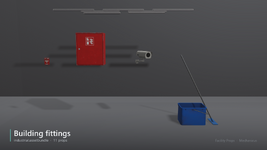
- “Fire Alarm” by Slinc, Poly Haven, https://polyhaven.com/a/fire_alarm: fire_alarm
- “Medical Box” by Ulan Cabanilla, Poly Haven, https://polyhaven.com/a/medical_box: medical_box
- “Medical Tape” by Miroslav Turura, Poly Haven, https://polyhaven.com/a/medical_tape: medical_tape
- “Metal Office Desk” by Ulan Cabanilla, Poly Haven, https://polyhaven.com/a/metal_office_desk: metal_office_desk
- “Mounted Fluorescent Lights” by Ulan Cabanilla, Poly Haven, https://polyhaven.com/a/mounted_fluorescent_lights: fluorescent_batten_a, fluorescent_batten_b, fluorescent_batten_c, fluorescent_batten_d, fluorescent_batten_e, fluorescent_batten_f, fluorescent_batten_g
- “Security Camera 01” by Alexander Otterbeck, Yann Kervran, Poly Haven, https://polyhaven.com/a/security_camera_01: security_camera
- “Vintage Crutches 01” by James Ray Cock, Poly Haven, https://polyhaven.com/a/vintage_crutches_01: crutches
- “Wheelchair 01” by Garreth Dean, Poly Haven, https://polyhaven.com/a/wheelchair_01: wheelchair_worn
Attachments
-
 00_cover_1024.png551.9 KB · Views: 0
-
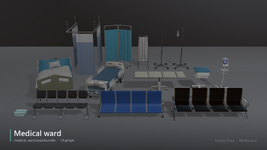 01_medical_ward_1920.png925.3 KB · Views: 0
-
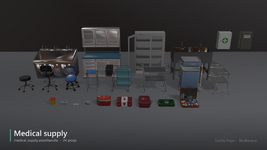 02_medical_supply_1920.png646.5 KB · Views: 0
-
 03_medical_equipment_1920.png941.2 KB · Views: 0
-
 04_office_1920.png1.2 MB · Views: 0
-
 05_industrial_1920.png904.6 KB · Views: 0
-
 06_medical_small_1920.png1.2 MB · Views: 0
-
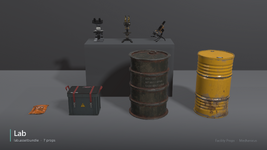 07_lab_1920.png1.3 MB · Views: 0
-
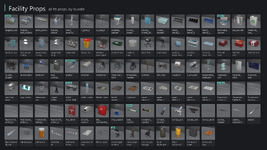 08_overview_all_props_1920.png815.5 KB · Views: 0
-
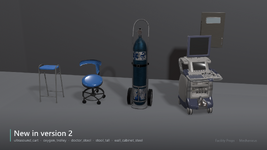 09_new_in_version_2_1920.png1.2 MB · Views: 0
-
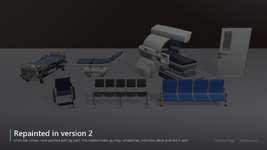 10_repainted_in_version_2_1920.png740.2 KB · Views: 0
-
 11_showroom_scene_1920.png691.4 KB · Views: 0
- 2
-
 2