JoiHUD 25
- Pool 1 and Pool 2 replace the old JSON and VAP switches. Each pool can be JSON, VAP, Pack, or a folder you type in, such as Saves/Person/appearance/myCharacters. Pool 1 starts as JSON. Pool 2 starts as VAP.
- Redesigned HUD
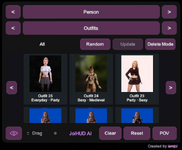
- The HUD is four rows of three equal buttons, with the switches on the right: Male / User, Pool 1 / Pool 2, Outfit / Scale, and Possess / Ride (aka Passenger). The gear sits beside Start. Reset is now on the Configuration page.
- The Switch Button has two pages. The main page ends with Jaw, Lip, and Embody. The next page is Start Character, Voice, and Moan, then Change Voice, Change Hair, and Scale, then Boobs.
- The actions strip has an X to close it. Applying a Context opens it only when your character has actions they can use in that scene. You can still open it by hand from the plugin.
- Voice now goes from 0 to 10, and it stays in step with volumeMultiplier on the Person Audio tab. Jaw, Lip, Outfit, and Scale stay in step with the plugin the same way, whichever side you move.
Link 4.6
- While you are signed in, Link shows your Playground credit balance beside Settings. If you still have Trial Credits, a pill shows the days left, such as 3D (3 Days).
- When a turn cannot start, Link says why.
- The HUD shows that same message instead of a raw HTTP error, and a refused Start Scene reports the error instead of looking idle.
- A failed Kokoro install shows the real pip error, so a path that is too long, a full disk, and an antivirus lock no longer all look like ERROR: Exception:.