

You are using an out of date browser. It may not display this or other websites correctly.
You should upgrade or use an alternative browser.
You should upgrade or use an alternative browser.

Plugins + Scripts High Performance Volume Light
- Author PluginIdea
- Creation date
-
- Tags
- volumelight
- Hub-Hosted VAR
- CC BY-ND
- Status
- Version change awaiting approval before being displayed publicly.


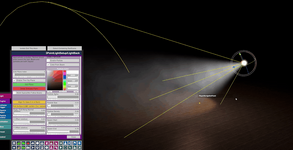
Here, the beam cutting has been greatly improved. For other new features, please refer to the last update.
New Features:
1. Add, select, and toggle each cut plane on its own.
2. Align to view or pick a surface: in pick mode, click any scene object and the plane snaps onto the surface and matches its normal (desktop).
3. Fine-tune placement: push or pull along the normal, use X/Y/Z offsets, and adjust rotation and flip.
4. Flexible space: let planes follow the beam, or lock them in world space.
5. Shapes: infinite plane, rectangle, circle, or capsule. Limit cuts to one area, such as blocking furniture or a character behind the light.
6. Soft edges: one slider fades clip edges for a more natural transition.
7. Wireframe preview: the selected plane shows a yellow outline and normal, so its position is always clear.
8. Saved with scenes and presets, and restored when you reopen them.
Quick start:
Add plane -> Select plane -> Align to view or pick surface -> Adjust shape and softness -> Save scene
See the intro video for full instructions.
Attachments


1. New fog shapes: Cylinder and dome are now available alongside sphere and box. Help better adapt to the scene.
2. Adjustable fog masks: Tiling, offset and strength controls, matched between fog volumes and dust.
3. More natural dust motion: Richer random drift, with turbulence working in every motion mode.
4. Beam dust randomness: A dedicated random motion slider lets you tune the drift on its own.
5. Clip planes: Up to 8 planes, add, remove and edit freely. They trim both beams and dust.
6. Clip plane debug outline: Toggle a visible outline and normal for the selected plane to line it up quickly.
7. Clip planes saved with the scene: They come back when you reload the scene, and presets save them too.
See the intro video for detailed usage.




What's new:
1. Inside fog for Box / Sphere Fog. Step into the volume and still see the fog. One toggle (on by default).
2. (Box / Sphere Fog) Much better performance with lighting enabled. Point and spot light scenes stay smoother when Enable Lighting is on.
3. Lighting is easier to balance. Fine-tune for looks or frame rate as needed.

1. Added preset function.

2. Added dust particle effect.(light beam & Box/Sphere Fog).


this time, it brought a brand-new powerful Box/Sphere high-performance volume fog.

Core features:
1. Almost no performance loss.
2. The volume fog effect of the same level as the original light beam will make the immersion of your scene reach a higher level.
3. Volume fog fully supports illumination (point light, spot light and directional light)
4. Complete VR support.
How to use:
Add VolumeFogShape.cslist to EmptyAtom- > parameter adjustment.



1. A high-performance box volume fog component is added (experimental). Such as video. There is no performance loss. This allows you to set the volume fog more flexibly.
For box volume fog, Mask in Z-axis direction is supported at the same time, and gray texure is used(R Channel). Support to adjust the transition at the intersection with the ground.
2. Removed an error that appeared in the old version of the game (before 1.22.07).

How to use:
Add VolumeFogBox.cslist to the empty atom.
Based on the feedback, an additional brightness control is added based on the Dynamic Friction of the atom (because this attribute is not usually used for empty atoms).
This increases flexibility in a large number of lighting controls.


- 6
-
 6
Through the further optimization of light beam Mesh and Shader. The attenuation transition of volume light is more natural (and a separate slider is added to control this transition), and the impression has been greatly improved.
Not only does it eliminate the ladder effect of the previous light beam, but the light beam can also be truly and perfectly integrated with the environment.


- 4
-
4
1. Add a separate switch to the light column.

2. You can now adjust the number of sides of the beam(There may be room for improvement.), This is very useful on many occasions, with a minimum of three sides.

- 2
-
2