

ColliderFit
A Person plugin that keeps the fixed colliders on the bones snug to the skin when the body morphs change. Slim a forearm with a morph and its collider no longer stays as thick as before: other hands, props, clothing and cloth touch the skin instead of an invisible shell around it. Free, CC BY.

Why
VaM rescales its automatic colliders (torso, chest, belly, hips, thighs) when the body morphs change. The fixed colliders on the arms, hands, feet, neck and jaw are different: their size is stored in the character prefab and nothing resizes it, so after you slim a forearm the collider keeps its original radius and sticks out of the skin by several millimeters.
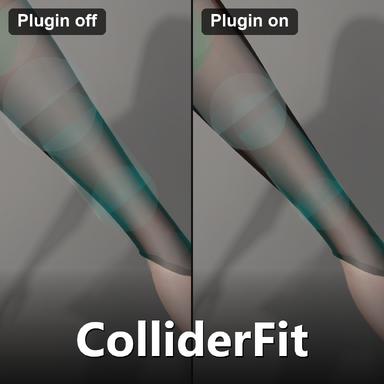
Same forearm, same camera, Collider Editor preview on. Left: plugin off, the collider is clearly thicker than the arm. Right: plugin on, the collider hugs the skin.

The other direction: the forearm made bigger with a morph. Without the plugin the collider stays smaller than the arm, so things sink into the skin before they are stopped.

What it does
Settings panel
Fit colliders to skin (main switch), Collider margin (mm), Fit colliders now, and a status table: how many colliders follow the skin, how many are set in Collider Editor, how many were changed by something else, and the time binding, fitting and the morph check take. Hover any row for details.

Per body part, with the exceptions listed in the tooltip of each row:

How to use
With Collider Editor
Collider Editor is not required, but it is the easiest way to see the colliders and the two work together. Install Collider Editor by Acid Bubbles on the same Person and switch on its preview.
Known limits
Requirements
Credits and license
ColliderFit and OverlayUI are written by mutoe, license CC BY. The code was written mainly by AI coding assistants under the author's direction.
Ideas only, no code copied: Collider Editor by Acid Bubbles (CC BY-SA) for how it stores the colliders you adjusted and how it refreshes the GPU colliders; VaM's built-in AutoCollider for the idea of resizing a collider from the morphed skin; Supplementary Colliders by UrukYay (CC BY) for fitting capsules to skin vertices (only its description was read). No other third-party code, shader or texture is included in the package.
Version
Package mutoe.ColliderFit.1 is the first release.
A Person plugin that keeps the fixed colliders on the bones snug to the skin when the body morphs change. Slim a forearm with a morph and its collider no longer stays as thick as before: other hands, props, clothing and cloth touch the skin instead of an invisible shell around it. Free, CC BY.
Why
VaM rescales its automatic colliders (torso, chest, belly, hips, thighs) when the body morphs change. The fixed colliders on the arms, hands, feet, neck and jaw are different: their size is stored in the character prefab and nothing resizes it, so after you slim a forearm the collider keeps its original radius and sticks out of the skin by several millimeters.
Same forearm, same camera, Collider Editor preview on. Left: plugin off, the collider is clearly thicker than the arm. Right: plugin on, the collider hugs the skin.
The other direction: the forearm made bigger with a morph. Without the plugin the collider stays smaller than the arm, so things sink into the skin before they are stopped.
What it does
- After the non-pose body morphs change, it measures the skin around each fixed collider and fits the collider's radius and center to the average skin position, then updates the GPU colliders that hair and cloth use. It recomputes only when the morphs change (about 0.4 seconds after you stop dragging a slider); posing does not trigger it. In between it only checks five times a second whether the morphs changed, which takes a fraction of a millisecond (shown as Morph check in the status table).
- Covers the upper arms, forearms, hands, palms, fingers, feet, toes, neck and jaw. With Use Advanced Colliders off it also covers the standard torso, thigh, calf and hip colliders. Both collider sets work, and it rebinds by itself when you switch.
- A margin slider (mm) makes the colliders thicker or thinner than the skin. The default 0 puts the collider surface on the average skin position, so skin that bulges out can poke a few millimeters through it.
- Switch it off, disable it or remove it and every collider (and rigidbody center of mass it had to correct) goes back to its original value.
- Not touched: AutoColliders (VaM already resizes those), soft body colliders, the tongue and the hair colliders.
Settings panel
Fit colliders to skin (main switch), Collider margin (mm), Fit colliders now, and a status table: how many colliders follow the skin, how many are set in Collider Editor, how many were changed by something else, and the time binding, fitting and the morph check take. Hover any row for details.
Per body part, with the exceptions listed in the tooltip of each row:
How to use
- Select a Person, open the Plugins tab, Add Plugin > Select File, choose
mutoe.ColliderFit>ColliderFit.cslist. VaM will ask to allow the plugin; accept. - About two seconds after loading it fits the colliders once. After that, change the body morphs as usual and the colliders follow by themselves; there is no button to press (Fit colliders now measures again without a morph change).
- To see the result, turn on the collider preview in Collider Editor (below).
With Collider Editor
Collider Editor is not required, but it is the easiest way to see the colliders and the two work together. Install Collider Editor by Acid Bubbles on the same Person and switch on its preview.
- A collider you adjusted in Collider Editor keeps your values: ColliderFit leaves it alone and counts it as set in Collider Editor in its status table. The two never fight over a collider.
- Reset that collider in Collider Editor and ColliderFit takes it over again.
- After a refit, if the Collider Editor preview is on, ColliderFit switches it off and on once so the wireframe follows the new size; if it is off, nothing is touched.
Known limits
- Only the fixed colliders are managed. AutoColliders and soft bodies are resized by VaM itself.
- Only the non-pose body morphs are followed. The skin bulging and denting while the character moves is not, and clothing (sleeves, gloves, shoes) is not counted as part of the surface.
- A collider with fewer than 12 skin vertices near it is left alone, and a fit that would change a radius by more than 50% or move a center by more than 15 mm is not written; both are listed in the status table.
- If a morph's vertex data is not loaded, the status table shows how many morphs were not counted and the colliders near them may be off.
- Tested on a single female character only (its skin is a merged mesh). Male characters and characters whose skin is not a merged mesh were not specifically tested; if you run into a problem, please report it.
Requirements
- mutoe.OverlayUI.5 (settings panel library, free), installed as a dependency.
- Collider Editor is optional (see above).
Credits and license
ColliderFit and OverlayUI are written by mutoe, license CC BY. The code was written mainly by AI coding assistants under the author's direction.
Ideas only, no code copied: Collider Editor by Acid Bubbles (CC BY-SA) for how it stores the colliders you adjusted and how it refreshes the GPU colliders; VaM's built-in AutoCollider for the idea of resizing a collider from the morphed skin; Supplementary Colliders by UrukYay (CC BY) for fitting capsules to skin vertices (only its description was read). No other third-party code, shader or texture is included in the package.
Version
Package mutoe.ColliderFit.1 is the first release.