• Hi Guest!

    We have posted a new VaM2 dev log on Patreon, starting a monthly cadence of written progress updates between Beta releases. Highlights include the new Gizmos System, Selection Carousel, and Modes System with Context-Specific Editing. Beta1.2 is 15 of 21 items complete.

    Read the full post on Patreon, or follow progress on the public Trello roadmap.
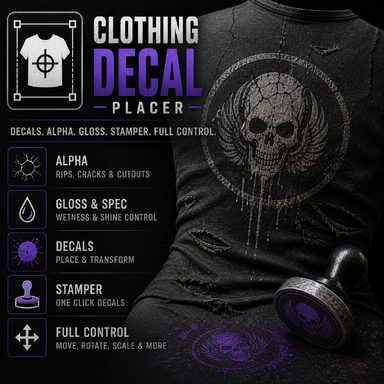
Clothing Decal Placer - Workhorse Beta

Plugins + Scripts Clothing Decal Placer - Workhorse Beta

Download [<1 MB]
Completed the Decal "baker" function.
This is version 68, because there is no need to publish V67 anymore.

- save all visible decals and main texture as stand alone file, to load it as an main texture without the plugin.
- save all visible decals as stand alone decal texture to load them as clothing decal without the plugin

Added two "bake" buttons for the new save feature.
you can place your decals, scale and move them, then bake a complete main texture with the decal or save the decals alone with transparent background to load them as clothing decal.


If you encounter some bugs, feel free to write me a message.
Added the decal baker function.

V66:
  • Added Bake Decal To Main Texture button.
  • Baking exports the current slot’s Decal onto the clothing Main/Diffuse texture.
  • Alpha, Gloss, and Spec are not included in the bake.
  • Bake output keeps the clothing UV layout, so the saved texture can be reused as a normal main texture without the plugin.
  • Material = All exports one baked texture per material. (means you got three picture files if the cloth has three materials)
  • Added persistent last-used image directory for browsing and bake export.
  • Improved bake scaling so baked decals better match their runtime size.
  • Improved bake color handling using alpha-over blending.
  • Main texture alpha is preserved during bake.
  • Bake logic is isolated from runtime rendering, Global Intensity, and Stamper behavior. So it should not broke something. Hopefully.

Partially smoketested it, it seems nothing is broke.

if you encounter some bugs etc. feel free to write me a few sentences. Have fun.
  • Changed slot logic: each slot now uses one shared clothing item for Decal, Alpha, Gloss, and Spec.
    • Why? Handling. Its more Easy to use one slot completly for the same cloth item for all 4 textures.
  • Added per-slot Global Intensity control. -> One Slider for all 4 textures. But the performance is not the best. (single slider still possible as it was)
  • Added Capture Slot Global Preset to store balanced Decal/Alpha/Gloss/Spec visibility values. -> e.g. adjust all 4 textures to the end position, capture, and the global slider will stop at the individual positions. because if alpha = 1 means you get a hole in the clothing in the most cases. So you can stop it at e.g. 0.5 also with the global slider.
  • Added Timeline-triggerable global intensity controls:
    • SelectedSlotGlobalIntensity
    • Slot1GlobalIntensity to Slot8GlobalIntensity
  • Improved Global Intensity performance by avoiding unnecessary full cache clears and rerenders.
  • fixed added states after load the project again. Textures visibility was scaled above 1 as an addition. That was a bug.
The performance is not the best at all, with the global slider (4 Layers at once). I have to run some tests with merging the layers etc. Single Slider usage is still fast.

also added a second demo video.
Back
Top Bottom