• Hi Guest!

    We are extremely excited to announce the release of our first Beta1.1 and the first release of our Public AddonKit!
    To participate in the Beta, a subscription to the Entertainer or Creator Tier is required. For access to the Public AddonKit you must be a Creator tier member. Once subscribed, download instructions can be found here.

    Click here for information and guides regarding the VaM2 beta. Join our Discord server for more announcements and community discussion about VaM2.
  • Hi Guest!

    VaM2 Resource Categories have now been added to the Hub! For information on posting VaM2 resources and details about VaM2 related changes to our Community Forums, please see our official announcement here.

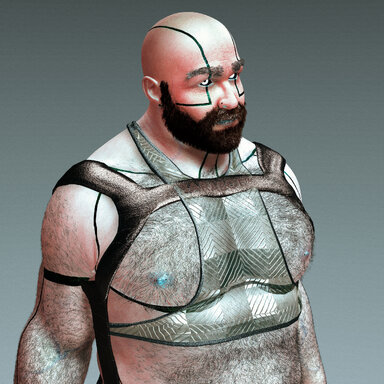
Barabot (Male)

A sexbot from the year 2077

-1767045311.jpg
-1767045317.jpg
-1767045314.jpg

Included

Morphs | Head, body and genital.
Skin | 4K Head & Genital, 8K Torso & Limbs keeping texel density across seams
Hair | 12 custom hair
Clothing | 4 items
Poses | 1 dynamic poses
Scale | 1.000

1767045283.jpg
1767045289.jpg
1767045295.jpg
1767045299.jpg
1767045369.jpg
1767045389.jpg
1767045395.jpg
1767045400.jpg

HairClothingPosePresets (maleBarabot)
ArmsCyber ShortsStanceAppearence
BackCyber TanktopClothing
BeardCyber HarnessHair
ButtPackagingMorph
ChestRealistic Foreskin & Erection Control Center
EyebrowsSkin
Groin
Head
Legs
Navel
Testicles

1767048418.jpg
1767049557.jpg
1767049609.jpg
1767050836.jpg

Default Male Atom Setup

The male atom geometry around the anus is very simple so I use default males as tops setups.
When using an appearance below are the plugins needed for the best results.

UrukYay Supplementary Colliders

  • Open Custom UI in the UYCol plugin
  • Press Guess fit
  • Press this button twice over
This allows all the clothes that have been created to sit correctly in the groin/hip area. Please note that when you pose the character you should go and re-press Guess Fit. Always place this plugin 1st in the list.

RunRudolf Realistic Foreskin & Erection

  • Open Custom UI in the RunRodolf.ControlCenter
  • Load preset and select the preset from the downloaded file
  • In some cases
    • Select Tab Cock
    • turn the Add/Remove Ball/Tip Collider off and on again
  • Adjust the erection amount in tab General
1767050923.jpg
React to this content...
Click the links below to support the other creators whose content was used to make this resource!

Share this resource

More resources from vamBear

Credits

Creator Support Link
UserBob UserBob
B boris47
Back
Top Bottom