


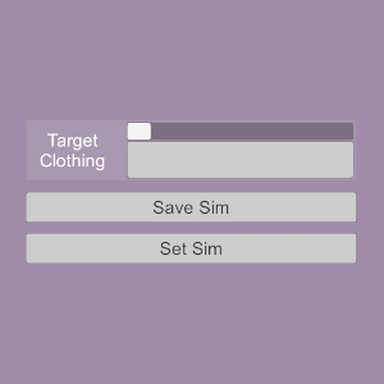


SimSetter is a small collection of plugins that allow you to save and restore a specific shape to a sim clothing item.
After manipulating a sim clothing item to be shaped in a certain way, via physics grab, morph changes, or pose adjustments, these plugins will save the position of the clothing's vertices and can then restore them to that exact position. This is useful for situations where certain morphs or poses may interfere with a clothing item's initialized sim state, or other situations where a person atom or other object is interacting with the clothing item in a specific way that the sim initialization would interfere with.
The saved sim position data will account for changes in atom position and rotation, but cannot account for pose or atom scale changes. These plugins do not rewrap or freeze the sim in place; the physics remain active after the vertex positions are set. Note that by disabling clothing collision and setting the clothing's stiffness, weight, and gravity to 0, the clothing can be made to appear "frozen" in a certain position, as long as the atom is in a static pose.
Note that the relevant clothing items must already be loaded into scene memory (though not necessarily active) before a preset is applied, otherwise the plugins will not load the sim data. Reapply the preset as needed once the items are loaded.
How To:
Target Clothing:
Allows for selection of clothing items.
Should only show simmed clothing.
List updates when the menu is opened.
Shows the entire uid so can be hard to read, but the display name of the selected item will also be shown in the info box.
Save Sim/Set Sim:
Saves and sets (applies) the vertex position data for the sim items.
Plugins that handle multiple items have extra options to update or delete all sim data with one click.
There are additional triggerable actions for queueing sim data to be applied after a short delay, which do not have button counterparts.
Bundle Controls:
For SimSetter.cs and SheetSetter.cs, bundles of data can be added, selected, and deleted to allow multiple sim states to be saved for the same clothing items or sim sheet.
Info Box:
Displays the name of the target clothing item for readability.
Displays information about which items have been saved, and to which bundle.
Contains other info about the state of the sim data.
Set On Load/Delay:
Applies the vertex data, or the selected bundle data, as soon as the scene is fully loaded.
When using the queue sim triggerable actions, the action will be delayed by an adjustable number of FixedUpdate frames to prevent conflicts with atom physics resetting on e.g. pose changes. 50 FixedUpdate frames = 1 second.
Presets:
Each plugin has its own type of preset file.
OutfitSetter.cs can load presets from ItemSetter.cs as single items to add to the collection.
SimSetter.cs can load presets from ItemSetter.cs to add to an existing bundle, and can load presets from OutfitSetter.cs as new bundles.
Silly little demo video using ItemSetter:
After manipulating a sim clothing item to be shaped in a certain way, via physics grab, morph changes, or pose adjustments, these plugins will save the position of the clothing's vertices and can then restore them to that exact position. This is useful for situations where certain morphs or poses may interfere with a clothing item's initialized sim state, or other situations where a person atom or other object is interacting with the clothing item in a specific way that the sim initialization would interfere with.
The saved sim position data will account for changes in atom position and rotation, but cannot account for pose or atom scale changes. These plugins do not rewrap or freeze the sim in place; the physics remain active after the vertex positions are set. Note that by disabling clothing collision and setting the clothing's stiffness, weight, and gravity to 0, the clothing can be made to appear "frozen" in a certain position, as long as the atom is in a static pose.
Note that the relevant clothing items must already be loaded into scene memory (though not necessarily active) before a preset is applied, otherwise the plugins will not load the sim data. Reapply the preset as needed once the items are loaded.
How To:
SimSetter.cs:

Allows for multiple bundles of clothing sim data to be saved and applied. Functions like an amalgam of the other three scripts; similar bundle control to SheetSetter.cs, similar save/apply control to OutfitSetter.cs.
Allows for multiple bundles of clothing sim data to be saved and applied. Functions like an amalgam of the other three scripts; similar bundle control to SheetSetter.cs, similar save/apply control to OutfitSetter.cs.
OutfitSetter.cs:

OutfitSetter.cs saves a single set of sim vertex positions for multiple clothing items at once.
OutfitSetter.cs saves a single set of sim vertex positions for multiple clothing items at once.
ItemSetter.cs:

ItemSetter.cs saves one set of vertex positions for a single clothing item. Best for one-offs where only one clothing item needs special attention.
ItemSetter.cs saves one set of vertex positions for a single clothing item. Best for one-offs where only one clothing item needs special attention.
SheetSetter.cs:

SheetSetter.cs works on SimSheet atoms.
SheetSetter.cs works on SimSheet atoms.
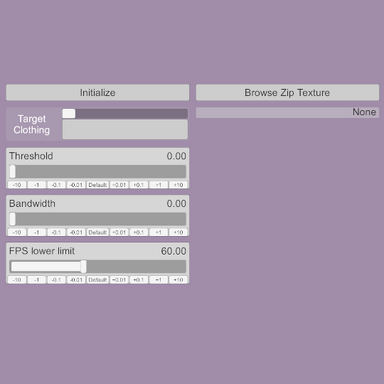
Target Clothing:
Allows for selection of clothing items.
Should only show simmed clothing.
List updates when the menu is opened.
Shows the entire uid so can be hard to read, but the display name of the selected item will also be shown in the info box.
Save Sim/Set Sim:
Saves and sets (applies) the vertex position data for the sim items.
Plugins that handle multiple items have extra options to update or delete all sim data with one click.
There are additional triggerable actions for queueing sim data to be applied after a short delay, which do not have button counterparts.
Bundle Controls:
For SimSetter.cs and SheetSetter.cs, bundles of data can be added, selected, and deleted to allow multiple sim states to be saved for the same clothing items or sim sheet.
Info Box:
Displays the name of the target clothing item for readability.
Displays information about which items have been saved, and to which bundle.
Contains other info about the state of the sim data.
Set On Load/Delay:
Applies the vertex data, or the selected bundle data, as soon as the scene is fully loaded.
When using the queue sim triggerable actions, the action will be delayed by an adjustable number of FixedUpdate frames to prevent conflicts with atom physics resetting on e.g. pose changes. 50 FixedUpdate frames = 1 second.
Presets:
Each plugin has its own type of preset file.
OutfitSetter.cs can load presets from ItemSetter.cs as single items to add to the collection.
SimSetter.cs can load presets from ItemSetter.cs to add to an existing bundle, and can load presets from OutfitSetter.cs as new bundles.
Silly little demo video using ItemSetter:








 I love your VR headset & hand movements in the demo video! ...Frickin hilarious!


