ClothingEraser

Plugins + Scripts ClothingEraser

Download [<1 MB]

LinkStatic

Member
Joined
Aug 7, 2025
Messages
8
Reactions
37
LinkStatic submitted a new resource:

ClothingEraser - Erase clothing directly in your scene: erase, make holes, and create torn areas.

A simple plugin I made for myself, but it turned out to be pretty useful, so I decided to share it.

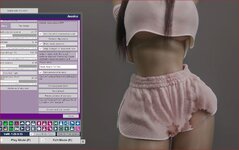
You can use it to shorten dresses, tear clothing, or add holes and cutouts directly in your scene.

How to use

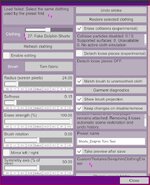
  1. Add the plugin to your Person atom.
  2. Select the clothing item in the plugin menu.
  3. Choose a brush and enable Enable editing.
  4. Hold Space + Left Mouse Button to erase.
  5. Hold Space + Shift + Left Mouse Button to restore.
...

Read more about this resource...
 
Last edited:
interesting concept,VR supported?
Sadly, I can’t test how it behaves in VR right now. Once the core features are finished (I still want to add more brushes and an option to adjust transparency) I’ll probably look into testing it in VR.

However, as I mentioned, Mxx’s Clothing Ripper already works well in VR, so I’m not sure how much demand there is for VR support in this plugin.
My plugin is mostly for making clothes look torn, shorten dresses or tranforming pants into shorts lol.
 
Great plugin, but there are some issues
1.If the clothing is simulated, it will not be able to be produced
2.When it takes effect, the outline of the clothing will become rough
屏幕截图 2026-11-10 100944.png
屏幕截图 2026-11-10 100948.png
 
Last edited:
Thanks for feedback guys!

Great plugin, but there are some issues
1.If the clothing is simulated, it will not be able to be produced
2.When it takes effect, the outline of the clothing will become rough
if
1. Pretty sure it should work if clothing has sim, not sure what you mean
2. Remove "Match brush " switch and it should be fine :D

Yeah, that is exactly what i was talking about maru01 has some clothes that acts weird as i mentioned in plugin :D , atm looking how to make it work for them, probably will be done in next patch (new patch is already pending). But, if you turn on "Deteach loose" you can still delete these pieces, its just a bit tricky.
And about wierd projection its because you probably moved person away after turing plugin on and since its not simulated projection "stayed", will be fixed in 0.3
1794310949433.png
1794310741291.png

These are temp workarounds for these problems. Will work on them in 0.3

In next patch 0.2 (im still waiting approval from hub)

- Added adjustable erase strength for gradual transparency.
- Added automatic saving and restoration of clothing edits with the scene. Keep the plugin attached for restoration. (Now state of clothing will save with the scene :D)
- Simplified controls: hold Space to erase and Shift + Space to restore. No mouse button required.
 
Last edited:
Hi, have a request, a question, an issue maybe, and a FYI. :)

(1) request: any chance you could make presets triggerable? unless not your interest? Idea being load clothing item with preset added via triggers for bigger scenes.
Did select "Clothing" item first in triggerables.
Adding a trigger did see 2 places to select eraser preset, but neither - no result when trigger fired. Tried after multiple save reloads.
Only way was in Eraser "Browse and load Preset".
(2) Q: How do you gradually make a preset "kick-in"?
This is what am referring to on your 1st page> " gradually reduce the visibility of selected areas directly in your scene."
(3) Issue:
See screenshot #1
Had made a scene, some small changes, reloaded scene.
Tried to activate my Eraser.Preset and error (see screenshot)
Also notice the saved preset Folder is now one i don't have on my PC?
Click "Browse and load Preset", click my image, and same error.
Click 'Refresh", reselect same shorts, and it works fine again.
That clothing item does have Stopper Clothing Manager and plugin Thick (see below)
So maybe that's why?
Or maybe because clothing in saved scene is already equipped? As opposed to load clothing later?
 

Attachments

  • clothing Eraser issue.JPG
    clothing Eraser issue.JPG
    85.8 KB · Views: 0
  • dance - show thickness with Eraser.JPG
    dance - show thickness with Eraser.JPG
    204.4 KB · Views: 0
Last edited:
Hi, have a request, a question, an issue maybe, and a FYI. :)

(1) request: any chance you could make presets triggerable? unless not your interest? Idea being load clothing item with preset added via triggers for bigger scenes.
Did select "Clothing" item first in triggerables.
Adding a trigger did see 2 places to select eraser preset, but neither - no result when trigger fired. Tried after multiple save reloads.
Only way was in Eraser "Browse and load Preset".
(2) Q: How do you gradually make a preset "kick-in"?
This is what am referring to on your 1st page> " gradually reduce the visibility of selected areas directly in your scene."
(3) Issue:
See screenshot #1
It appears? that the clothing has an item# beside it? 27?
What's if item number changes in a later scene dev?
Had made a scene, some small changes, reloaded scene.
Tried to activate my Eraser.Preset and error (see screenshot)
Also notice the saved preset Folder is now one i don't have on my PC?
Click "Browse and load Preset", click my image, and same error.
Click 'Refresh", reselect same shorts, and it works fine again.
That clothing item does have Stopper Clothing Manager and plugin Thick (see below)
So maybe that's why?
Or maybe because clothing in saved scene is already equipped? As opposed to load clothing later?

(4) fyi:
Using both this and https://hub.virtamate.com/resources/clothingthickness.70835/,
did have them both working (see screenshot).
Added Extra thickness for less clipping.
Is still a visible outer edge. LOL, but am pretty sure you didn't design this to work with thickness. So just an FYI.

:rolleyes:
 
Hi, have a request, a question, an issue maybe, and a FYI. :)

(1) request: any chance you could make presets triggerable? unless not your interest? Idea being load clothing item with preset added via triggers for bigger scenes.
Did select "Clothing" item first in triggerables.
Adding a trigger did see 2 places to select eraser preset, but neither - no result when trigger fired. Tried after multiple save reloads.
Only way was in Eraser "Browse and load Preset".
(2) Q: How do you gradually make a preset "kick-in"?
This is what am referring to on your 1st page> " gradually reduce the visibility of selected areas directly in your scene."
(3) Issue:
See screenshot #1
It appears? that the clothing has an item# beside it? 27?
What's if item number changes in a later scene dev?
Had made a scene, some small changes, reloaded scene.
Tried to activate my Eraser.Preset and error (see screenshot)
Also notice the saved preset Folder is now one i don't have on my PC?
Click "Browse and load Preset", click my image, and same error.
Click 'Refresh", reselect same shorts, and it works fine again.
That clothing item does have Stopper Clothing Manager and plugin Thick (see below)
So maybe that's why?
Or maybe because clothing in saved scene is already equipped? As opposed to load clothing later?

(4) fyi:
Using both this and https://hub.virtamate.com/resources/clothingthickness.70835/,
did have them both working (see screenshot).
Added Extra thickness for less clipping.
Is still a visible outer edge. LOL, but am pretty sure you didn't design this to work with thickness. So just an FYI.
Hey there!

1 - Will test it, probably addable, you see, initally i made it for fun, then i thought it could be great to store presets, then i thought it is annoing each time to chose them and it should be stored in scene.
But i can see your point that somebody could use it large scenes with triggers. Ty for advice!
2 - My bad choice of words, it is about tranceparency, since in 0.2 it is possible to change tranceparancy
3 - Will try to fix it in next version, forgot to remove my own path lol.
4 - Yes, some edges are pain in the ass, as clothes with weird geometry like spheres and cillinders, atm im working on "Erase depth" to fix it.

Thank you for feedback!

UPD:

Small update will be released as soon as hub allows it.

- Added Load Preset trigger support for buttons and scene events.
- Added adjustable Erase Depth to reach thicker edges and overlapping clothing layers.
- Improved preset folder path handling when saving and reloading scenes.

Small guide how to load preset with trigger in next version -
In the buttons triggers, select Person - ClothingEraser - Preset JSON.
In Text To Send, enter your presets path, for example:
Custom/Textures/MyPresets/TornDress.json
Add a second action: Person - ClothingEraser - Load preset.
Save and click the button. The required clothing must be equipped.

And im think im pretty much done here, not sure if this plugin needs anything else. Trying to keep it simple without overloading sliders etc.
 
LinkStatic updated ClothingEraser with a new update entry:

Erase depth and triggers

- Added Load Preset trigger support for buttons and scene events.
- Added adjustable Erase Depth to reach thicker edges and overlapping clothing layers.
- Improved preset folder path handling when saving and reloading scenes.

Small guide how to load preset with trigger in next version -
In the buttons triggers, select Person - ClothingEraser - Preset JSON.
In Text To Send, enter your presets path, for example:
Custom/Textures/MyPresets/TornDress.json
Add a second action: Person -...

Read the rest of this update entry...
 
Hi. Take a look at how my script works; it should be helpful. You also need to calculate the edges or individual parts correctly—if they’re left hanging in mid-air, they should be discarded. Or, for instance, if a skirt is cut in half, it ought to fall away just like a towel; in other words, it should no longer remain attached to the body.
 
Hi. Take a look at how my script works; it should be helpful. You also need to calculate the edges or individual parts correctly—if they’re left hanging in mid-air, they should be discarded. Or, for instance, if a skirt is cut in half, it ought to fall away just like a towel; in other words, it should no longer remain attached to the body.
Sup, yeah saw your plugin, great job! Bc of it, i finnally could fix some tie issues for shirts. (Also one of the reasons i finally decided that depth erasing is needed, lol)
Im pretty sure its already should work this way, at least on clothes with simple geometry, however, yes, some clothes are still have issues. Not sure whats cousing them at this moment(
 
Back
Top Bottom