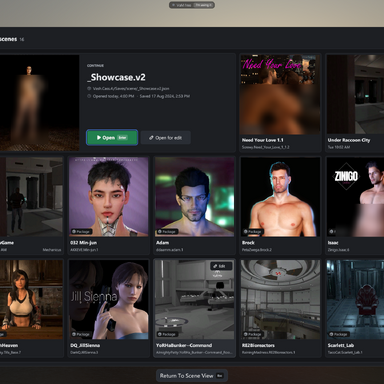
Mechanicus GUI

Plugins + Scripts Mechanicus GUI

Download [<1 MB]
Joined
Oct 24, 2026
Messages
4
Reactions
14
Mechanicus submitted a new resource:

Mechanicus GUI - Theme that includes minor functional changes to the UI. Focusing however mostly on cosmetic changes

View attachment 636953


GUI Theme that includes minor functional changes to the UI. Focusing however mostly on cosmetic changes.


Install


  • Put Mechanicus.VAM122M_EditionUI.1.var in VaM’s AddonPackages folder, or download it from the Hub.
  • If an older copy is already there, remove it first.
  • Start VaM, or click Rescan Packages if it’s already running.
Turn it on (this session)

  • Open the main menu and go to the Session...

Read more about this resource...
 
Nice UI! looks so much more modern

One small bug for me, the hoover over message appears briefly for probably 1 frame and then goes aways. Makes understanding the new icons a lot harder
 
Veery impressive, looks amazing. I second Redeyes post, hoover messages dont work... for example in the texture tab of a person, it is important cause you cant see the full path and name of the texture if it is a custom local one.

Awesome job thanks!
 
Nice UI! looks so much more modern

One small bug for me, the hoover over message appears briefly for probably 1 frame and then goes aways. Makes understanding the new icons a lot harder
I will investigate and try to update in the next days. The flesh is weak.
 
I will investigate and try to update in the next days. The flesh is weak.
Great thanks! Also (and this is an extra hehe) if it could be possible to make it compatible with everlaster uxplus, would be awesome... that or add a Favorites option to plugin lists hehe
 
And the animation pattern triggers don´t appear themed... once you click them they open and it is themed, but the main trigger window isnt.
Screenshot 2026-10-28 191713.jpg


Just trying to help btw :) I repeat it is an awesome plugin, in fact i think vam seems more agile with it active than with the native ui....
 
And the animation pattern triggers don´t appear themed... once you click them they open and it is themed, but the main trigger window isnt.View attachment 637058

Just trying to help btw :) I repeat it is an awesome plugin, in fact i think vam seems more agile with it active than with the native ui....
Dont worry about it. Thats why I put it in Beta.
Thanks for the feedback!
 
Love this a lot. So so very much. It looks great and feels like a whole new VAM.

I've got an issue where if I load a second scene after loading a different one first, the UI disappears. It's clearly still there as my inputs pass to it since my mouse in the bottom left corner won't interact with anything in the scene, but it's not visible and forces me to quit and restart. Is there any information I can give you that might help track it down?

Edit: This was my fault. A session plugin that utilizes another camera similar to PostMagic is just the same old bug we've dealt with forever where PostMagic eats the UI, not the fault of your plugin. Sorry about that!
 
Last edited:

Similar threads

Back
Top Bottom