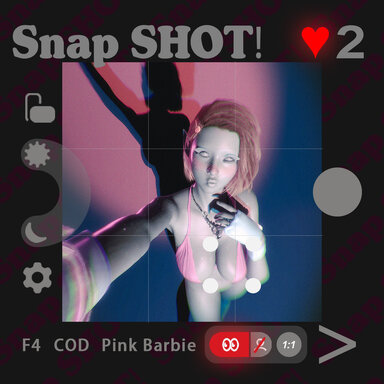
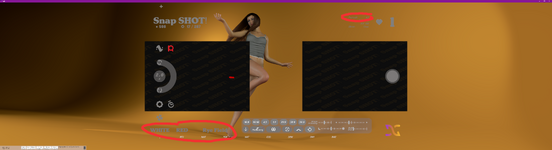
SnapSHOT! (app)

Scenes SnapSHOT! (app)

Download [42.4 MB]
非常感谢你们为社区所做的所有精彩工作!你的东西帮我省了好多时间。只是想问——我该如何手动选择预设?我能不能自己制作并添加预设?
顺便说一句,我还遇到了一个奇怪的bug,预览照片只显示头发,身体和衣服是透明的。有什么办法解决吗?
嗨!感谢您的认可! 🫡
您提到的“手动选择预设”是指姿势预设吗,您的意思是您希望创建自己的姿势按钮是吧
如果是的话,建议您稍等我发布最新的80版本,我打通了创建按钮的工作流,而且修复了很多bug,包括您提到的反射问题
是的反射问题是因为背景创建logo图案的投影插件导致的,权衡轻重后,我在新版本已经移除了该插件,修复了反射问题
我会在更新发布后回复您有关新建预设的问题
 
supperGR updated SnapSHOT! (app) with a new update entry:

Massive MASSIVE update coming in HOT!!!!

View attachment 625983
SnapSHOT! – ver.5 Update
Massive Update — Full Experience Overhaul, Visual & Performance Improvements

This is a huge update. The scene has been optimized in every aspect, with significantly improved visuals and better performance. I have also heavily revised the main introduction page, including many images and videos.
Please check the main page for...

Read the rest of this update entry...
 
Is it possible to stop the aspect ratio, lighting, background, etc from changing every time you select a new pose? I have loved the scene for generating a series of images since you first released, but I hate having to change the settings on every pose back to what I require. The random is a good function, but it would be great to be able to "switch it off".
 
Bug: The rotation indicator bar becomes misaligned on horizontal axis depending on resolution scaling. The UI elements change position with adjustment as expected, but the rotation bar does not change relative horizontal position.
 

Attachments

  • Screenshot 2026-09-24 142342.png
    Screenshot 2026-09-24 142342.png
    179.2 KB · Views: 0
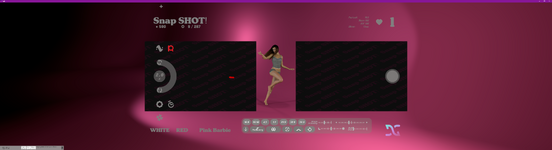
BUG: Framing border issue on 5120x1440, the borders do not align with the end image. Not tested at other resolutions.

(Happy to do any testing you require)
 

Attachments

  • Screenshot 2026-09-24 144221.png
    Screenshot 2026-09-24 144221.png
    1.5 MB · Views: 0
  • 1790257342.jpg
    1790257342.jpg
    1 MB · Views: 0
Love the new "Studio" mode where you can pick poses, again it would be great if I could switch to "photo" mode without losing the lighting and scene settings.

For example I might have "Bright" "MAT" "Vanilla Gold" set and want to keep that while switching back and forth between picking pose and photo mode.

(Currently only keeps settings when going from Photo to Studio)
 
Incredible work dude - this level of UI polish is pretty unheard of in the VAM world!!

Do you have any measurements (before & after) of leaving Focus on in default settings (without disabling high frequency)? I can do a performance-tuning pass on the plugin since i haven't touched it in awhile (seemed stable enough). While I'm at it, any tweaks/additions you can recommend? I might sneak some in with the update if simple enough :p
 
Hi @Jexx !! :geek:

1. Saving custom camera / lighting / background settings (your first and fourth points)

This is a very valuable direction. Considering general usability, here’s an idea: what if we turn the down arrow at the bottom-left of the configuration bar in Photo Mode into a Save button? When clicked, it saves the current camera angle’s settings into the photo system. Then, next time you switch to that camera angle, it will use your customized settings. In the same way, after exiting Photo Mode, no matter which pose is selected, as long as that pose’s settings have been customized and saved, they can be restored correctly and saved with the scene.
toolbar+.jpg

By the way, regarding the Save button — do you think it should also save the camera position parameters? I think it should, as that would make the logic more complete

There is one exception: Color Themes. Since switching Color Themes loads a relatively large number of Atom presets, it can cause varying degrees of stutter on different pc. So I intentionally kept Color Themes separate from camera angle configs. They need to be switched manually and independently, and will not be saved with the camera angle.

2. Rotation indicator bar misalignment / resolution scaling

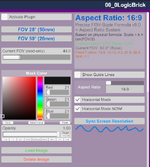
Regarding resolution adaptation: since it’s difficult to monitor every resolution perfectly in real time, I already added a button in the plugin that can detect the current resolution and match it with one click. Please give it a try and let me know how it goes! (Since I've only tested it on my other 2560x1600 secondary monitoro_O)That said, you’re right about the rotation plugin’s hub offset at different resolutions — I genuinely hadn’t considered that o_O. Thank you for pointing it out! I’ll try to fix it. If I need help with testing, I’ll DM you
core.png

3. Framing border issue on 5120x1440

Same as above — please try the one-click resolution detection/matching button and let me know if it helps. The border alignment issue on 5120x1440 is also very useful feedback. I haven’t tested it at other resolutions yet, and I really appreciate your offer to help test :LOL:. I’ll reach out if needed

Once again, thank you so much for your suggestions and prompt feedback!!!!!!
 
Last edited:
Incredible work dude - this level of UI polish is pretty unheard of in the VAM world!!

Do you have any measurements (before & after) of leaving Focus on in default settings (without disabling high frequency)? I can do a performance-tuning pass on the plugin since i haven't touched it in awhile (seemed stable enough). While I'm at it, any tweaks/additions you can recommend? I might sneak some in with the update if simple enough :p
Hi PrettyFrank !! :geek:

Thank you so much for your kind words! And a huge thank you for making Focus — the original plugin works perfectly. It has been rock-solid in my SlutShow scene , and I've never felt any extra performance pressure, so please don't worry about that at all ;)

My customized version is mainly to support a "simulated camera autofocus" feature in my photo scene. Here's what I changed:

The original mainly scans horizontally, with about 40 rays at 30 times per second
In my scene, the player camera is the camera screen, so I needed to simulate an autofocus area. I added vertical scanning and adapted it for portrait/landscape, wide-angle/telephoto, and FOV
To make focus prioritize specific body parts, I also added collider weight scoring
This increased the ray count per scan to about 180. If it still ran at the original 30 times per second, the total ray count would be too high. So I added a High Frequency Mode toggle: default low frequency (about 10 times/sec) for performance, and high frequency (about 50 times/sec) for fast tracking :unsure:

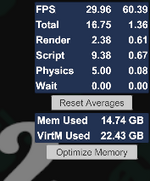
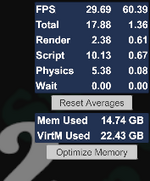
As you suggested, I tested with a performance-heavy outfit while moving the camera quickly, and captured the VAM performance window with high frequency off/on. Here are the screenshots and data:

High Freq OFF: High Freq OFF.png

High Freq ON: High Freq ON.png

My setup: Ryzen 7 5800H + 32GB RAM + RTX 3070 Laptop. As you can see, enabling high frequency only adds about 1 ms total overhead, and FPS barely changes. It's totally acceptable in my scene...

I'm not a programmer — the customization was all done with AI help o_O— so I can't offer any professional suggestions o_O. I just hope this data is helpful for your performance tuning. Thanks again for your plugin!:D
 
Thanks for the quick response!

1. Not sure I understand, I'm not asking to save camera angle just the Aspect Ratio and current 3 Colour Theme settings, this would be less taxing on systems as it wouldn't change every time you clicked for a new random pose. But yes if that button could become a "Lock Settings" toggle it would be great. For clarity the two things I want to stay the same when clicking next random pose button, or when entering the phone mode, are in the pictures attached:

I set the three options:
Screenshot 2026-09-25 090325.png
and the aspect:
Screenshot 2026-09-25 090406.png

Screenshot 2026-09-25 091113.png
Press the next random pose button:
Screenshot 2026-09-25 090444.png
and the settings have changed:
Screenshot 2026-09-25 091949.png


2-3. I have tried the button and nothing changes, I see the log output:
[Precise Formula] ✅ Resolution synchronized: 5120 × 1369
Aspect ratio: 3.7400 (3739:1000 (Custom))
Canvas logical size: 4039 × 1080
Current: FOV 50° (26mm)
Screen type: ultra-wide screen
Compensation mode: width-based
 
@Jexx

Hi Jexx,

Thanks again for the detailed follow-up

1. Lock Settings / keeping Aspect Ratio & Colour Theme unchanged

Now I understand what you mean. You’re not asking to save camera angles per pose — you want a way to keep Aspect Ratio and the current 3 Colour Theme settings unchanged when switching random poses or entering the phone.

That makes sense. The small lock icon idea is interesting, but putting a lock on every config option might make the UI too fragmented. A cleaner approach would be a single global Lock Settings toggle for the most important settings, such as Aspect Ratio, Colour Theme, Bloom, and Light Intensity.

That said, I want to be honest: the core design of this scene is that every pose comes with its own lighting, camera angle, and visual setup. So a full lock feature would somewhat go against that direction. Because of that, I’ll put this at a lower priority for now — but it’s on my list.

2. Resolution issue

I’ve already modified a new version of the plugin. It can automatically detect the screen resolution / aspect ratio and apply compensation automatically, without relying on manually clicking a button. I’ve also added more debug output. I’ll DM it to you — looking forward to your test results! 🫡
 
The photos displayed on the in-scene Photo Wall only show the hair, without the face and body.View attachment 626214
Hey yanoldwest

I saw Chinese in your screenshot, and the name of your image attachment has Chinese in it too. So I'm guessing you're Chinese, right? I'll reply in Chinese from now on
嘿,就像刚刚Jexx提到的,通常应该不是snapshot场景本身的问题,应该是你的会话插件有一些例如滤镜之类的东西?或者是什么皮肤相关的插件??或者反射相关的插件,你可以尝试禁用一些插件试试看。
然后顺便看看点地上的照片,显示的照片原图有没有身体部分啊?
 
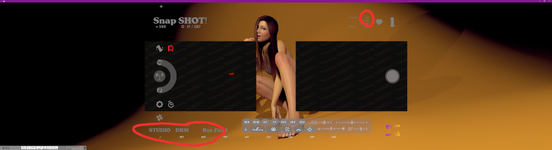
This is one of the best scenes I've used, but I ran into a problem. As shown in the picture, the UI repeats when the camera is at 2X, but it's fine at 0.5X. Did I set something up wrong?
c415069a-995c-46fa-bf36-b34e82685198.png
 
This is one of the best scenes I've used, but I ran into a problem. As shown in the picture, the UI repeats when the camera is at 2X, but it's fine at 0.5X. Did I set something up wrong?
Hi KKKK5698, I've tested this and have not been able to reproduce your issue, have you checked your VAM logs for any failed plugins or errors, also, do you have any session plugins running? Are you running BepInEx or any other external Mod? (To be honest I've never used the function until testing, I just roll the mouse wheel to zoom).

Does the issue happen every time, even after a fresh start of VAM?
 
Last edited:
Hi PrettyFrank !! :geek:

Thank you so much for your kind words! And a huge thank you for making Focus — the original plugin works perfectly. It has been rock-solid in my SlutShow scene , and I've never felt any extra performance pressure, so please don't worry about that at all ;)

My customized version is mainly to support a "simulated camera autofocus" feature in my photo scene. Here's what I changed:

The original mainly scans horizontally, with about 40 rays at 30 times per second
In my scene, the player camera is the camera screen, so I needed to simulate an autofocus area. I added vertical scanning and adapted it for portrait/landscape, wide-angle/telephoto, and FOV
To make focus prioritize specific body parts, I also added collider weight scoring
This increased the ray count per scan to about 180. If it still ran at the original 30 times per second, the total ray count would be too high. So I added a High Frequency Mode toggle: default low frequency (about 10 times/sec) for performance, and high frequency (about 50 times/sec) for fast tracking :unsure:

As you suggested, I tested with a performance-heavy outfit while moving the camera quickly, and captured the VAM performance window with high frequency off/on. Here are the screenshots and data:

High Freq OFF: View attachment 626209

High Freq ON: View attachment 626210

My setup: Ryzen 7 5800H + 32GB RAM + RTX 3070 Laptop. As you can see, enabling high frequency only adds about 1 ms total overhead, and FPS barely changes. It's totally acceptable in my scene...

I'm not a programmer — the customization was all done with AI help o_O— so I can't offer any professional suggestions o_O. I just hope this data is helpful for your performance tuning. Thanks again for your plugin!:D
Interesting usage (and I loved your previous work with Slut Show as well btw)! I tend to like to release a plugin, quickly fix any bugs, then let it just stay as a stable release for awhile while folks (like you and I) use it and discover its limits, where it could be improved etc.

Focus is one of those that I routinely use (often with Sensor), so it's certainly a candidate for a revisit and update if I need. In particular now that Fable is so danged good, I can go in and ultra-tune previous plugins with little effort.

Btw, I'm fully in the middle of a new high-immersion plugin (Attention) that handles eye/head tracking modeled off real human behavior (rather than random cyclic behaviors). Basically replaces all the Glance/Gaze plugins (handles all the stuff they did, plus a lot more). It's also designed around multiple targets (all built in) so getting a model to look at different cameras is as easy as setting targets in the scene and triggering the action. Really powerful for scenes like yours where you may want to bring a model to life a bit - can just drop it in and she comes to life, or dive into the advanced controls for elaborate scenes. Stay tuned for a release before long :)
 
Interesting usage (and I loved your previous work with Slut Show as well btw)! I tend to like to release a plugin, quickly fix any bugs, then let it just stay as a stable release for awhile while folks (like you and I) use it and discover its limits, where it could be improved etc.

Focus is one of those that I routinely use (often with Sensor), so it's certainly a candidate for a revisit and update if I need. In particular now that Fable is so danged good, I can go in and ultra-tune previous plugins with little effort.
Focus really is a game-changer. Ever since I saw that cinematic zoom shot in your promo video, I was completely hooked :LOL:

At first, when I tried using it directly in my snapshot scene, the issue was that the HeadLink plugin I was using locks an empty atom in front of the player camera and attaches UI to it so the icons follow the camera (yeah, a very dumb approach:ROFLMAO:). Because of that, Focus would often lock onto that empty atom by mistake. Even if I put it in the exclusion list, it seemed like as soon as I packaged the scene and loaded it in a fresh VAM setup, the exclusion would stop working again. That's why I went with a custom version and hard-coded some exclusion rules

Then I realized it'd be way better to make Focus part of a camera focus-tracking indicator system, so I customized stuff like text display, focus weighting, performance optimization, etc

Btw, I'm fully in the middle of a new high-immersion plugin (Attention) that handles eye/head tracking modeled off real human behavior (rather than random cyclic behaviors). Basically replaces all the Glance/Gaze plugins (handles all the stuff they did, plus a lot more). It's also designed around multiple targets (all built in) so getting a model to look at different cameras is as easy as setting targets in the scene and triggering the action. Really powerful for scenes like yours where you may want to bring a model to life a bit - can just drop it in and she comes to life, or dive into the advanced controls for elaborate scenes. Stay tuned for a release before long :)
Wow, Attention is exactly the plugin I've been hoping for!

I really don't want the model in a studio scene to just blankly stare at one spot, or the opposite—stare at the camera nonstop. I tried combining a super bloated, barely working gaze system that AI helped me write with a random pose morph system, just so the character wouldn't feel so stiff. Like, randomly looking at points in a view cone to simulate spacing out, or the longer the camera stays still, the more distracted she gets—until she basically stops looking at the camera at all :sneaky:

I've already pulled up a chair and I'm just waiting for Attention to drop hahaha :geek:
 
This is one of the best scenes I've used, but I ran into a problem. As shown in the picture, the UI repeats when the camera is at 2X, but it's fine at 0.5X. Did I set something up wrong?View attachment 627077
我靠这问题还真是奇葩哈哈哈,所以是不是,点击变焦之后,镜头完全没动,fov也没变,然后只有所有UI复制了一份然后向中心缩小了??
那我猜缩小之后的那些UI都还可以交互??原来位置的大一些的这些UI应该就没法交互了吧,正常右下角切姿势或者右上角切机位时候的自动变焦会触发这bug吗??
我最开始也是用的中文翻译补丁,结果经常出现奇奇怪怪的bug,甚至导致某个插件的某个按钮直接无法交互..所以我现在都直接用英文版呢,毕竟中文不是原生支持的,而且有的UI他给翻译有的就不翻译,特别不稳定 :cautious:

不过现在这个第五个版本有个严重的bug就是对于超宽屏不兼容,我马上会发布一版修复版本,到时候看看这个问题还是不是存在
 
I really don't want the model in a studio scene to just blankly stare at one spot, or the opposite—stare at the camera nonstop. I tried combining a super bloated, barely working gaze system that AI helped me write with a random pose morph system, just so the character wouldn't feel so stiff. Like, randomly looking at points in a view cone to simulate spacing out, or the longer the camera stays still, the more distracted she gets—until she basically stops looking at the camera at all :sneaky:

I've already pulled up a chair and I'm just waiting for Attention to drop hahaha :geek:

That's def what it does! It's super easy to add targets throughout the scene (no need for GlanceTargets or other weird plugin hacks), and either look at them (eyes only), track them (eyes and head), or react to them (quick reactions followed by tracking). All this comes with global and per-target sliders for things like chance to notice, fascination, motion sensitivity (she'll naturally track moving objects/player like anyone would), etc. Includes micromovements (eyelids and brows) that hopefully shouldn't collide with most folks looks/poses, a blink engine modeled off research white papers (honestly everything was) :)

Def includes bored scanning, weighting systems for what's noticed, spent time on, etc. Any target added naturally exposes look/track/react triggers for use in your scene as well...

Teaser shots:
1790655857743.png
1790655892671.png
 
That's def what it does! It's super easy to add targets throughout the scene (no need for GlanceTargets or other weird plugin hacks), and either look at them (eyes only), track them (eyes and head), or react to them (quick reactions followed by tracking). All this comes with global and per-target sliders for things like chance to notice, fascination, motion sensitivity (she'll naturally track moving objects/player like anyone would), etc. Includes micromovements (eyelids and brows) that hopefully shouldn't collide with most folks looks/poses, a blink engine modeled off research white papers (honestly everything was) :)

Def includes bored scanning, weighting systems for what's noticed, spent time on, etc. Any target added naturally exposes look/track/react triggers for use in your scene as well...

Teaser shots:
View attachment 627299View attachment 627300
Holy...
Honestly, I'm out. Done with the soulless AI gacha game :ROFLMAO:
Even the UI is ORZ-level pro 🫡

Can’t wait!!
 
Hi KKKK5698, I've tested this and have not been able to reproduce your issue, have you checked your VAM logs for any failed plugins or errors, also, do you have any session plugins running? Are you running BepInEx or any other external Mod? (To be honest I've never used the function until testing, I just roll the mouse wheel to zoom).

Does the issue happen every time, even after a fresh start of VAM?
Yes, it happens every time VAM starts, and there’s no error. I haven’t modified the program either. I’ll reinstall this scene later to see if it works properly.Thanks for your concern and help.
 
我靠这问题还真是奇葩哈哈哈,所以是不是,点击变焦之后,镜头完全没动,fov也没变,然后只有所有UI复制了一份然后向中心缩小了??
那我猜缩小之后的那些UI都还可以交互??原来位置的大一些的这些UI应该就没法交互了吧,正常右下角切姿势或者右上角切机位时候的自动变焦会触发这bug吗??
我最开始也是用的中文翻译补丁,结果经常出现奇奇怪怪的bug,甚至导致某个插件的某个按钮直接无法交互..所以我现在都直接用英文版呢,毕竟中文不是原生支持的,而且有的UI他给翻译有的就不翻译,特别不稳定 :cautious:

不过现在这个第五个版本有个严重的bug就是对于超宽屏不兼容,我马上会发布一版修复版本,到时候看看这个问题还是不是存在
点击变焦后镜头动了,FOV也改变了。缩小后的UI不可以交互,原来大的UI可以交互。我更新了第六版还是这样,看来我不走运。我怀疑是画面被复制缩小了一份。我之后会重新下载安装这个场景,看看能不能解决它。谢谢你的帮助
 
点击变焦后镜头动了,FOV也改变了。缩小后的UI不可以交互,原来大的UI可以交互。我更新了第六版还是这样,看来我不走运。我怀疑是画面被复制缩小了一份。我之后会重新下载安装这个场景,看看能不能解决它。谢谢你的帮助
如果能附上一个特别短的录屏就太好了,因为看起来似乎是三个插件同时被复制,大概和相机有关,你确定会话插件什么都没有吗,比如postmagic之类的,因为会影响相机的插件不多,通常重新下载安装不太会解决问题的,,
下次启动vam后,不要打开场景,先按下“alt+t”强制切换回英文,然后再打开场景测试下,好在snapshot启动速度远大于slutshow。。也不排除是中文翻译造成的问题
 
Back
Top Bottom