
Geraldo

Well-known member
Joined
May 12, 2024
Messages
229
Solutions
7
Reactions
604
Geraldo submitted a new resource:

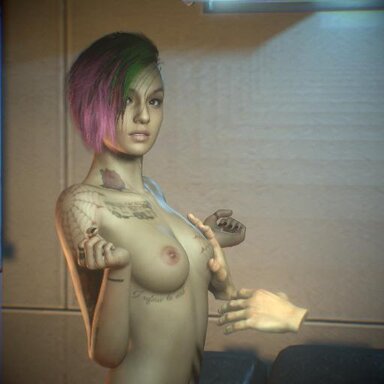
Judy's preem BD - A brief demo scene focused on interactivity for desktop players

For the majority of scenes and especially for people not playing in VR, interaction is limited and most strategies resort to pressing buttons while watching an animation play out. Moving forward, I want to take on a different approach on scene creation, focusing more on "gaming" aspect of VaM instead of the "viewing". In this short demo scene I explored @Mxx 's amazing FloatingHand plugin in an attempt to...

Read more about this resource...
 
Looks great! Just an idea to make this even more immersive, I would clone Judy's voice in voxta and add the touch elite plugin. 😎
 
Looks great! Just an idea to make this even more immersive, I would clone Judy's voice in voxta and add the touch elite plugin. 😎
Thanks! Never used Voxta or the touch elite plugins, I'll take a look.
Hey, great scene! I was wondering if ProximityGrab would be of any help to add grab actions 😗
Thanks! ProximityGrab works great and I've been trying to incorporate it into some of my scenes, might give it a try in this one too (y)
 
Thanks! Never used Voxta or the touch elite plugins, I'll take a look.

Thanks! ProximityGrab works great and I've been trying to incorporate it into some of my scenes, might give it a try in this one too (y)
You need somewhat decent hardware for it to run locally on your machine. So definitely research it.
 
Geraldo updated Judy's preem BD with a new update entry:

Lots of new features

- You now have a penis: Press 5 while you're in game mode to spawn a penis that follows your movement. Pressing 6 locks it in place performing a thrust animation while you're free to move around. I'll configure male orgasm in a future update. Choosing Male 1 grants you a bigger penis, for obvious reasons.
- Draggable body parts: Head, hips, and nipples can be dragged around by clicking and holding LMB. They reset the position if you let go. I'll think about the possibility of integrating...

Read the rest of this update entry...
 
Geraldo updated Judy's preem BD with a new update entry:

Massive update: Enhancing the sandbox features and immersion

- A huge emphasis in this update was given to the atmosphere and player interaction with the environment. I wanted the space to feel lived, that this place could actually be Judy's flat, so I put a bunch of cool stuff around, animated some things... Several objects scattered around the scene contain physics. So, yes, feel free to move around and mess things up, it is intended for you to break things by moving objects ;) there's also a cat living in the flat now, which moves around from place...

Read the rest of this update entry...
 
Is their a way to remove Judys hair? When i try to load an appareance it stays and i can seem to find it anywere to remove it.
 
It's a CUA, not real hair. You'll have to delete/disable the two following atoms from the scene: CUA_Hair_Judy and CUA_Cyberware_Judy. I'd suggest you just disable them in case you want to load Judy back again eventually. For that, go to the control tab and disable it.
1789939108250.png

1789939219684.png


I'll add a button in the UI to remove those for people who switch the look.
 
Is their a way to remove Judys hair? When i try to load an appareance it stays and i can seem to find it anywere to remove it.
Btw check this guide to understand what CUAs are:
I also had issues when I first started using VaM not really understanding why some things are the way they are. A lot of characters don't have real VaM hair, they instead have objects (assets) which are glued to the head and act as hair. This generally saves performance while also being easier to model the hair exactly how the game appearance is, so a lot of looks use this strategy.
 
Back
Top Bottom