• Hi Guest!

    We have posted a new VaM2 dev log on Patreon, starting a monthly cadence of written progress updates between Beta releases. Highlights include the new Gizmos System, Selection Carousel, and Modes System with Context-Specific Editing. Beta1.2 is 15 of 21 items complete.

    Read the full post on Patreon, or follow progress on the public Trello roadmap.
VaM Backstage - your library manager

Plugins + Scripts VaM Backstage - your library manager

Download [109.78 MB]
1.- Works great, thanks for the update. Labels are really nice and it remembers window state on reopen, and it really feels lighter and more agile.
2.- Maybe it´s obvious but how do the offload folders work? I created one in the preferences but how do i send packages to the offload folders and restore them from the interface?
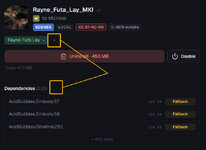
3.- Another request hehe, would it be possible to add a button to add a Label to all dependencies of a package at the same time? That way it would help a lot to organize stuff... i attach picture to this purpose.
4.- Is it possible to show dependencies of a loose file the same way a package does? Maybe can´t be done cause of vam file structure or something like that, but if it is possible i would really love it :D

Thanks again for your work!
 

Attachments

  • Rquest.jpg
    Rquest.jpg
    79 KB · Views: 0
Once you add offload folder you can change disable behavior to move files to that folder instead of renaming to .var.disabled

Label inheritance already works, if you assign a label to package all its content items will show up when you filter content by that label. I'm considering how to improve the way labels from package and its content can interact, like how to select all packages that have a content item with certain label to bulk enable/disable easily. Btw did you know you can multi select contents and packages to enable/disable or apply a lable to all selected items at once. Of if you want to label content items specifically and not package you can use multi select in content library to filter by package - select all - assign label.

Detecting dependencies of loose files would require digging into VAM scene and other formats, I'd like to avoid doing that. But if some open source plugin does that I may consider looking at its code and porting functionality to Backstage.

Update: oh wait I misunderstood, you want to label dependencies and not content items. I don't understand use case then. For example Timeline or Embody dependencies would likely be used by multiple packages at the same time. And in general Backstage assumes the user doesn't want to look at dependencies too much, and wants them out of sight and automatically managed.
 
Last edited:
Thanks for your work, but i'm wondering if this tool can scan the things in the vars, as many vars from china now contain many duplicate clothes, textures, hairs and so on. Usually i'll delete them before putting them into addonpackage folder. But once i delete the textures, i have to find it and reload it on that person atom. This has been confusing me for long.
sorry for my poor english
 
I don't think package manager is the right tool to edit package contents. One thing you can try to make it easier is to try and open scene file with a text editor, and maybe find/replace path in text will be faster than reloading in vam, if this works you can then ask ChatGPT to write a small script for you.
 
Once you add offload folder you can change disable behavior to move files to that folder instead of renaming to .var.disabled

Awesome! Didn´t see it thanks!

I don't understand use case then.

My idea is that if i want to open a specific scene, i could open it with only the exact dependies it needs and nothing more to save resources and open it faster... The idea is to disable all, then select a scene inside Backstage, and with a single click enable ONLY the dependies needed by that single scene. It could be done with labels (I asign a label with the name of a scene to all its dependencies, then filter packages by that label, and enable only those), or even better with a "enable/disale" button that affects all dependencies of a specific scene at a time. Or even even better a kind of "Isolate" button for each scene, that in a single click disables everything except for dependencies needed by that specific scene. Or even even eeeeeeven better, make some kind of global "snapshots" or "states", meaning that i could save diferent global snapshots for everything. For example i enable 50 packages out of 100, then save a snaphot called "Bananas", and after that i could just load the "Bananas" snapshot at anytime, and everything would go to exactly how it was when i saved the state. I´m not sure if im explaining it right or if it is even possible... just throwing ideas that i would personally love and use all the time hehe, but the snapshots thing would be aweeeesooome i think :D
 
Last edited:
Enable/disable already works like that! When you disable a package, it will also automatically disable any of its dependencies that are not needed for other enabled packages. Same with enable, it will ensure everything that's needed is enabled.

And as for snapshots, you can assign "Bananas" label to packages that you need (you only need to mark directly installed packages, Backstage will handle the deps), then select all -> disable, filter by your label -> select all -> enable.

I had "enable/disable all packages with/except this label" in label right click menu, but I hidden it before release because I wanted to ensure such behavior is intuitive when you click on label in content tab (like should it touch all packages where at least single item contains this label? how to make it clear for the user?). I'll release that at some point later when this feature is properly thought out.
 
Enable/disable already works like that! When you disable a package, it will also automatically disable any of its dependencies that are not needed for other enabled packages. Same with enable, it will ensure everything that's needed is enabled.

True, but for example it does not detect session plugins, or packages needed by plugins like Decalmaker or postmagic lut for instance, that load things from other packages on demand, plus, it doesn´t work for scenes i´m still working on and haven´t saved as .var already... just loading a specific global preset would be a lot easier imho.

then select all -> disable

When i select all and hit disable, it doesn´t actually disable all packages (maybe cause it detects dependencies needed by those still enabled? dunno), so (in my case) i have to select all and hit disable or enable at least 3 or 4 times in a row to actually enable/disable all...
 
When i select all and hit disable, it doesn´t actually disable all packages (maybe cause it detects dependencies needed by those still enabled? dunno), so (in my case) i have to select all and hit disable or enable at least 3 or 4 times in a row to actually enable/disable all...
That's a bug. I'll fix it and make it work faster, after testing disabling a large library took 10 seconds, should be under 1 second.

True, but for example it does not detect session plugins, or packages needed by plugins like Decalmaker or postmagic lut for instance, that load things from other packages on demand, plus, it doesn´t work for scenes i´m still working on and haven´t saved as .var already... just loading a specific global preset would be a lot easier imho.
Right, if it's not listed as a dependency in .var, enable/disable actions will not affect it. This use case would be solved by adding bulk actions to label right click menu, a bit later.

thansk for update, but i cant seem to delete packages in the content tab
I don't understand. There is only "disable package" button in the content tab, to uninstall a package you'll have to go to the library tab.
 
That's a bug. I'll fix it and make it work faster, after testing disabling a large library took 10 seconds, should be under 1 second.


Right, if it's not listed as a dependency in .var, enable/disable actions will not affect it. This use case would be solved by adding bulk actions to label right click menu, a bit later.


I don't understand. There is only "disable package" button in the content tab, to uninstall a package you'll have to go to the library tab.
ok i was using it wrong then, let me delete stuff from library tab now
 
poma updated VaM Backstage - your library manager with a new update entry:

Auto hide even more irrelevant content and many small bug fixes and improvements

  • Hide bundled hairstyles, poses, and clothing: Optional auto-hide rules for hair, pose, and clothing items that ship inside packages categorized as something else, so the Hairstyles, Poses, and Clothing views only show dedicated packs.
  • Faster bulk actions: Enabling, disabling, and removing many packages at once is now noticeably quicker, with a handful of related bugs fixed.
  • Many small improvements: Polish across the library, content, and Hub views -...

Read the rest of this update entry...
 
This looks great! But it doesn't work with softlinks?
 
It currently ignores links to avoid circular references and such. What's your exact use case with links?
 
Everything in the last update works great for me thanks!

Just found an ocasional bug but haven´t isolated when and why it happens... sometimes when i´m browsing the Hub and the program window is not maximised, when i click to view a package details in hub it maximises the window by itself o_O hapenned to me twice but still dunno why happens only sometimes, sorry. If i manage to find out exactly when it happens i´ll tell u.

edit: Oh, nearly forgot, another request mwuahaha. Would it be possible to auto disable the old version of a package when u update it through the program?

Great work, keep it up! :D
 
I'm still thinking what to do with an old package when user updates. Not sure what's the best and most intuitive action. For dependency packages it's easy - users can clean up in orphans filter, but idk what to do with main packages. Maybe I'll add it as options in settings so the user decides to do one of: nothing, disable, delete, delete only if not local, ask every time.
 
Maybe I'll add it as options in settings so the user decides to do one of: nothing, disable, delete, delete only if not local, ask every time.
That sounds perfect, and if possible, inherit labels (y)(y)
 
Thanks for making this, here's some unsolicited and highly opinionated feedback:

- Ability to read soft links (symbolic links), vam supports this, you can add a soft link inside "AddonPackages" that points to another folder, i usually use this so I load only a set of vars depending what i need.
- A filter on LICENSE "Not commercial allowed" that will include *-NC* , PC, etc
- Ability to add other folders and not just "AddonPackages", personally I have multiple folders with different set of vars, depending on what I work, sometimes I create looks, sometimes I work on my SaaS, sometimes i just wanna make some photos


I did something quickly for myself with AI, it seem to work, shows everything, was able to extract looks etc.
1778185558856.png

If you want the first AI pr on your repo, let me know :ROFLMAO:
 
A filter on LICENSE "Not commercial allowed" that will include *-NC* , PC, etc
Done, will be in new version

Ability to add other folders and not just "AddonPackages", personally I have multiple folders with different set of vars, depending on what I work, sometimes I create looks, sometimes I work on my SaaS, sometimes i just wanna make some photos
That's exactly what offload folders are for. Needs better naming?

Ability to read soft links (symbolic links), vam supports this, you can add a soft link inside "AddonPackages" that points to another folder, i usually use this so I load only a set of vars depending what i need.
This would require some work to handle all edge cases. Like what if user toggles enable/delete/offload on such a package, do we move the target or symlink itself? And what if symlink target is on another disk? By the way, afaik symlinks usually require admin privileges, do you grant them every time to your package manager script? Why symlinks and not file moves?

If you want the first AI pr on your repo, let me know :ROFLMAO:
Development is 20% of work writing code and 80% reviewing it and making decisions, so PRs only make sense if one is ready to put serious effort into it. Otherwise it's easier for me to do it myself.
 
Last edited:
That's exactly what offload folders are for. Needs better naming?
No, I just didn't saw it, I was too tired
--

About the filter Not-"Commercial allowed"

I saw you already have "Commercial allowed" which shows all vars that can be used commercially, which is great
I was suggesting one that does the opposite, show all vars that are not allowed to be used commercially.

---

afaik symlinks usually require admin privileges
To create, yes. To read, no

Why symlinks and not file moves?
A, I just want to save my SSDs and it's easier/faster to me to create a symlink to a 60GB folder (manually, I press a few clicks, using Link Shell ) or create symlinks to multiple separate folders, needed when i work on my platform but used separately sometimes, then I just remove the symlinks that I don't.


"If you want the first AI pr on your repo, let me know" you should have ignored this :LOL: just a joke since github is filled with clanker PRs
 
Last edited:
This thing works better than the other ones. That being said, one small issue is compatibility with browser assist. Browser Assist offloads vars in "VamRoot\Saves\PluginData\JayJayWon\BrowserAssist\OffloadedVARs". This isn't an allowed location within Backstage because it "Overlaps a VAM managed directory". I do not know if this specific overlapping directory is a good place or not to put offloaded vars, I just take the author of browser assists word for it. Can you remove the path check so this path can be used please?
 
Back
Top Bottom