• Hi Guest!

    We have posted a new VaM2 dev log on Patreon, starting a monthly cadence of written progress updates between Beta releases. Highlights include the new Gizmos System, Selection Carousel, and Modes System with Context-Specific Editing. Beta1.2 is 15 of 21 items complete.

    Read the full post on Patreon, or follow progress on the public Trello roadmap.
Sim Setter (et al.)

Plugins + Scripts Sim Setter (et al.)

Download [<1 MB]
I'm not quite sure what you mean by this, could you elaborate?
Well i mean when you save presets (inside some plugins) it's make auto capturing of sort of little preview picture (together with preset file), for keep in mind what exactly this saved preset was for.
But in SimSetter preset system i not see this, ie it create file only, with no images. (sorry or i'm did miss something ?)
 
Well i mean when you save presets (inside some plugins) it's make auto capturing of sort of little preview picture (together with preset file), for keep in mind what exactly this saved preset was for.
But in SimSetter preset system i not see this, ie it create file only, with no images. (sorry or i'm did miss something ?)
Ah okay I get it now, I'll have to look into how that's done; the current preset code is basically just copied from what other creators have shared, so I haven't dug into it that much. You're right though, it would make some sense to have a thumbnail as a visual record of what each one is.
 
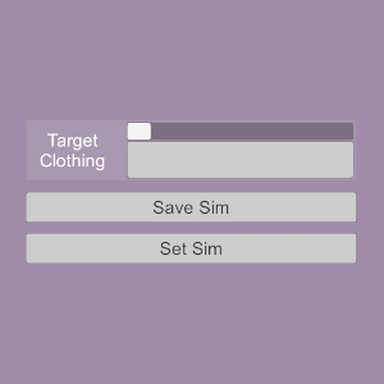
1776800620164.png

Getting this message when triggered by scene change in bodylanguage plugin (PoseMe>Actions>OnPoseEnter). When triggered manually by the Set Sim button in SimSetter works fine. Could you investigate pls?
 
View attachment 584829
Getting this message when triggered by scene change in bodylanguage plugin (PoseMe>Actions>OnPoseEnter). When triggered manually by the Set Sim button in SimSetter works fine. Could you investigate pls?
Are you directly triggering a full scene change with the trigger? If so, are you also triggering Set Sim at the same time? If that's the case, or similar, it's possibly trying to trigger Set Sim before the plugin has its saved clothing and sim data loaded in. If not, can you give a more detailed description of what exactly is being triggered, and how?

(In cases where you're switching to a new scene, using the "set on load" toggle in the destination scene is your best bet, because it's specifically there to make sure the set sim function is only triggered once the scene is fully finished loading, after the plugin data is restored and clothing sim is reset.)
 
Are you directly triggering a full scene change with the trigger? If so, are you also triggering Set Sim at the same time? If that's the case, or similar, it's possibly trying to trigger Set Sim before the plugin has its saved clothing and sim data loaded in. If not, can you give a more detailed description of what exactly is being triggered, and how?

(In cases where you're switching to a new scene, using the "set on load" toggle in the destination scene is your best bet, because it's specifically there to make sure the set sim function is only triggered once the scene is fully finished loading, after the plugin data is restored and clothing sim is reset.)
Shit, sorry not scene change. Pose change. I set up poses in BodyLanguage, one of them has a OnPoseEnter trigger to set sim. Switching between poses does not trigger setsim properly, I get the message mentioned above instead.
 
Shit, sorry not scene change. Pose change. I set up poses in BodyLanguage, one of them has a OnPoseEnter trigger to set sim. Switching between poses does not trigger setsim properly, I get the message mentioned above instead.
I set up what should be the barest version of the scenario (otherwise blank scene, basic person, body language + simsetter, two poses, pose 1 triggers set sim, ui buttons to apply each pose) and wasn't able to replicate the issue. The plugin should only send this message if the variable "savedClothing" is null or empty, and "savedClothing" should always be set to the selected clothing item when Save Sim is applied, so off the top of my head I'm not sure what could be causing this.

Some extra troubleshooting steps:
1. Have you tried re-saving the sim in the plugin and then attempting the triggered load?
2. You said that applying the sim via the plugin's UI button works; did you try using the pose trigger directly after this, or alternate back and forth between the two at all to see if there was a change in behavior?
3. This feels like a dumb question, but you aren't triggering save sim as part of this, right?

Additionally: are you using the Set Sim or Queue Set Sim trigger when doing the pose change? Pose changes in general reset the clothing sim, so triggering Set Sim at the same time won't do anything because it tries to apply the vertex position before the vertices are available to be set. I don't know if it would be related to the log message you're getting, but it's probably what should be done in this case anyway.

(Not sure if there's a way [functionally or policy-wise] to share the pertinent parts of the scene so I can poke at it directly, that would probably be the easiest.)
 
1. Tried that, still got the message.
2. First I tried changing the pose immediately after trigger set up expecting it to work and it didn't, then I tried the button within the plugin and it worked, tried changing the pose afterwards and it didn't work. I also tried reloading the scene and pose change trigger still didn't work.
3. I have not set up any save triggers pertaining to setsim plugin or any other. I manually positioned the clothing, pressed savesim in the plugin UI and tested if save worked by triggering setsim within plugin UI. It worked. Changing the pose afterwards made the plugin behave as if the variable "savedClothing" is null.

I have yet to try Queue Set Sim trigger and I will try it later, but I also felt maybe Delay trigger Logic Brick would do fine with the problem I am having. That said, I had two poses set in pretty much exactly the same conditions, first one of them worked as intended. First one was with atom in vertical position and the second one was in bent horizontal. That's about all difference there was, so the answer to why the second pose did not work is still very much obscure to me. I don't feel I can call my testing efforts extensive, but that's mostly because I don't have many ideas as to what could be the cause to begin with. If there is a plugin conflict I'd be quite surprized. Then again I consider BodyLanguage to be quite unstable with triggers and other much more heavily trigger dependent scenes collapsed easily in my experience, so might just be another BL hiccup. I'd love to share the scene here so you could pick it apart if you want, but it probably has way too much of critical assets I cannot post for copyright reasons, plus some of my own assets I am not prepared to share yet. All in all, it's a minor issue and for now I don't feel like further investigation will be conclusive, perhaps it will reveal itself at some point later with other people, making it easier to narrow down.
 
That said, I had two poses set in pretty much exactly the same conditions, first one of them worked as intended. First one was with atom in vertical position and the second one was in bent horizontal. That's about all difference there was, so the answer to why the second pose did not work is still very much obscure to me.
Does each pose have an instance of SimSetter it uses to set the clothing? This would lead to another potentially stupid question if so: did you make sure to save their respective sims in each one? They don't talk to each other so each one would need to be saved separately. I just ran a test with two poses with a plugin/state for each, and had no issue when each had saved sim data, but of course when one instance hadn't had its sim saved yet it would display that log message.

Using the delay trigger brick would probably give the same or similar results as queue set sim, but could also be another point of failure in the "chain of command" depending on the situation. However I don't think this particular issue points to some kind of instability in BodyLanguage or LogicBricks, it's either something internal to SimSetter or something in the way the things are connected together.
 
Back
Top Bottom