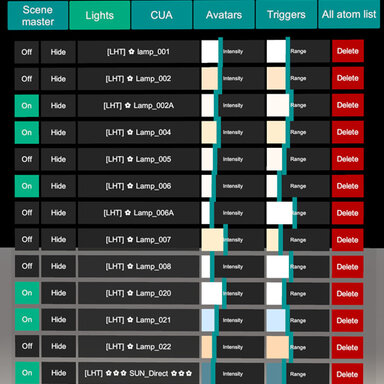
Outliner Remake (collections blender like)

Plugins + Scripts Outliner Remake (collections blender like)

Download [<1 MB]
@Miztress , @yesferatu
Guys, please test this build. I added the things you asked for, but I need confirmation that these solutions are actually viable and work the way they should.
I’m going to bend the site rules a little and share a MEGA link here. Hopefully the moderators will forgive me 🤗 I’ve fully unlocked all the controls for VR mode - https://mega.nz/file/oKokmKIS#hSQZDwVhHl2Tam7XgRlHXD1xHCcrUthVMtk4VcoPbas
What I need from you now is a screenshot of the settings you end up using for VR mode and VR Reset. You can save your settings by clicking the disk icon. menu should now be draggable by grabbing the top header. Billboard mode has been added as well, along with an experimental FOV compensation. The Reset button currently ignores the distance set with the slider and places the menu at a fixed distance of 2 meters.
Your feedback and the settings you end up using, will help define the default outliner configuration for VR.


View attachment 623402
Positioning the panel works much better in 10.var 😁
  • Desktop dragging works great in all modes(y)(y)
  • Desktop alignment settings off works great (y)(y)
  • Desktop "Stick to view" works great (y)
  • Desktop "Face the camera" works great (y)
  • Desktop "Face the camera" + "Billboard" works :unsure:
  • Desktop "Face the camera" + "Billboard" + "Follow view position" works :unsure::unsure::unsure: (rotating upside down is a bit strange)
  • Desktop "Face the camera" + "Follow view position" works great (y)(y)(y)
  • Desktop "Follow view position" works :unsure:
  • VR dragging works great in all modes (y)(y)
  • VR alignment settings off works great (y)(y)
  • VR "Stick to view" works great (y)
  • VR "Face the camera" is a bit odd :unsure::unsure::unsure: (...the panel counter-rotation during head yaw-axis rotation is strange to me, but I guess it is useful for adjusting the panel world rotation without moving it...)
  • VR "Face the camera" + "Billboard" works great (y)(y)(y)
  • VR "Face the camera" + "Billboard" + "Follow view position" works great (y)
  • VR "Face the camera" + "Follow view position" works great (y)
  • VR "Follow view position" is a bit odd :unsure::unsure::unsure: (...the panel counter-rotation during head yaw-axis rotation is strange to me, but I guess it is useful for moving the panel world position without rotating it...)
Take my comments with a grain of salt. Works MUCH BETTER than 9.var (y)(y)(y)

I will give it a few days of practical use before deciding on preferred settings.
 
EvilBox updated Outliner Remake (collections blender like) with a new update entry:

Reworked stick Mode - Profiles

Changes v10​

  • Window modes have been completely reworked into five independent profiles: Face Camera, Stick to View, Follow + Billboard, Free Billboard, and Custom. Each profile keeps its own behavior and interface settings.
  • Added many new placement controls, including separate Desktop/VR view selection, optional position memory, stabilized Billboard, header dragging, camera tilt, interface scale, visible rows, Recenter...

Read the rest of this update entry...
 
The new options for scale and position work great! Some things i noticed (with outliner loaded on a empty atom hehe):

1.- each time a person atom is selected in hierarchy, this error appears ciclically: !> [Outliner .10] person-controls: Object reference not set to an instance of an object

Sugestions:

1.- option to disable tooltips at the top.
2.- option to disable the cute ascii backround (its cute but it interferes with text hehe)

Haven´t noticed anything else weird, great job and thanks :)
 
Thanks! I’ve made a hotfix. Whenever you change something it’s always easy to accidentally break something else.
 
The new options for scale and position work great! Some things i noticed (with outliner loaded on a empty atom hehe):

1.- each time a person atom is selected in hierarchy, this error appears ciclically: !> [Outliner .10] person-controls: Object reference not set to an instance of an object

Sugestions:

1.- option to disable tooltips at the top.
2.- option to disable the cute ascii backround (its cute but it interferes with text hehe)

Haven´t noticed anything else weird, great job and thanks :)
fixed
Okay. I’ve actually caught myself thinking that the cat gets in the way sometimes too 🙃 I’d like to focus mostly on feedback and performance for next update. Hopefully I can find a way to make the tree a bit faster in heavier scenes.
 
All works great now :D

If you are looking for more things to implement, i can suggest one more option :cool: i could use a function to contract to title bar with double click. I mean when i double click the title bar, plugin contracts and shows only title bar, double click again to expand to default view.
Also, improve performance if at all possible. In big scenes it consumes a LOT of fps hehe

Anyway, the way it is works like a charm and saves a lot of time, cheers!
 
Two issues with 11.var (...not experienced in prerelease 10.var...)
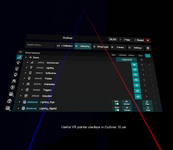
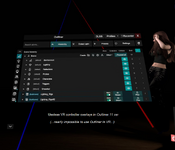
  1. In VR, Outliner draws on top of VR controller beams making Outliner nearly impossible to use (...screenshot 01, 02)
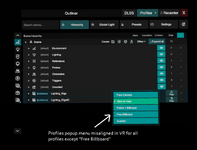
  2. In VR, Profiles popup menu draws in incorrect position in all Profile modes except "Free Billboard" (...screenshot 03)
 

Attachments

  • 01-var10-vr-controller-draw-correct.png
    01-var10-vr-controller-draw-correct.png
    478.9 KB · Views: 0
  • 02-var11-vr-controller-draw-incorrect.png
    02-var11-vr-controller-draw-incorrect.png
    508.4 KB · Views: 0
  • 03-var11-profile-popup-location-incorrect-in VR.png
    03-var11-profile-popup-location-incorrect-in VR.png
    265.7 KB · Views: 0
Two issues with 11.var (...not experienced in prerelease 10.var...)
  1. In VR, Outliner draws on top of VR controller beams making Outliner nearly impossible to use (...screenshot 01, 02)
  2. In VR, Profiles popup menu draws in incorrect position in all Profile modes except "Free Billboard" (...screenshot 03)
Thanks (y)This happened because I was trying to make the UI render on top of another plugin. I didn’t expect it to have this kind of side effect with the VR controller beams. I’ve restored the layer setup from version 10, so the beams should no longer be blocked and I also fixed the popup.
I’ll wait for your confirmation that the fix works :p
 
Back
Top Bottom