• Hi Guest!

    We have posted a new VaM2 dev log on Patreon, starting a monthly cadence of written progress updates between Beta releases. Highlights include the new Gizmos System, Selection Carousel, and Modes System with Context-Specific Editing. Beta1.2 is 15 of 21 items complete.

    Read the full post on Patreon, or follow progress on the public Trello roadmap.
Clothing-Driven Morphs

Plugins + Scripts Clothing-Driven Morphs

Download [<1 MB]

Stopper

Invaluable member
Featured Contributor
Joined
Dec 7, 2022
Messages
363
Solutions
1
Reactions
4,903
Stopper submitted a new resource:

Clothing-Driven Morphs - Clothing plugins that allows clothes to set morph values on equip

A clothing plugin that allows setting morph values when a clothing item is put on.

Currently in an early phase. Feedback welcome.

Notes
  • Currently will set values irrespective of what they were before.
  • Removing the clothing will attempt to set the morphs to whatever value was set when the plugin was last enabled
  • Added a toggle to disable the plugin if Naturalis is present
    • This is a quick and dirty hack to prevent potential conflicts with Naturalis...

Read more about this resource...
 
this plug-in looks awesome! Though when I try I adding the morph in the clothing driver plug-in after all the steps, I can’t find it in the long list
 
This does not seem to work for morph values with an extended range. When restoring values they are clamped to within a morph's default range.
 
Do it step by step, but nothing
 

Attachments

  • 01.JPG
    01.JPG
    8.1 KB · Views: 0
  • 02.JPG
    02.JPG
    11.3 KB · Views: 0
  • 03.JPG
    03.JPG
    52.8 KB · Views: 0
  • 04.JPG
    04.JPG
    5.5 KB · Views: 0
If you use local morph, the morph cannot be read after packaging is completed.My suggestion is to package the local morph into var. Use morph from the package。This way the morph can be read on other people's computers。
 
Last edited:
As I understand it, there is no answer to why the morph does not appear in the list? Is this the final? Did those 4 people who left reviews test this plugin at all?
 
Any way of getting this to work with extended ranges ?
 
據我所知,目前還沒有解釋為什麼變形功能沒有出現在清單中?這是最終版本嗎?那四個留下評論的人真的有測試過這個外掛嗎?

As I understand it, there is no answer to why the morph does not appear in the list? Is this the final? Did those 4 people who left reviews test this plugin at all?
I can't find morph uid too
 
I can't find morph uid too
I have also been at this for some time now. I can't figure it out either. Followed the steps closely, also tried a bunch of other stuff, but i can't make it work.
 
Finally found the solution to make this work with custom morphs for packages!


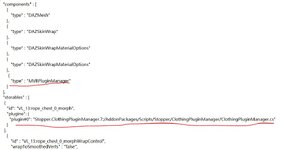
Apart from what was shown in the video, you also have to add the Name.default.clothingplugins file to the package and modify it before packaging:

2025-05-04_190809.jpg


Pay close attention to where to use “:” and “;”. If you have clothing presets you have to do this to each of the preset files too.

Lastly you also have to tick the "Morph Pack" box at the top in the package builder window.

Huge thanks to @VL_13 for posting this on Discord!
 
I have also been at this for some time now. I can't figure it out either. Followed the steps closely, also tried a bunch of other stuff, but i can't make it work.
Did you ever figure this out?

I have done everything as I should, but the clothing item does not show up in the morph uid list.

It appears that it requires a .vmi file, but I don't really know much about this.
 
Thanks, but this does not solve the issue that I am experiencing.

I can get the plug-in and everything to show up in the newly created clothing item, but inside the clothing driven morph plugin, I can not select my clothing item as it does not appear on the list which appears to only show .vmi files as I mentioned.

View attachment 604630
I don't really understand your question sorry.

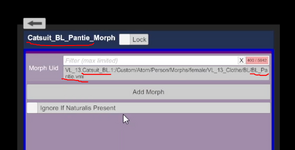
You got the plugin showing inside the clothing item. The morph Uid allows you to connect the clothing to a morph to activate the morph, when the clothing is active.
As i see it, the morph Uid is only supposed to show morphs, (vmi.) so i guess i don't see the issue?
 
I don't really understand your question sorry.

You got the plugin showing inside the clothing item. The morph Uid allows you to connect the clothing to a morph to activate the morph, when the clothing is active.
As i see it, the morph Uid is only supposed to show morphs, (vmi.) so i guess i don't see the issue?

Must be a language issue on your end then.

I followed the video tutorial that is in the linked guide.

After he had done the first steps, he goes in and select a morph related to that specific clothing item.

ffff.PNG

Since nothing else was mentioned in the guide or video, this gave me the impression that the same would happen to me, I could go in, select the Morph uid for my newly "created" clothing item and add it.

But there is nothing, so I am wondering if I am missing a step, is the clothing item I did this on not compatible with this, or am I just supposed to go through the long list of random morphs in the hopes of finding one that can adjust the correct parts of the body?

I really don't know how to explain this any simpler than what I have already done..
 
Must be a language issue on your end then.

I followed the video tutorial that is in the linked guide.

After he had done the first steps, he goes in and select a morph related to that specific clothing item.

View attachment 604944

Since nothing else was mentioned in the guide or video, this gave me the impression that the same would happen to me, I could go in, select the Morph uid for my newly "created" clothing item and add it.

But there is nothing, so I am wondering if I am missing a step, is the clothing item I did this on not compatible with this, or am I just supposed to go through the long list of random morphs in the hopes of finding one that can adjust the correct parts of the body?

I really don't know how to explain this any simpler than what I have already done..
Extract the specific morph VMI and VMB files you need and place them in `vam1.22.0.3\Custom\Atom\Person\Morphs\female`. Locate the morph within the plugin, click "Add Morph," and slide the control to 1.
 
Extract the specific morph VMI and VMB files you need and place them in `vam1.22.0.3\Custom\Atom\Person\Morphs\female`. Locate the morph within the plugin, click "Add Morph," and slide the control to 1.

So it is in fact nothing like what the guide(s) makes it look like and you need to do several extra steps that are not mentioned..
 
Back
Top Bottom