


You are using an out of date browser. It may not display this or other websites correctly.
You should upgrade or use an alternative browser.
You should upgrade or use an alternative browser.
VaM 1.x An annoying issue with the abdomen, belly, pelvis or genital area.
- Thread starter RefNinG
- Start date
Threads regarding the original VaM 1.x
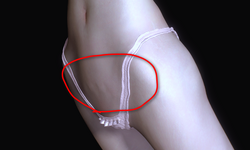
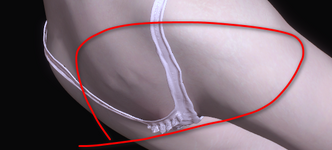

Are the characters from the same creator?
Is the model's morphs merged as one?
If not merged, you can go through the morphs and see which one/s are causing that.
I think this might not be a morph issue because I loaded the default character and just made her a bit slimmer. It seems more like a problem with the internal mesh of the genital area—it doesn't adjust with the morphs, almost as if it's fixed in place internally.
Upvote
0
It seems like this issue was brought up a while ago, but nobody ever replied to it.Question - Creating smooth morphs that affect both main body and genital model.
I've been making morphs for a while, but genital morphs eluded me. I've figured it out today, but sadly it did not fix my main reason for learning how to do it. If I want to create a morph that affects the area between the lower abdomen and pubic area, I get ugly geometry from the sudden stop...hub.virtamate.com
Upvote
0

Try the following
get https://hub.virtamate.com/resources/female-mons-morphs.5009/
and try 'v1 GM Mons extend' (not any of the other similar named)
The goal is to test a theory as to why this may be happening. See if this 'deals' partly with the issue of seemingly 'non-moving' verts.
A value of 0.10 may be enough.
get https://hub.virtamate.com/resources/female-mons-morphs.5009/
and try 'v1 GM Mons extend' (not any of the other similar named)
The goal is to test a theory as to why this may be happening. See if this 'deals' partly with the issue of seemingly 'non-moving' verts.
A value of 0.10 may be enough.
Upvote
0
Thank you so much for your reply! I adjusted the sliders as you suggested, but it seems to have only slightly improved the external morph. The internal mesh still has an error—there are two vertices that simply refuse to adjust.Try the following
get https://hub.virtamate.com/resources/female-mons-morphs.5009/
and try 'v1 GM Mons extend' (not any of the other similar named)
The goal is to test a theory as to why this may be happening. See if this 'deals' partly with the issue of seemingly 'non-moving' verts.
A value of 0.10 may be enough.
Upvote
0
(1) What's your VAM smoothing at?Thank you so much for your reply! I adjusted the sliders as you suggested, but it seems to have only slightly improved the external morph. The internal mesh still has an error—there are two vertices that simply refuse to adjust.
i use 4.
Saw a person mention that Skynets latest SSS plugin has masks for varying levels smoothing for individual areas. Perhaps of interest if smoothing helps.
(2) Any chance you could share how i would achieve roughly that look?
Even if it's roughly close, especially if one morph or look. VAM hub Link would be best. Will have a look and see if can fix with native DAZ morph.
Have lotsa characters but don't have any "skinnier" models or similar.
Still have a theory as to why that is occuring.
Upvote
0
1. I make sure that all of my graphics and physics settings are set to the absolute maximum, including the smoothing levels.(1) What's your VAM smoothing at?
i use 4.
Saw a person mention that Skynets latest SSS plugin has masks for varying levels smoothing for individual areas. Perhaps of interest if smoothing helps.
(2) Any chance you could share how i would achieve roughly that look?
Even if it's roughly close, especially if one morph or look. VAM hub Link would be best. Will have a look and see if can fix with native DAZ morph.
Have lotsa characters but don't have any "skinnier" models or similar.
Still have a theory as to why that is occuring.
2. As for how I achieved this effect: I simply loaded the default character into an empty scene to ensure the colliders wouldn't cause any errors. Then, I used VAM's built-in 'body' morphs, specifically body size and ren (thin). You just need to push either of those sliders—adjusting 'ren' up to 2 or shrinking 'body size' down to -2—to see if you get the same effect I am experiencing.
Upvote
0
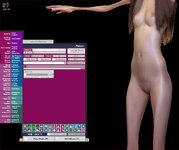
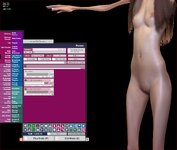
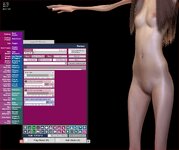
Hi. Had a little time, so tried it out.
3 screenshots.
(1) Body Size -2
(2) see each screenshots for only morphs active (turned all others off)
(3) " " + add an unreleased personal morph just to show how can pull crease out
How does this compare to what you are wanting? Maybe am misunderstanding?
3 screenshots.
(1) Body Size -2
(2) see each screenshots for only morphs active (turned all others off)
(3) " " + add an unreleased personal morph just to show how can pull crease out
How does this compare to what you are wanting? Maybe am misunderstanding?
Attachments
Upvote
0
Thank you so much again for taking the time to test this out and for your detailed reply! As you can see, this does indeed cause some errors in the genital area. I’m not sure if it’s an issue with the morphs themselves or an inherent problem with the VaM character's genital mesh, which tends to act up during slightly exaggerated bends—especially on thinner characters.Hi. Had a little time, so tried it out.
3 screenshots.
(1) Body Size -2
(2) see each screenshots for only morphs active (turned all others off)
(3) " " + add an unreleased personal morph just to show how can pull crease out
How does this compare to what you are wanting? Maybe am misunderstanding?
I haven't been able to find a better morph that can simultaneously adjust both the body and genital sizes without causing errors, mostly because a lot of characters are just too large for my preference. That said, your advice was incredibly helpful. Even though there might still be some internal mesh errors, it looks much better now at least.
Upvote
0
Glad to hear looking better for you!Thank you so much again for taking the time to test this out and for your detailed reply! As you can see, this does indeed cause some errors in the genital area. I’m not sure if it’s an issue with the morphs themselves or an inherent problem with the VaM character's genital mesh, which tends to act up during slightly exaggerated bends—especially on thinner characters.
I haven't been able to find a better morph that can simultaneously adjust both the body and genital sizes without causing errors, mostly because a lot of characters are just too large for my preference. That said, your advice was incredibly helpful. Even though there might still be some internal mesh errors, it looks much better now at least.

With a custom morph for that area, made maybe not in Blender (vert order issue?), would think it could be even closer to what you want. (saw this vert issue for that issue in another HQ morph maker; not sure what program they use, but more folks using Blender these days). Part of theory.
Upvote
0
Sorry for the delayed response, I've been a bit busy this past week. I just find it really frustrating that VAM's built-in morphs suffer from these smoothing issues, especially since it affects the key morphs of my character. I am still exploring why exactly this problem occurs.Glad to hear looking better for you!
With a custom morph for that area, made maybe not in Blender (vert order issue?), would think it could be even closer to what you want. (saw this vert issue for that issue in another HQ morph maker; not sure what program they use, but more folks using Blender these days). Part of theory.
Upvote
0
May want to check the 2 new in-VAM sculpt packages by Skynet or Mxx. I used one of them and made 2 morphs his & her. WYSIWYG. Would suspect that may resolve your issue.Sorry for the delayed response, I've been a bit busy this past week. I just find it really frustrating that VAM's built-in morphs suffer from these smoothing issues, especially since it affects the key morphs of my character. I am still exploring why exactly this problem occurs.
Upvote
0
Similar threads
- Replies
- 1
- Views
- 564
- Replies
- 1
- Views
- 1K

- Question
- Replies
- 1
- Views
- 459

- Replies
- 4
- Views
- 4K
- Replies
- 2
- Views
- 581