• Hi Guest!

    We are extremely excited to announce the release of our first Beta1.1 and the first release of our Public AddonKit!
    To participate in the Beta, a subscription to the Entertainer or Creator Tier is required. For access to the Public AddonKit you must be a Creator tier member. Once subscribed, download instructions can be found here.

    Click here for information and guides regarding the VaM2 beta. Join our Discord server for more announcements and community discussion about VaM2.
  • Hi Guest!

    VaM2 Resource Categories have now been added to the Hub! For information on posting VaM2 resources and details about VaM2 related changes to our Community Forums, please see our official announcement here.
ReCloth Blender Export Tools

Toolkits + Templates ReCloth Blender Export Tools

Download [<1 MB]
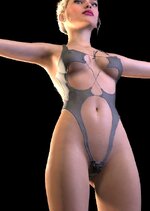
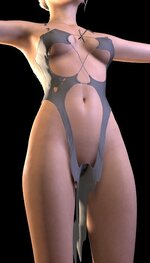
This is how VAM looks natively in Figure 1, but it becomes Figure 2 when using your plugin. Do you know why?
 

Attachments

  • Figure 1.jpg
    Figure 1.jpg
    44.8 KB · Views: 0
  • Figure 2.jpg
    Figure 2.jpg
    42.4 KB · Views: 0
This is how VAM looks natively in Figure 1, but it becomes Figure 2 when using your plugin. Do you know why?
There could be many causes. Could you please provide a bit more information. Also it is always good to go back the tutorial and check if there any steps you missed.
 
There could be many causes. Could you please provide a bit more information. Also it is always good to go back the tutorial and check if there any steps you missed.
This clothing is not exported to Blender using the FBX export method, but imported via the import_daz plugin in Daz to Blender.

When importing into Blender via FBX, the bones get messed up, but the import_daz plugin doesn’t cause this problem. I’d like to ask what your FBX export settings are.
 

Similar threads

Plugins + Scripts ReCloth
Replies
14
Views
318
Replies
1
Views
516
Replies
19
Views
3K
Assets + Accessories minecraft tools pack
Replies
0
Views
409
Assets + Accessories tools in tunnel
Replies
0
Views
368
Back
Top Bottom