
• Hi Guest!

    We are extremely excited to announce the release of our first Beta1.1 and the first release of our Public AddonKit!
    To participate in the Beta, a subscription to the Entertainer or Creator Tier is required. For access to the Public AddonKit you must be a Creator tier member. Once subscribed, download instructions can be found here.

    Click here for information and guides regarding the VaM2 beta. Join our Discord server for more announcements and community discussion about VaM2.
  • Hi Guest!

    VaM2 Resource Categories have now been added to the Hub! For information on posting VaM2 resources and details about VaM2 related changes to our Community Forums, please see our official announcement here.
Rigify

Plugins + Scripts Rigify

Download [<1 MB]

Skynet

Well-known member
Featured Contributor
Joined
Jan 28, 2023
Messages
514
Reactions
3,448
Skynet submitted a new resource:

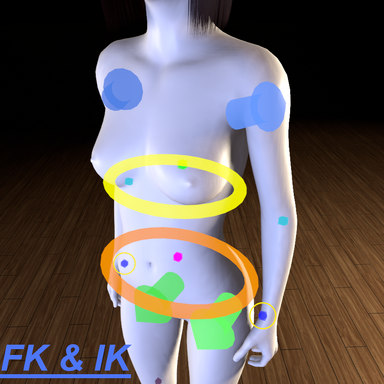
Rigify - FK & IK solver Rig inspired from blender's Rigify Addon

-- How to use?
- Simply load on person atom.

-- What does this plugin do?
- Adds extra control nodes with custom shapes that can control controllers in bulk in Forward Kinematics fashion, or auto positions elbows & knees if Inverse Kinematics is enabled. node positions will adjust based on whether FK or IK is active due to different role.
*FK mode: this is normal behaviour, the arrows will act as a hub to...

Read more about this resource...
 
which plugin did you use for screenspace button and timeline ui?
I also want to know this? What plugin makes timeline a separate menu? Feels necessary so you don't have to tab out of different menues constantly when posing and adding keyframes. Thanks in advance!
 
would it be possible to be able to grab the new controllers in VR in a tuture update?
agree, need a finger controller, but it seems like the timeline doesn't recognize finger morphs changed through other plugins
 
Skynet updated Rigify with a new update entry:

update v2

-- Improvements:
- Increased min & max values of "Node Alpha" slider.
- Increased min & max values of "Node Size" slider.
- Added new "Sync With Native Controllers" toggle, disable it so you can use the plugin nodes exclusively in Play mode or in Edit Mode.

-- Fixes:

- Changed Node Visual shaders for proper Z testing support, now draws on top of everything without needing post magic plugin to be active.

Read the rest of this update entry...
 
This is awesome! But is there a reason it's not a session plugin similar to https://hub.virtamate.com/resources/posinghelper.28888/ ?
i think you wont be able to selectively enable IK in each person or selectively hide/ show the nodes in each person if it is a session plugin, will require a complete plugin restructure to account for states in each person in the scene... etc. you know how it is lol

i'm essentially bypassing all that extra work by making it a person plugin
 
Back
Top Bottom