• Hi Guest!

    We are extremely excited to announce the release of our first Beta1.1 and the first release of our Public AddonKit!
    To participate in the Beta, a subscription to the Entertainer or Creator Tier is required. For access to the Public AddonKit you must be a Creator tier member. Once subscribed, download instructions can be found here.

    Click here for information and guides regarding the VaM2 beta. Join our Discord server for more announcements and community discussion about VaM2.
  • Hi Guest!

    VaM2 Resource Categories have now been added to the Hub! For information on posting VaM2 resources and details about VaM2 related changes to our Community Forums, please see our official announcement here.
Xtoys Connect 2

Plugins + Scripts Xtoys Connect 2

Download [<1 MB]

Seiryuu

New member
Joined
Nov 4, 2025
Messages
10
Reactions
14
Seiryuu submitted a new resource:

Xtoys Connect 2 - Connect your toys via Xtoys. No external app this time.

This plugin allows you send and receive data from Xtoys script via local websocket.
For example you can control your toys from inside the scene or trigger something in the scene with coyote button or motion sensor.
Should work much faster and more reliable then the first. And easier to setup.
Doesn't require external app.
I'll leave the first version cause it allows you to connect to Xtoys running on a different pc or phone. This one only works on the same pc.

[ATTACH...

Read more about this resource...
 
Can this be used to allow an existing script to control an atom in a scene?
What do you mean?
You can send triggers and floats (sliders) to xtoys script that interprets this messages to control your toys (you'll need need to set this up yourself, cause there are infinite number of toys combinations you could use, but It's really simple). Also you can generate some signals from various sensors or tools connected to xtoys and send them to this plugin to activate triggers in VAM.
 
Where do I get this Xtoys script?

Is it not an external app?

It's unclear how to set this up from the perspective of being a brand new user to this.
 
Xtoys is an app that is used to control toys. It's pretty simple, but you'll need to install chrome extension and XToys Windows Utilities to connect to VAM.
xtoys.app
Short guide for basics:
1776184300474.png
Click here and check if your toy is supported. add it to session. (for this guide I added launch and switched it to position mode)
1776184575058.png
1776184667659.png
Then add blank script.
1776184919962.png
Click script name and select edit.
1776184986643.png
First we need to add blocks that will be used for control and connection. For toy control "Generic Output" block is enough for many cases(for simple vibes and strokers), but you may need something more specialized for toys with multiple parameters (like e-stim boxes). You will also need "Local webhook" block to connect to VAM.
1776185755041.png


1776186037671.png
1776186141840.png
Next we'll need a trigger. Local webhook : sliders will trigger whenever data is received from my VAM plugin (in form of numbers 0-100) and store it's values in temporary variables.

1776186638992.png
1776186720826.png
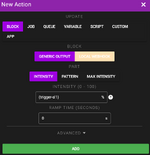
Then we need to add an action. Whenever data is received it will set intensity of our generic output block to value stored in {trigger-sl1} variable. And it's a value of slider 1 in my VAM plugin. Sliders trigger block will receive values of every slider from plugin so you can add multiple actions here with multiple output blocks if you need.
1776187201832.png
Here is our trigger. Save the script.

1776187285493.png
1776187316137.png
Click here to connect script to your toy and add webhook block to session.
1776187445558.png
Click on webhook. You'llneed to install extension and XToys Windows Utilities for it to work. Follow instructions.
1776187605242.png
Disable Webhook Id and SSL. Connect. At this point VAM plugin should already be able to connect to xtoys.
1776187792868.png
Connect your toy. Start script. Done. You can now control your toy with a slider from VAM plugin (with no delay if everything works as it should).
Now you can connect some triggers to control the slider. For example depth trigger of BodyLanguage plugin or Timeline.

Tell me if you need to connect something specific. I'll see if I can help with settings.
 

Attachments

  • 1776186841913.png
    1776186841913.png
    42.2 KB · Views: 0
Back
Top Bottom