


Lol! Once again you're way ahead of me! I love it!If you're in the VaM discord server, check the work-in-progress thread
You are using an out of date browser. It may not display this or other websites correctly.
You should upgrade or use an alternative browser.
You should upgrade or use an alternative browser.
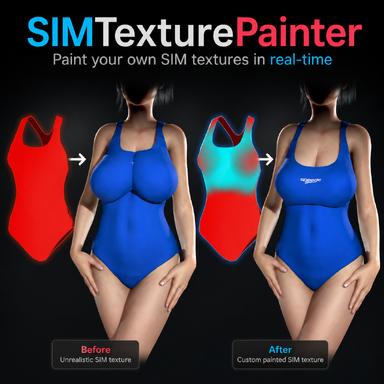
Plugins + Scripts SIMTexturePainter
- Thread starter Mxx
- Start date

Mxx updated SIMTexturePainter with a new update entry:
v1.2
Read the rest of this update entry...
v1.2
- Paint now stays within UV boundaries
Previously, painting near the edge of a clothing part could bleed into the empty space on the texture, causing paint appearing in wrong areas. Paint is now restricted to the actual UV island of each part, so what you paint stays exactly where it should — even right up to the edge.
This is an example of how a created SIM texture looked in v1.1, vs what it looks like now in v1.2:
View attachment 587349[ATTACH...
Read the rest of this update entry...

Amazing plugin. Would be great to have a slider to move the item we paint on a bit further from the figure.
Unless it's there and I missed it.
Also, having a way to add a variable color to the whole thing would be great too. I know it currently has all black or all red, but an option with a slider to fill it all with a chosen color would be amazing. (often times you want a map that's mostly solid red, but not fully.)
Unless it's there and I missed it.
Also, having a way to add a variable color to the whole thing would be great too. I know it currently has all black or all red, but an option with a slider to fill it all with a chosen color would be amazing. (often times you want a map that's mostly solid red, but not fully.)
Last edited:
Loving the new version!
One more small "quality of life" suggestion: add a checkbox to give the option to show the current working sim texture in the clothing item's _mainTex slot, updating whenever a change is made. When fine tuning, it's sometimes hard to guess exactly what part of the paint model lines up exactly with the clothing item when worn.
One more small "quality of life" suggestion: add a checkbox to give the option to show the current working sim texture in the clothing item's _mainTex slot, updating whenever a change is made. When fine tuning, it's sometimes hard to guess exactly what part of the paint model lines up exactly with the clothing item when worn.
Amazing plugin. Would be great to have a slider to move the item we paint on a bit further from the figure.
Unless it's there and I missed it.
Also, having a way to add a variable color to the whole thing would be great too. I know it currently has all black or all red, but an option with a slider to fill it all with a chosen color would be amazing. (often times you want a map that's mostly solid red, but not fully.)
Great ideas, will include these in the next update!
Loving the new version!
One more small "quality of life" suggestion: add a checkbox to give the option to show the current working sim texture in the clothing item's _mainTex slot, updating whenever a change is made. When fine tuning, it's sometimes hard to guess exactly what part of the paint model lines up exactly with the clothing item when worn.
Amazing suggestion again, will also include this in the next version!
Mxx updated SIMTexturePainter with a new update entry:
v1.3
Read the rest of this update entry...
v1.3
- Overlay now spawns next to the Person atom and follows it
The painting overlay used to spawn at the world origin, which often meant it ended up far from your model in larger scenes. It now spawns right at the Person atom the plugin is attached to and stays glued to it as you drag the atom around the scene. A new "Overlay Distance" slider lets you push the overlay to either side of the atom (negative = left, positive = right).
[ATTACH type="full"...
Read the rest of this update entry...

 Too bad I'm broke right now, and since I'm in China, converting to USD makes it even more expensive.
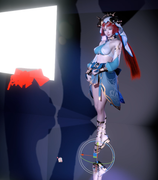
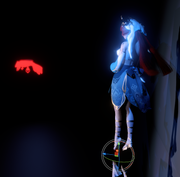
Dude, the weight model following the movement is definitely a lot better, but after trying it out, it's not as good as I imagined. That's because some characters' weight models aren't positioned on the side — there should be a toggle to turn the following behavior on or off.
Last edited:
Bug report: when the "apply to decal" box is activated, the default _mainTex also loads, though that change is not reflected in the Vam textures ui, and it can't be removed.
But I have an even more serious problem. Can't ... stop... simming clothing! Please send help!
But I have an even more serious problem. Can't ... stop... simming clothing! Please send help!
Dude, I just talked to a friend about this — is it possible to extract the weight map texture from clothes that are already painted? So I can modify them based on the original weights afterwards?
It can, but the sim texture would need to be somewhere on your local VaM folder. The plugin can't browse inside var files (I'll have to see if that's possible). But once you have the sim texture from the original creator somewhere in your VaM folder, you should be able to load it with the "Load Existing Texture" button.Wow, this is a really great plugin, but can it modify the original simulated text
Yes, I've noticed that too when I used the plugin in different scenes. I think I can fix it so it will be placed to the side of the chestControl node.Dude, the weight model following the movement is definitely a lot better, but after trying it out, it's not as good as I imagined. That's because some characters' weight models aren't positioned on the side — there should be a toggle to turn the following behavior on or off.
What do you mean with the default _mainTex also loads? As in the default _mainTex from that clothing item instead of your own custom one?Bug report: when the "apply to decal" box is activated, the default _mainTex also loads, though that change is not reflected in the Vam textures ui, and it can't be removed.
Haha I get what you mean. Work on this plugin often got interrupted because I was finding myself making new sim textures for lots of clothingBut I have an even more serious problem. Can't ... stop... simming clothing! Please send help!
I've been working on "AlphaTexturePainter" that should work mostly the same as this plugin, but for Alpha textures. It's not out yet, and I first want this plugin to be mostly done without issues.Additionally, is there a way to apply the method for drawing simulated textures to transparent textures? This would be a very useful feature.

Can confirm!Just a heads up on a bug: if you load the original sim textures and then try painting, it lags like crazy.
View attachment 588694
Could the texture resolution options be expanded? A friend mentioned that some creators use 4096×4096 textures, but the plugin's current maximum option is 2048×2048. Though locally saved 4096 textures are still recognized, it would be great to have 4096×4096 available as a selectable option in the plugin as well.
A friend mentioned that some creators use 4096×4096 textures, but the plugin's current maximum option is 2048×2048. Though locally saved 4096 textures are still recognized, it would be great to have 4096×4096 available as a selectable option in the plugin as well.Just a heads up on a bug: if you load the original sim textures and then try painting, it lags like crazy.
View attachment 588694
Can confirm!
I'll look into that
Could the texture resolution options be expanded?
I could, but painting at 2048x2048 already drastically decreases performance, to the point my fps drops to 20fps when painting at 2048x2048. I could add the option, but your fps might drop all the way to below 10fps...
Personally, I think 4k is overkill for a sim map. It's usually fades from one color to another and not really highly detailed ares of sim. You could also uprez the 2k texture using an upscaler.Could the texture resolution options be expanded?
Be aware that the sim map resolution has absolutely no bearing or effect on the other textures the clothing uses. Sim maps aren't generally highly detailed, so 512x512 will almost always be enough. Other textures can still be 4k.Could the texture resolution options be expanded?
Yes, I usually work with _MainTex set to "null" so i have a blank white color so i can best see what's going on. But the clothing items default _MainTex loads when i use the "load sim to decal" button. The clkothing item UI still shows as "null", so the texture can't be altered.What do you mean with the default _mainTex also loads? As in the default _mainTex from that clothing item instead of your own custom one?
One last request: Some sort of "eyedropper" function. I find that when editing textures I use different R-values on different regions, and often want to return to a previously used value to touch up certain areas. Could "ctrl-c" set the R-value slider to match the color the cursor is over?
Mxx updated SIMTexturePainter with a new update entry:
v1.4
Read the rest of this update entry...
v1.4
- Seamless painting across UV seams
Painting now wraps naturally across UV island boundaries the same way Substance Painter does. Where v1.3 left a hard cut at every seam (like the seam connecting the front and back of a shirt), the brush now considers the actual 3D geometry of the mesh, so a stroke that crosses a seam continues smoothly onto the other side without the user having to reposition the brush. A back-face check keeps the paint from bleeding through onto the inside...
Read the rest of this update entry...

What a handy tool! I hope you will succeed with VR version and I'm looking forward to it!

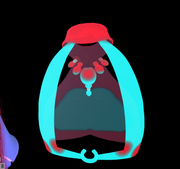
Dude, There's a bug in the plugin. I only made one brush stroke, but it ended up painting the entire rest of the texture.
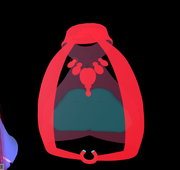
Unfortunately, there will always be some clothing items that still give issues. Try turning off other parts (if it has them), unchecking (paint on all parts), or using a smaller brush size.
Bug report: this clothing item comes with two versions, up and down. When the "down" version is loaded, the plugin loads the UV set for the "up" version.
