
• Hi Guest!

    We are extremely excited to announce the release of our first Beta1.1 and the first release of our Public AddonKit!
    To participate in the Beta, a subscription to the Entertainer or Creator Tier is required. For access to the Public AddonKit you must be a Creator tier member. Once subscribed, download instructions can be found here.

    Click here for information and guides regarding the VaM2 beta. Join our Discord server for more announcements and community discussion about VaM2.
  • Hi Guest!

    VaM2 Resource Categories have now been added to the Hub! For information on posting VaM2 resources and details about VaM2 related changes to our Community Forums, please see our official announcement here.
Rave Night

Scenes Rave Night

Download [<1 MB]

AfterImage

Active member
Joined
Dec 29, 2022
Messages
26
Reactions
180
AfterImage submitted a new resource:

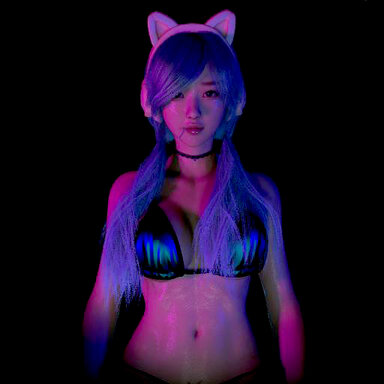
Rave Night - VR POV Scene

A seated POV scene designed for VR. No male character is included.
View attachment 541663

Story: You're attending your first ever rave. You had a great time, but too many drinks, and now it's the end of the night and you happen to run into a childhood crush. You get to talking and keep drinking, and as things progress you think she may have slipped something into your dink...

View attachment 541665

This scene is more intense than my last few, but is...

Read more about this resource...
 
Thank you for using Noelle in your creations, it really makes me happy to see her performing on different stages. I do have a small suggestion though. You might want to replace the dependency

Code:
Jakuubz.90's_Bikini.latest

because it’s not actually available on the Hub. If any dependency is missing, your release won’t be listed as Hub-hosted, and the biggest downside is that people won’t see it in the default Hub list inside the game client. That hurts visibility quite a bit.
 
Last edited:
Thank you for using Noelle in your creations, it really makes me happy to see her performing on different stages. I do have a small suggestion though. You might want to replace the dependency

Code:
Jakuubz.90's_Bikini.latest

because it’s not actually available on the Hub. If any dependency is missing, your release won’t be listed as Hub-hosted, and the biggest downside is that people won’t see it in the default Hub list inside the game client. That hurts visibility quite a bit.
Thanks for the input. I actually noticed this during the initial upload and replaced the top with one of Maru's, but I'm not super competent with removing dependencies from scenes already started, so couldn't figure out how to remove it.

The scene started with MonsterShinkai's Risa character, which used Jakuubz's bikini, so I kept the clothing preset. If you know how to remove that dependency I'm happy to update the scene.

Also, Noelle is a great character. Almost all of my scenes start with MonsterShinkai's Rin character, then the ones I plan to release get shifted to Noelle or Sophia.
 
Thanks for the input. I actually noticed this during the initial upload and replaced the top with one of Maru's, but I'm not super competent with removing dependencies from scenes already started, so couldn't figure out how to remove it.

The scene started with MonsterShinkai's Risa character, which used Jakuubz's bikini, so I kept the clothing preset. If you know how to remove that dependency I'm happy to update the scene.

Also, Noelle is a great character. Almost all of my scenes start with MonsterShinkai's Rin character, then the ones I plan to release get shifted to Noelle or Sophia.


Screenshot 2025-11-17 010945.png


Usually, if you’ve removed the clothing but it still shows up as a dependency, it’s most likely because it’s still included in one of your presets, and the scene is calling that preset somewhere.

I checked it for you. The dependency appears in both of your character appearance presets
Code:
Custom\Atom\Person\Appearance\Preset_Noelle_Dancer.vap
and
Code:
Custom\Atom\Person\Clothing\Preset_Noelle_Dancer1.vap

as well as in the main scene file:
Code:
Saves\scene\AfterImage_Rave_Night.json

The specific issue is that even though you’re using maru01’s bikini outfit, the material maru01:mbikinibt05Materialp is referencing that missing Hub package. The simplest fix is to revert the material back to maru01’s default. You’ll need to update all three locations mentioned above.

Hope this helps.
 
View attachment 542161


Usually, if you’ve removed the clothing but it still shows up as a dependency, it’s most likely because it’s still included in one of your presets, and the scene is calling that preset somewhere.

I checked it for you. The dependency appears in both of your character appearance presets
Code:
Custom\Atom\Person\Appearance\Preset_Noelle_Dancer.vap
and
Code:
Custom\Atom\Person\Clothing\Preset_Noelle_Dancer1.vap

as well as in the main scene file:
Code:
Saves\scene\AfterImage_Rave_Night.json

The specific issue is that even though you’re using maru01’s bikini outfit, the material maru01:mbikinibt05Materialp is referencing that missing Hub package. The simplest fix is to revert the material back to maru01’s default. You’ll need to update all three locations mentioned above.

Hope this helps.
Thanks, I have to be more careful to look through texture files!
 
Wanted to try my hand at syncing the lights to some music, but I'm having trouble tracking down the BPMIntervalTrigger plugin. Could you tell me which atom it's tied to?
 
Wanted to try my hand at syncing the lights to some music, but I'm having trouble tracking down the BPMIntervalTrigger plugin. Could you tell me which atom it's tied to?
If I remember right it's on the _BRAIN item... Nope, just checked, it's a scene plugin. It's below the Postmagic stuff so I can see how it would be easy to miss.

I've been messing with that plugin a little more, and hopefully future scenes I'll be able to make it easier to sync to music.
 
I wanted to give your scene a try, but when I load it there is a giant wall of text talking about how the scene is for VR and it doesn't go away making the scene kind of unusable. Am I missing something? there does not appear to be a button to remove it
 
I wanted to give your scene a try, but when I load it there is a giant wall of text talking about how the scene is for VR and it doesn't go away making the scene kind of unusable. Am I missing something? there does not appear to be a button to remove it
That text box should only show up in Edit mode. If you switch over to play mode (I think keystroke 'P') It should go away. Play mode should also hide a number of the behind the scenes buttons. If that doesn't work you can just delete the text box. I believe it is called ?HELP or something like that in the items. I'll try and make the help text less obtrusive in future scenes.
 
That text box should only show up in Edit mode. If you switch over to play mode (I think keystroke 'P') It should go away. Play mode should also hide a number of the behind the scenes buttons. If that doesn't work you can just delete the text box. I believe it is called ?HELP or something like that in the items. I'll try and make the help text less obtrusive in future scenes.

Cheers for the reply! I would recommend you add a button to hide it, or ensure the play/start button is easily visible at the starting location and pressing that hides it. The size itself is fine but I dont think you should rely on 'play' to hide it though. When I am on desktop mode I am always in edit mode, because I want to load my character into the scene, add my plugins for the character and get everything setup and working in the scene. Sometimes this requires the scene to be started and playing first, depending on how the scene works so I just stay in edit mode
 
Back
Top Bottom