• Hi Guest!

    We are extremely excited to announce the release of our first Beta1.1 and the first release of our Public AddonKit!
    To participate in the Beta, a subscription to the Entertainer or Creator Tier is required. For access to the Public AddonKit you must be a Creator tier member. Once subscribed, download instructions can be found here.

    Click here for information and guides regarding the VaM2 beta. Join our Discord server for more announcements and community discussion about VaM2.
  • Hi Guest!

    VaM2 Resource Categories have now been added to the Hub! For information on posting VaM2 resources and details about VaM2 related changes to our Community Forums, please see our official announcement here.

VaM 1.x I need help. The morphs break down in another scene.

Threads regarding the original VaM 1.x

AkaliLeggera

New member
Joined
May 8, 2024
Messages
8
Reactions
0
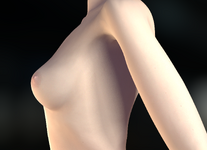
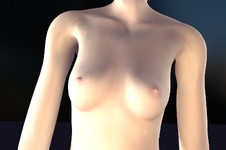
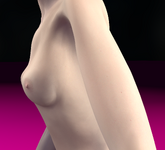
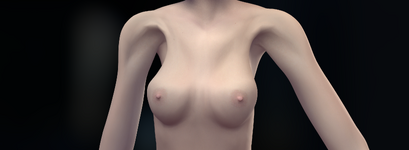
I upload a different character in a new scene that I liked, and she now broken. Her height is changing, her arms are getting longer, her shoulders are wider, and her torso is too slender and breasts breaks. How can I fix this?
 
Please, if you want support or help from the community, provide details, screenshot, steps to reproduce, scene references...
Giving such incomplete information will make this a guessing contest for pretty much anyone willing to give you two minutes of their time.
 
Upvote 0
Please, if you want support or help from the community, provide details, screenshot, steps to reproduce, scene references...
Giving such incomplete information will make this a guessing contest for pretty much anyone willing to give you two minutes of their time.
 

Attachments

  • First Scene No Broken 2.png
    First Scene No Broken 2.png
    1.4 MB · Views: 0
  • First Scene No Broken.png
    First Scene No Broken.png
    1 MB · Views: 0
  • Next Scene Broken 2.png
    Next Scene Broken 2.png
    2 MB · Views: 0
  • Next Scene Broken.png
    Next Scene Broken.png
    1.4 MB · Views: 0
Upvote 0
Ok, did you try loading another character than yours? Pretty much any appearance will do.

If it's doing the same thing, it means the scene forces morphs. Which unless you edit the scene, you won't be able to fix.
 
Upvote 0
Ok, did you try loading another character than yours? Pretty much any appearance will do.

If it's doing the same thing, it means the scene forces morphs. Which unless you edit the scene, you won't be able to fix.
Another character doesn't break, and even if it did, how do I edit the scene so that the scene doesn't broke character?
 
Upvote 0
It's pretty much reverse engineering. Every scene is different, there are dozens if not hundreds of ways to edit/modify/transform a character during a scene.
You need to understand scripting logic and find out what the creator did.
 
Upvote 0
Another character doesn't break, and even if it did, how do I edit the scene so that the scene doesn't broke character?
Any chance you're using a look in which the whole appearance is one concentrated morph? For example, PixelPorts' looks have one slider which controls the whole appearance. I've had issues where attempting to load them into another scene would cause this global morph to not be loaded properly. Could be what's happening in your case, but it's difficult to say.
 
Upvote 0
It's pretty much reverse engineering. Every scene is different, there are dozens if not hundreds of ways to edit/modify/transform a character during a scene.
You need to understand scripting logic and find out what the creator did.
Is there really no plugin that would auto fix? Why does every scene change everything, then why presets and poses, not to mention a simple change of appearance. Everything breaks anyway
 
Upvote 0
Any chance you're using a look in which the whole appearance is one concentrated morph? For example, PixelPorts' looks have one slider which controls the whole appearance. I've had issues where attempting to load them into another scene would cause this global morph to not be loaded properly. Could be what's happening in your case, but it's difficult to say.
There is a slider that changes the appearance, it is specially made for the character. Does it break in the new scene? But the first scene is no different from the second. There's nothing in it that can break the character, it's empty. It looks like the model can only be used once in a new scene, and the third time the breakdown begins.
 
Upvote 0
There is a slider that changes the appearance, it is specially made for the character. Does it break in the new scene? But the first scene is no different from the second. There's nothing in it that can break the character, it's empty. It looks like the model can only be used once in a new scene, and the third time the breakdown begins.
Check if when loading the character into another scene this slider goes to 0.
 
Upvote 0
Check if when loading the character into another scene this slider goes to 0.
In another scene, slider turned on to 100 - without this, the appearance would be completely different looks like standart base model. I have already noticed that if I make two versions - for example, small breasts and large breasts, then if I go on scene with model large breasts and want to load a small breasts version model in it, then replacing the large one with a small one loads even more big breast instead small. Load section from Look or Morphs make broken model. Load Different Pose also edit morphs. It looks like model only can edit one time for one scene. I also noticed that game crashes in that scene often and this scene I downloaded in 2023 so maybe it so old and broken but second scene also from 2023 and also crash and model also from 2023... Maybe all this outdated and game cannot play it correct way...
 
Upvote 0
Back
Top Bottom