• Hi Guest!

    We have posted a new VaM2 dev log on Patreon, starting a monthly cadence of written progress updates between Beta releases. Highlights include the new Gizmos System, Selection Carousel, and Modes System with Context-Specific Editing. Beta1.2 is 15 of 21 items complete.

    Read the full post on Patreon, or follow progress on the public Trello roadmap.

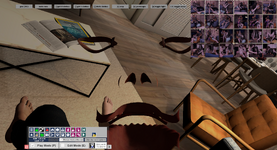
Solved Hidden geometry from Embody doesn’t fully remove the mouth model

mienbrodepueblo

New member
Joined
Aug 11, 2024
Messages
12
Reactions
2
I enabled a few session plugins, but turning them off didn’t resolve the issue.
I’ve attached images of the problem below, along with the drawing plugins I had enabled. Any help would be appreciated.
Snipaste_2026-02-11_16-36-32.png
 

Attachments

  • Snipaste_2026-02-11_16-37-29.png
    Snipaste_2026-02-11_16-37-29.png
    2 MB · Views: 0
  • Snipaste_2026-02-11_16-39-08.png
    Snipaste_2026-02-11_16-39-08.png
    108 KB · Views: 0
  • Snipaste_2026-02-11_16-39-41.png
    Snipaste_2026-02-11_16-39-41.png
    95.5 KB · Views: 0
Remove the face clothing parts in the Clothing tab.
 
Upvote 0
The facial features of the character ATOM have individually assigned shaders. If they persist despite Embody's standard settings, temporarily hiding the following materials will make them disappear:
Mouth Materials, Tongue Materials, Teeth Materials, Eyelash Materials, Lacrimals Materials, Sclera Materials, and Iris Materials.
 
Upvote 0
Hi everyone, thank you all very much for your help.
I tried the methods suggested by Atani and Calvados. When I applied them, the abnormal mesh disappeared instantly, but after about 2–3 seconds, the issue came back again.


I suspect this might be related to my session plugins, because I tested the same setup in a clean VAM installation and the problem did not occur there.
Do I need to completely clear my session plugin list? Is simply unchecking them not enough?
 
Upvote 0
Also thanks to SlimerJSpud. Offset Camera helps reduce the issue a bit,
but some scenes just don’t have enough room to use it properly.
 
Upvote 0
Hi everyone, thank you all very much for your help.
I tried the methods suggested by Atani and Calvados. When I applied them, the abnormal mesh disappeared instantly, but after about 2–3 seconds, the issue came back again.


I suspect this might be related to my session plugins, because I tested the same setup in a clean VAM installation and the problem did not occur there.
Do I need to completely clear my session plugin list? Is simply unchecking them not enough?
If you mention what session plugins are you using then we could point to the one causing the problem.
 
Upvote 0
I think subsurface scattering is the one
 
Upvote 0
Solution
Back
Top Bottom