• Hi Guest!

    We have posted a new VaM2 dev log on Patreon, starting a monthly cadence of written progress updates between Beta releases. Highlights include the new Gizmos System, Selection Carousel, and Modes System with Context-Specific Editing. Beta1.2 is 15 of 21 items complete.

    Read the full post on Patreon, or follow progress on the public Trello roadmap.
BusDriver

Plugins + Scripts BusDriver

Download [<1 MB]

Yoooi

Member
Joined
Jun 17, 2022
Messages
14
Reactions
88
Yoooi submitted a new resource:

BusDriver - plugin that generates motion from TCode input
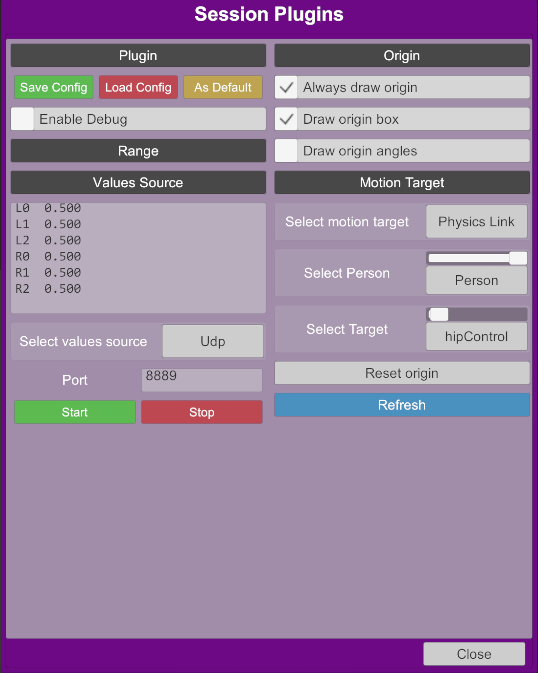
screenshot.png


BusDriver is a VaM (Virt-a-Mate) plugin that accepts motion data from various sources and animates selected target in the scene.

Features
  • Accepts data from UDP server
  • Supports TCode data format
  • Animates target using Physics Link or Force

Read more about this resource...
 
Great plugin, just wish I could figure out how to align L0 with the primary angle of movement in the scene.
 
It would be nice to post a video review to see how it works.
 
I love this plug-in. I use ayva software to run robots with VaM - AMAZING
 
A really useful plugin!
When the plugin is assigned to a person's hipControl, that control becomes fixed in world space. As a result, the person cannot move. For example, moving the head forward no longer causes the rest of the body to follow, since the hipControl is locked.
This behavior occurs even when the “Enable” option in the plugin is unchecked. How can I release the person so that they can move normally again?
 
Yoooi submitted a new resource:

BusDriver - plugin that generates motion from TCode input


Read more about this resource...
total VAM beginner here but im quickly getting the hang of things, i just got a rubjoy and am trying to connect to VAM via the AYVA websocket program, but im not exactly sure how to actually connect the two together. once in VAM and the plugin has been added, the menu has some connection options that i unfortunately do not understand at all. i have both the busdriver and busdrivertoycontroller plugins at the moment but the normal busdriver plugin doesnt have any connection options? sorry if this is confusing i just cant find any resources on how to connect to vam through ayba websocket
1770799472818.png
 
I love this plug-in. I use ayva software to run robots with VaM - AMAZING
Hey there, any chance you’d be able to give me any insight on how to do that? I just got a rubjoy and was trying to connect it to vam through the ayva websocket thing but I couldn’t really figure out what to do to sync them
 
posting up the new code so that you dont have to run localhost for the UDP streams.

within UdpValuesSource.cs

{
_server = new UdpClient();
_server.ExclusiveAddressUse = false;
_server.Client.Blocking = false;
_server.Client.SetSocketOption(SocketOptionLevel.Socket, SocketOptionName.ReuseAddress, true);
// _server.Client.Bind(new IPEndPoint(IPAddress.Loopback, port));
// this is forcing to only listen to localhost
_server.Client.Bind(new IPEndPoint(IPAddress.Any, port));

}


rename and copy over then you can stream MFP UDP from another PC (laptop) and not have the CPU overhead seems to work well.

debugging use netcat.


you can then stream different body parts with diffferent udp streams.
so if you want the chest to follow 1 behavior for a setup

and the waist to follow another behavior, and vam doesnt have the complete cpu overhead of the steams.
 

Attachments

  • UdpValuesSource.txt
    4 KB · Views: 0
Last edited:
Back
Top Bottom