


-
Hi Guest!
We are extremely excited to announce the release of our first Beta1.1 and the first release of our Public AddonKit!
To participate in the Beta, a subscription to the Entertainer or Creator Tier is required. For access to the Public AddonKit you must be a Creator tier member. Once subscribed, download instructions can be found here.
Click here for information and guides regarding the VaM2 beta. Join our Discord server for more announcements and community discussion about VaM2. -
Hi Guest!
VaM2 Resource Categories have now been added to the Hub! For information on posting VaM2 resources and details about VaM2 related changes to our Community Forums, please see our official announcement here.

-

Assets + Accessories AnimeShader(CUA)
Its a shader for https://hub.virtamate.com/resources/custom-shader-loader.56671/ Put the loader plugin on the cua, then choose the assetbundle from the scripts/shader folder. Optional to the Anime shader I can recommend this one. That is for cua, clothing and skin... -
VaM 1.x Vam Overlays but for images?
Ah ok, this head light plugin works but not for desktop mode. Nvm, I just needed to rerange it.- Okachu
- Post #7
- Forum: Questions & Answers
-
VaM 1.x Vam Overlays but for images?
Ok I'm trying this, ty!- Okachu
- Post #6
- Forum: Questions & Answers
-
VaM 1.x Vam Overlays but for images?
Can I load custom fonts in VamStory?- Okachu
- Post #3
- Forum: Questions & Answers
-
VaM 1.x Vam Overlays but for images?
Can I put images that they are always in front of the widow camera? And can I use custom fonts in vam?- Okachu
- Thread
- Replies: 6
- Forum: Questions & Answers
-
Looks Jessica
I've updated the dependencies from the hub, but can't see it. There is an invisible Person in the white room. -
VaM 1.x CUA plugin
Beside the other plugins I'm using this https://hub.virtamate.com/resources/colorscale.416/ for color and scale :sneaky: https://hub.virtamate.com/resources/cuashadermod.41328/ and this for alpha But the last one is changing the whole cua.- Okachu
- Post #9
- Forum: Questions & Answers
-
Benchmark Result Discussion
Not the right thread but if you mean the performance patch: The dll in the mainfolder is not enough you also need this files in the performancepatches directory (look in the readme file for instructions) \PerformancePatches\SkinMeshPartDLL.dll \PerformancePatches\SkinMeshPartDLL.ini But...- Okachu
- Post #1,249
- Forum: Hardware & Accessories
-
VaM 1.x UI buttons disappear after deleting the AddonPackages
Vam has standard files (scenes and whatever else) and they are located in the addonapackages, too. Not sure if you need all this but these are the the basic files in addonpackages folder for me, that I configured out for my needs. I'm starting with a black screen, too but you can choose a...- Okachu
- Post #2
- Forum: Questions & Answers
-
Assets + Accessories Artist Asset Pack
Okachu submitted a new resource: Artist Asset Pack - Artist, Tools, Cosplay, Workshop Read more about this resource... -
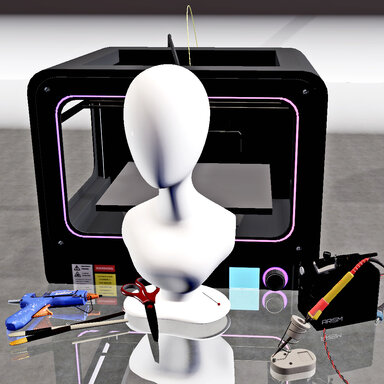
Assets + Accessories Artist Asset Pack 1
Hub-Hosted VAR CC BYPorted some Cosplay and Workshop assets from Sketchfab All credits goes to the creators: "Pin for 3D clothing" (https://skfb.ly/6xOUO) by RunemarkStudio is licensed under Creative Commons Attribution (http://creativecommons.org/licenses/by/4.0/)...- Okachu
- Resource
- artist cosplay glue gun pin printer scissor soldering iron tool wig workshop
- Category: Assets + Accessories
-
Section for Unity in the hub?
I see only resources how can I post questions here?- Okachu
- Post #5
- Forum: Hub Feedback
-
-
VaM 1.x Seperate objects of the same scene into one assetbundle?
I want to divide this scene of 2 paintbrushes that I have 3 choices. I copied the prefab, renamed it and made another scene. It's working so far but I can only choose between 2 and the bright one. But the dark one is the bright one, too. Maybe because it's basically the same? However one is...- Okachu
- Thread
- Replies: 1
- Forum: Questions & Answers
-
VaM 1.x Ambient Occlusion Material in Unity?
It's probably for an internal light/color. I had the AO in another asset that lightened up a second mixed color part. It's maybe more clear if I finally release them. Hmm, I could just post the model...- Okachu
- Post #5
- Forum: Questions & Answers
-
VaM 1.x Colliders don't apply in Prefab?
4mb was ok for me, too. Then I thought that the assetbundle is unpacking during the use and taking space. Then I can keep the 4mb, yay. -
VaM 1.x Delete directional light before exporting an asset?
Ty, I'm always open for critics. I don't know what parameters are important for vam assets. I can see that they are working for me but only in my little test scene for 2minutes with crappy light. Sometimes it's better to ask the veterans who are already working with vam and unity. And I'm...- Okachu
- Post #3
- Forum: Questions & Answers
-
VaM 1.x Colliders don't apply in Prefab?
Yeah, it's not correctly, meaned that I imported a gltf in a scene so it became a gltf scene in my mind. Imported a new asset that was only accepted by dragging the scene to the window several times (like the other before). And that worked. However this asset seems a little bit too big? The... -
Section for Unity in the hub?
Makes it sense to have a Unity or third-party section in the hub?- Okachu
- Thread
- Replies: 5
- Forum: Hub Feedback
-
VaM 1.x Delete directional light before exporting an asset?
I saw in many vam tutorials for Unity, that I can export a scene with directional light. But if I'm doing that the light is changing, too if I use the asset in Vam. So I ended up to delete the directional light before exporting, is that bad?- Okachu
- Thread
- Replies: 2
- Forum: Questions & Answers