

You are using an out of date browser. It may not display this or other websites correctly.
You should upgrade or use an alternative browser.
You should upgrade or use an alternative browser.

Plugins + Scripts YAVAM - Yet Another VaM Addon Manager
- Author FivelSystems
- Creation date
This is a small patch in an attempt to provide stable and unstable channels for the brave users who feel like testing latest cutting edge changes.
I do not recommend to use unstable versions for normal use, 1.3.20 acts as a bridge to 1.4.X versions which will feature a foundational change in how YAVAM works by implementing SQLite. This will allow for increased scan performance, solid cache & dependency lookup; even cross-library references, as well as more advanced features like rating as requested by some users, advanced library management with granular permissions for remote webclients and enhanced search/filtering functions, being able to use just the searchbar to filter by different properties through inline keywords like "category:Plugincreator:acidbubblesmyRandomSearch etc" and hopefully includes autocomplete options.
1.3.19 didn't have any way to change between stable and unstable, so if you were to download an `unstable` build, then switch to `stable`, you'd get stuck in the stable 1.3.19 build and have to re-download 1.4.X-unstable manually again, so this is why 1.3.20 acts as a bridge.
Development has shifted towards 1.4 branch given that the experiments are showing great results, hopefully 1.3.20 is the last 1.3 release, but if there's anything left to be fixed I am willing to update 1.3 branch as well with newer patches while 1.4 is on the way.
⚠ Final warning, use unstable branch AT YOUR OWN RISK, use it only if you're willing to test and report back whatever errors, issues, bugs you had through VaM Hub or GitHub.
Unstable branches will be released automatically weekly every saturday as long as they had at least one change, it's not controlled by hand and may break anytime.Added
- Update Channels: A new Stable / Unstable selector under Settings → Application → Updates. Stay on tested Stable releases, or opt into Unstable to preview weekly in-development builds early. Switching back to Stable is always available, and your data is preserved either way.
- Manual Update Check: A "Check now" button in the Updates section lets you check your selected channel on demand instead of waiting for the startup check.
Changed
- Deletion: Improved package deletion behaviour, the process runs in the background and a toast shows the progress, this way you can continue browsing libraries instantly.
- Corrupt files: You can right click the `Corrupt` category and delete all corrupt packages with a single click, if you so desire. Be aware to verify if you actually have corrupt packages in there, it's rare to see false positives but they do exist in very specific cases.
Sorry for not pushing an update earlier in this platform, the real answer is that I was too lazy to do so, but since bugs were present my excuse is that I wanted to delay the update here until I perform more tests
IMPORTANT QUESTIONS
1. Is the `Update available` modal too invasive? Would you like it to behave differently?
2. Would you like to have update channels you can opt-in? I.E. being able to swap between stable/beta/development/nightly builds?
3. Have you felt the need to read changelogs because you closed it by mistake?
4. Is there anything else you want YAVAM to improve?
Now, proceeding with the CHANGELOG:
Added
- Image Carousel: Clicking the main thumbnail or any image in the "Contents" tab now opens a full-screen, navigable gallery of all images inside the package. (Issue #27)
- Dependency Context Menu: You can now right-click any dependency in the Right Sidebar to quickly open the action menu (Enable/Disable, Resolve, Delete) without losing your place. (Issue #29)
- Keyboard Shortcuts: Pressing CTRL+C while a package is selected will now copy its physical file path directly to your system clipboard. (Issue #35)
Fixed
- Bulk Toggle: Fixed an issue where toggling multiple packages would not work properly.
- App Restarts: Fixed an issue where restarting the application (e.g., during a self-update or factory reset) would cause it to hang or fail to open.
- Bulk Deletion: Deleting multiple packages at once is now much more reliable. If a single file fails to delete, the rest will continue processing, and you'll receive granular feedback instead of a generic error.
- File Deletion: Fixed a bug where deleting a package could fail if its file extension was manually toggled outside the app (e.g., from .var to .var.disabled) since the last scan.
Changed
- Internal Analysis: Expanded the backend data models to explicitly track "Orphaned" and "Exact Duplicate" packages, laying the foundation for the upcoming Library Optimization engine.

- 1
-
 1
1
This update aims to be friendlier towards slow hard drives by splitting the scan into 3 distinct phases, improving the initial loading time and allowing the user to interact with the application while the scan is in progress.
I personally have a dying hard drive with thousands of files, it's VERY slow and having to wait for a full scan to complete before being able to do anything is a pain.
Fixed
- Library Switching: Clean stop between library selections now works properly even in web clients.
- Library Switching: Packages from previous libraries will no longer appear after switching libraries from an unfinished scan process.
- Privacy Settings: Resolved a race condition where privacy mode and blur settings were not applying properly upon application launch.
- Network Settings: Improved server initialization logic. The "Start Server" button now correctly triggers the server process independently instead of incorrectly manipulating the "Run on Startup" preference toggle.
Added
- Scan Optimization (Issue #34): Replaced the monolithic up-front zip scan with a three-phase pipeline:
- Light Pass: Filesystem walk only — package cards appear as animated skeletons within seconds of opening a library. No .var files are opened in this phase.
- Hard Pass: Prioritized zip scan — packages on the current page are always processed first. Navigating to a new page or clicking an unscanned card immediately reprioritizes that work in the queue. Thumbnails appear as each package finishes.
- Link Pass: Dependency resolution, duplicate detection, and orphan analysis run after all packages are scanned. Results (missing deps, obsolete, duplicate flags) are streamed back per-package via a package:analyzed event.
- Thumbnail Cache: Package cover images are now cached to
%AppData%/YAVAM/thumbnails/. On subsequent library opens, thumbnails are served from cache, completely skipping the zip open for that step. Cache keys include file modification time and size, so updated packages invalidate automatically.- Stacked Progress Bar: The existing single progress bar is replaced with three stacked strips — one per scan phase (blue = Discovering, amber = Scanning, green = Analysing). Each strip shows its own package count and fills independently.
- Settings — Thumbnail Cache: New "Thumbnail Cache" section in Application settings shows current cache size and provides a "Clear Cache" button.
- Extensible DependencyResolver interface (
pkg/services/library/dependency_resolver.go): The Link Pass accepts a slice of resolvers tried in order. LocalResolver (current library) is the default. Future MultiLibraryResolver and OnlineResolver implementations can be plugged in without changing the scan orchestrator.Changed
- Search Bar: Search no longer filters in real-time while typing. Results are applied on Enter (desktop) or the search button (mobile). This prevents the package grid from jumping mid-scan as the user types. Escape clears the search.
- Backend Analysis: Dependency/duplicate/orphan analysis (analyzePackages) moved from the frontend to the Go backend (LinkPass in
pkg/services/library/analysis.go). The frontend now listens forpackage:analyzedevents instead of running a full graph traversal in the browser.- Scan Events: New package:discovered (Light Pass) and package:analyzed (Link Pass) events join the existing
package:scanned. Thescan:progressevent is replaced byscan:stagewhich carries the active phase name, current count, total, and done flag.
v1.3.16 — Stability & Web Fixes
- CRITICAL: Fixed an issue where the "Setup Required" screen would persist in web mode after completing the wizard.
- CRITICAL: Resolved a server deadlock that could cause the application to hang during startup.
- Web Client: Fixed the "Waiting for Host Configuration" false positive; the dashboard now populates immediately after setup.
- Consistency: Cleaned up library caching to ensure the UI always reflects your live configuration.
v1.3.15 — Categories & Onboarding
- Expanded Categorization: Added support for Sound, Image, SubScene, PluginPreset, Pose, and Blueprint packages.
- Fixed Setup Wizard: Our 3-step onboarding wizard is now functional again for fresh installs.
- CRITICAL: Fixed multiple bugs where the Setup Wizard would fail to show or save properly.
- Standardization: Renamed the "Script" category to Plugin to better align with Hub standards.
- Categorization Engine: Completely overhauled the pipeline for better accuracy reading meta.json files.
- Dependency UI: New visualization for direct and nested package dependencies, including file size display.
- Migration: Added automatic migration for existing users to the new configuration format.
perfectbloo's PackageVault was used as reference for categorization algorithm. https://github.com/FivelSystems/YAVAM/issues/17#issuecomment-4321931459
Since version 1.3.2, we have completely rewritten the core of YAVAM to transform it into a robust, secure, and high-performance utility.
Major Highlights
1. Deep Dependency Intelligence
We have overhauled how YAVAM handles package relationships.
- Recursive Auto-Installer: No more hunting for missing textures. The new installer detects nested dependencies and installs the entire chain in one click.
- "Used By" (Reverse Lookup): Ever wonder "Can I delete this?" Now you can see exactly which Scenes or Presets depend on a package before you remove it.
- Cascade Delete: When deleting a package, YAVAM analyzes the graph and offers to clean up the "orphans" (dependencies that are no longer needed by anything else).
- Fuzzy Logic: The system now intelligently matches dependencies even if versions differ slightly (e.g., mapping `v1` to `v1.0`), drastically reducing false "Missing" alerts.
2. Next-Gen Performance
- Suspend Mode (Tray Optimization): When minimized to the tray, YAVAM now unmounts the UI layer, releasing over 500MB+ of RAM/VRAM while keeping the backend active.
- Zero-Stutter Scrolling: We rewrote the grid engine. Scrolling through 10,000+ packages is now buttery smooth with 50% less memory usage.
- Smart Thumbnails 2.0: New logic prioritizes Scenes and Looks over generic assets, ensuring your library looks cleaner.
3. "Fort Knox" Security
- Native System Calls: We have completely removed dependencies on `cmd.exe` and `PowerShell`. All file operations are now handled by secure, native Go syscalls.
- Path Locking: Strict path validation ensures the app can never touch files outside your specified library folders.
- BCrypt Authentication: Login security has been hardened using industry-standard `bcrypt` hashing.
Quality of Life Changes
- Corrupt Package Detection: Bad downloads are now flagged with a red "Corrupt" badge to prevent confusion.
- Visual Clarity: **"Unreferenced"** packages (typically Scenes or Looks that aren't dependencies of anything else) are now highlighted in Violet to distinguish them as main content.
- Smart "Locate": If a file moved, YAVAM now finds it by ID instead of failing.
- Random Package (R): Don't know what to check out next? Press R to randomly select a package from your current view.
- Sidebar Search: Quickly filter the "Creators" list without leaving the sidebar.
Critical Fixes
- Fixed infinite login loops and race conditions on startup.
- Fixed the "Run in Background" toggle not persisting.
- Fixed Web Client issues (401 errors on content tabs, mobile scanning spinners).
- Fixed "What's New" modal not appearing after updates.
- 1
-
1
YAVAM v1.3 - The "Privacy & Stability" Update
The biggest overhaul to YAVAM yet. We've rewritten the core, hardened the security, and added tools to make your library management effortless.
- Unified Settings Dialog: A completely redesigned, tabbed settings menu with smooth "cascading" animations. Everything you need (Application, Privacy, Network, Security) is now in one beautiful place.
- New Setup Wizard: A Streamlined 3-step onboarding process (Library -> Password -> Network) to get you running in seconds.
- Global Error Boundary: No more white screens. If YAVAM crashes, it now catches the error gracefully and offers a 'Reload' or 'Factory Reset' option.
Centralized Keybinds
Key Action Shift + Left/Right Switch Pages Left/Right Select Package Ctrl + Left/Right Multi-Select Packages Ctrl + A Select All DELETE Delete Selected ESCAPE Clear Selection / Close V Toggle Privacy Mode TAB Toggle Sidebar Ctrl + F Search Ctrl + , Open Settings Ctrl + S Toggle Web Server F5 Refresh Library
Privacy Mode 2.0
- Smart Blurring: The 'V' key now instantly toggles the global Blur effect.
- Deep Privacy: We added options to Hide Metadata (turns text invisible) and Hide Creator Names when Privacy Mode is active.
- Blur Intensity: You can now customize exactly how strong the blur effect is via a new slider.
Enterprise-Grade Security
- Challenge-Response Authentication: Your password is never transmitted over the network. We use a secure cryptographic proof (SHA256) to log you in.
- Session Management: View all connected devices (phones, tablets, PCs) in Real-Time and revoke access to specific devices instantly from the Settings menu.
- Guest Mode: Web clients (remote devices) are now restricted from accessing sensitive settings (Network/Security) or changing Keybinds.
- Zip Bomb Protection: The parser now enforces a 20MB extraction limit to prevent malicious packages from crashing the server.
- Ed25519 Digital Signatures: The Auto-Updater now cryptographically verifies every update before applying it.
- Strict Path Validation: The file server is now locked down to strictly allow access ONLY to your defined library folders.
Core & Maintenance
- Easy Repair (Factory Reset): Added a "Reset YAVAM" button in settings. If your configuration ever gets messed up, this simply clears YAVAM's internal cache and settings to give you a fresh start. (<Note: This does NOT delete any of your library files!>).
- Backup & Restore: You can now Export your entire configuration (Libraries, Settings, Sessions) to a zip file and Import it later. (Desktop only).
- Centralized Logging: All application logs are now cleanly written to
for easier debugging.Code:%AppData%/YAVAM/application.log- Smarter Parsing: Refined thumbnail extraction to prioritize Scenes over Presets, and expanded valid package detection for clothing/hair libraries.
- Updater Loop: Fixed a critical bug where the updater would fail to restart the app due to Windows file locking (phantom .old files).
- Persistence: Fixed Grid Size and Auth Polling Interval resetting on restart.
- Crash Fixes: Resolved crashes related to Recursive Zip exports and strict mode double-mounting.
Download v1.3 via the in-app updater or grab it from GitHub!
- 2
-
2
YAVAM v1.2.16 Update
Hey everyone! This update focuses on making the library cleanup tools safer and easier to use, plus a bunch of improvements for mobile and web users.
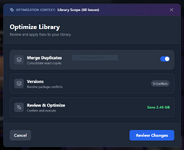
- Smarter Cleanup (Optimization Modal):
We've redesigned how you manage duplicate packages. It's now split into three tabs (Merging, Versions, Review) so you always know what's happening.
- Review Tab: See exactly which files will be deleted and how much space you'll save before committing.
- Delete Older: Added a simple way to clear out old versions while keeping the newest one.
- Smart Merging: The system now handles merging more intelligently, keeping your root folder organized.
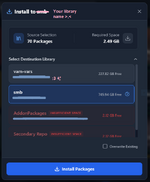
- Better Installation Process:
Installing packages to your library is now much more informative.
- Progress Bars: You can now see real-time progress for installs, even when using the web client.
- Disk Space: We'll check if you have enough space before starting a big install.
- Mobile Layout:
If you use YAVAM on your phone, you'll notice a completely new header and footer designed specifically for touch screens. It's much cleaner!
Improvements
- Notification cleanup: Instead of spamming you with 50 popups when you "Enable All", you'll get a single summary message.
- Sidebar Progress: Added a progress indicator to the sidebar actions so you know when it's working on a big batch of files.
- Performance: Generally smoother animations and faster response times on the web client.
Fixes
- Fixed issues with duplicate packages appearing during startup.
- Fixed "Merge" sometimes using the wrong deletion logic.
- Fixed connection stability issues for web users.
Full Changelog on GitHub


- 1
-
1