Contains executable files or external scripts. Ensure you trust the creator and apply your own security measures.
QVARO
Qvaro is a fast external desktop app to help you manage VARs and local items with bunch of useful features.
One of the main features that makes Qvaro useful is that it builds dependency graphs to display what depends on each package, including local items.

» Download TRIAL «
TRIAL version is limited to 100 packages and a lot of features are disabled.
One of the main features that makes Qvaro useful is that it builds dependency graphs to display what depends on each package, including local items.
» Download TRIAL «
TRIAL version is limited to 100 packages and a lot of features are disabled.
Installation
1. Qvaro is a single 15 MB exe file that needs to be placed in your VaM directory.2. Launch it. That's it.
~. If you've updated your OS anytime in the last 5+ years, it should just work. Otherwise you might need to install Windows WebView2.
Note: The app is made using Go programming language which produces fast, lean, single file binaries (perfect for this use case). But some antiviruses don't see this packaging type often, and trigger false positives. This is a known quirk with go binaries. You can run the app through VirusTotal to see the couple of weirdos that don't like it and decide for yourself if you trust it or not. I could prevent this by signing the binary, but the signing certificates can cost up to thousands of dollars per year  , sooo I'm not doing that...
All the data Qvaro produces is stored in Qvaro_Data directory. It's just a couple of configs and a catalog file. There is no garbage like extracted thumbnails or anything else (thumbs are served directly from VARs as needed).
Item browser
Browse all clothing, hairs, scenes, person presets, and assets in your VaM.

Downloading dependencies
You can download missing dependencies hosted on Hub. You can cherry pick which ones to download, with an option to download all of the VAR's dependencies.

Powerful search
Logical search along with advanced filters for find anything you need.

Speedup your VaM!
Qvaro provides a quick mechanism to disable all packages you're currently not interested in.

Disabling is done simply by changing the .var's extension to .disabled.
Packages categories in Keep enabled lists are never disabled, and most popular session plugins are already pre-configured to be keep enabled.
Disabling is done simply by changing the .var's extension to .disabled.
Packages categories in Keep enabled lists are never disabled, and most popular session plugins are already pre-configured to be keep enabled.
Virtual categories
If you keep your VARs outside VAM's AddonPackages directory, or are using tools such as Var Browser that moves them somewhere else, you can create a Virtual category to tell Qvaro to catalog and manage them as well.

Virtual categories are only seen by Qvaro, they won't be loaded by VaM.
Virtual categories are only seen by Qvaro, they won't be loaded by VaM.
License Disabler
This tool allows you to disable packages based on restrictiveness of their license. Useful for creators who want to ensure they're not using any NC/Questionable/PC stuff in their content.

Item Deduplicator
VaM is plagued with packages made by inconsiderate authors who extract other people's vars and embed their content in their own. While the licenses technically allow this, it's a bad practice which clutters and slows down our UIs.
Qvaro detects what items are in more than one var, and gives you options to either delete the item in individual VARs, or keep the item in a specific VAR and delete it in all of the others in one go.

If you have your VARs categorized, you can use Automatic deduplicator to automatically delete duplicates from packages that are not in one of the dedicated clothing or hair categories.

Qvaro detects what items are in more than one var, and gives you options to either delete the item in individual VARs, or keep the item in a specific VAR and delete it in all of the others in one go.
If you have your VARs categorized, you can use Automatic deduplicator to automatically delete duplicates from packages that are not in one of the dedicated clothing or hair categories.
Morph Deduplicator
Sick of browsing morphs where each page is just two morphs duplicated 5 times? This tool deletes all unnecessary copies of morphs with the same ID from their containing packages.

Package Preview Generator
This tool creates an image with preview of all items inside a package.

Island zipper
If you want to easily share your creations with people, you can use this to pack a package and all or some of its dependencies into one convenient zip file.

Hub Search tool
Allows downloading any Hub hosted package by its name.

Package Files Browser & Editor
Lists all files in a package with logical search bar with an option to delete, preview, or edit them.

Package Issues Resolver
This tool shows up if there are any package issues such as as duplicate or corrupted packages, and allows easily resolving them. It can also repackage Chinese VARs with wrong encoding.


Clothing Plugins integration & Builder Browser
While browsing clothing items, you can see indicators of which ones are using Clothing Plugins (have Stopper's ClothingPluginManager on them).
You can also use is:cpm filter to search for them.
Local items have buttons and context menus to add add or remove Clothing Plugins Manager on them.
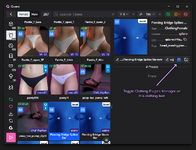
There's also a Builder Browser tool that has a button to fix all Clothing Plugin Manager related issues in prepared packages before you finalize building them.

You can also use is:cpm filter to search for them.
Local items have buttons and context menus to add add or remove Clothing Plugins Manager on them.
There's also a Builder Browser tool that has a button to fix all Clothing Plugin Manager related issues in prepared packages before you finalize building them.
Tutorial
How to clean your collection with Qvaro
1. Use arrows to quickly navigate between items.
2. Use Alt+Left/Right to change between Item Info tabs to get an idea if you want to delete it or not (what else is inside the package and what depends on it).
3. Press Delete, which will delete the package.
~. Use ` (backtick, the key below Esc) to zoom currently selected item and navigate in zoomed mode.

2. Use Alt+Left/Right to change between Item Info tabs to get an idea if you want to delete it or not (what else is inside the package and what depends on it).
3. Press Delete, which will delete the package.
~. Use ` (backtick, the key below Esc) to zoom currently selected item and navigate in zoomed mode.
Contains executable files or external scripts. Ensure you trust the creator and apply your own security measures.