


Import any clothing directly from a .var archive into Blender, with its default materials, presets and packed textures!
This plugin was created to help VAM players customize assets in Blender. It automatically reads a VAR file, looks for clothing items and presets, generates previews in the file browser and imports it as a Blender mesh. The tool rebuilds an approximation of VAM's original shader, adds all textures and adds a SIM texture as well.
What you can do with it:
How to use
The plugin is very simple. Go on File -> Import -> Virt-a-Mate Clothing (.var), and navigate to the folder containing the packages. The importer will look for valid .var files.
When you open a folder containing VARs, Blender might try to scan and cache their images for previews. When you select a VAR, the browser will read it and display the images of the clothing assets, and list all presets for it. Use the selection boxes to choose which clothing you want to import, when there are multiples in the same VAR, and the preset as well. Opening huge VAR files with lots of assets might freeze your Blender for some seconds (but shouldn't crash).
Bugs and limitations
This plugin was tested extensively, and i tried to cover some material naming conventions that creators use, so i wasn't able to reprouce any importing bugs as of publishing with the many assets i have. If you find anything, please report!
Accuracy:
A big thanks to all talented creators who had made so many great assets!
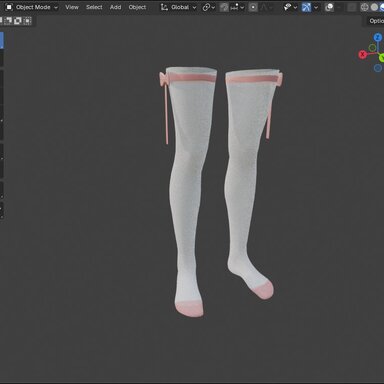
Asset on the thumbnail is https://hub.virtamate.com/resources/bow-stockings.2150/
This plugin was created to help VAM players customize assets in Blender. It automatically reads a VAR file, looks for clothing items and presets, generates previews in the file browser and imports it as a Blender mesh. The tool rebuilds an approximation of VAM's original shader, adds all textures and adds a SIM texture as well.
What you can do with it:
- Texture editing and creation: Now it's easy to re-texture a clothing item!
- Edit the geometry: You can cut, add, edit the geometry however you want and re-import into VAM using the standard cloth creation workflow.
- Create SIM paints and test them: You can paint SIM textures and test them a bit using Blender's new XPBD cloth simulation (in 5.2), which acts a lot like VAM.
- Select a preset: You can select which cloth preset to import on the file dialog. Import all or only the selected meshes.
- Refit: You can re-sculpt the clothing items with professional tools to better adapt to your morphed character.
- Render in Blender: With the adequate licenses, you can use assets for Blender renders as well.
- Cloth exporting: To create new clothing you still need to use VAM's traditional workflow after modelling. It does not export ready-to-use assets to VAM.
- General asset importing: This tool only imports clothing items. It does not import morphs, CUAs or Hair geometry.
- Extract built-in clothing: This tool does not read or attempts to extract VAM's built-in clothing. It only reads what is inside VAR files.
How to use
The plugin is very simple. Go on File -> Import -> Virt-a-Mate Clothing (.var), and navigate to the folder containing the packages. The importer will look for valid .var files.
When you open a folder containing VARs, Blender might try to scan and cache their images for previews. When you select a VAR, the browser will read it and display the images of the clothing assets, and list all presets for it. Use the selection boxes to choose which clothing you want to import, when there are multiples in the same VAR, and the preset as well. Opening huge VAR files with lots of assets might freeze your Blender for some seconds (but shouldn't crash).
Bugs and limitations
This plugin was tested extensively, and i tried to cover some material naming conventions that creators use, so i wasn't able to reprouce any importing bugs as of publishing with the many assets i have. If you find anything, please report!
Accuracy:
- The material rebuilding is not 100% accurate. it just makes it easy for you by importing the textures and making an approximate guess. If you want to render in Blender, feel free to adjust the shaders.
- If the asset has it's materials named in a weird way, you will receive a warning that the plugin could not build them and the asset will be without textures. Although i think i covered most cases.
- This tool was tested on Blender 5.2. It should work on Blender 4.2+, but no testing was made on that version.
A big thanks to all talented creators who had made so many great assets!
Asset on the thumbnail is https://hub.virtamate.com/resources/bow-stockings.2150/