




Good afternoon, friends!
My previous guide explained how to use free AI services to generate a source photo that can then be used in FaceGen:
Creating look-a-likes characters. Getting sources with neutral facial expressions for Facegen
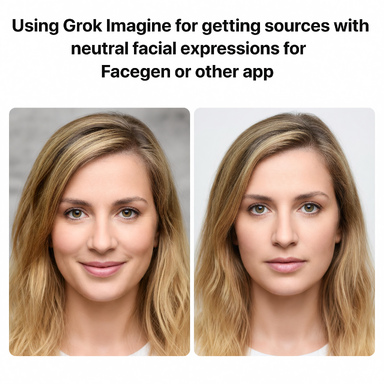
Technology is constantly evolving, and now we can use Grok Imagine to enhance low-quality photos and produce images with a straightened face, almost like a passport photo. Here’s an example of a photo with the head turned slightly to the side and the mouth slightly open (the person in the photo never existed; this is AI-generated content):

And after processing the photo in Grok Imagine with these parameters, we get this result, which we can use in FaceGen and similar programs and services. Here’s the prompt:
"A professional passport-style photo of the person from the original image. Face perfectly centered, strictly frontal view. Direct eye contact with the camera lens, eyes looking dead center into the lens. Completely neutral facial expression, no smile, relaxed lips. Symmetrical facial features. High-resolution, even studio lighting, looking straight forward."
And here’s the result we got:

I recommend adding this prompt to the main one if the resulting image differs significantly from the reference:
"Non-negotiable 100% fidelity to the original facial bone structure, exact eye shape/distance/color, nose, lips, jawline, skin texture, pores, skin tone and all unique features with zero deviations, morphing or artistic interpretation. Perfect alignment, direct gaze at camera, neutral pleasant expression, professional soft even studio lighting, ultra sharp 8k details, clean neutral background. Indistinguishable from a real high-end photograph of this exact person."
When you think about it, with Grok Imagine offering these features, the face-alignment service I mentioned in the previous guide is essentially no longer relevant. But since Grok is no longer completely free with this feature, you can still use the old method.
Happy creation for everyone!
My previous guide explained how to use free AI services to generate a source photo that can then be used in FaceGen:
Creating look-a-likes characters. Getting sources with neutral facial expressions for Facegen
Technology is constantly evolving, and now we can use Grok Imagine to enhance low-quality photos and produce images with a straightened face, almost like a passport photo. Here’s an example of a photo with the head turned slightly to the side and the mouth slightly open (the person in the photo never existed; this is AI-generated content):
And after processing the photo in Grok Imagine with these parameters, we get this result, which we can use in FaceGen and similar programs and services. Here’s the prompt:
"A professional passport-style photo of the person from the original image. Face perfectly centered, strictly frontal view. Direct eye contact with the camera lens, eyes looking dead center into the lens. Completely neutral facial expression, no smile, relaxed lips. Symmetrical facial features. High-resolution, even studio lighting, looking straight forward."
And here’s the result we got:
I recommend adding this prompt to the main one if the resulting image differs significantly from the reference:
"Non-negotiable 100% fidelity to the original facial bone structure, exact eye shape/distance/color, nose, lips, jawline, skin texture, pores, skin tone and all unique features with zero deviations, morphing or artistic interpretation. Perfect alignment, direct gaze at camera, neutral pleasant expression, professional soft even studio lighting, ultra sharp 8k details, clean neutral background. Indistinguishable from a real high-end photograph of this exact person."
When you think about it, with Grok Imagine offering these features, the face-alignment service I mentioned in the previous guide is essentially no longer relevant. But since Grok is no longer completely free with this feature, you can still use the old method.
Happy creation for everyone!

